5-18
IPS-800/IPS-1600 Series - User’s Guide
5.3.5. The Telnet Parameters Menus
The Telnet Parameters Menus are used to enable/disable Telnet access to the
IPS command mode and select the TCP port for Telnet connections.
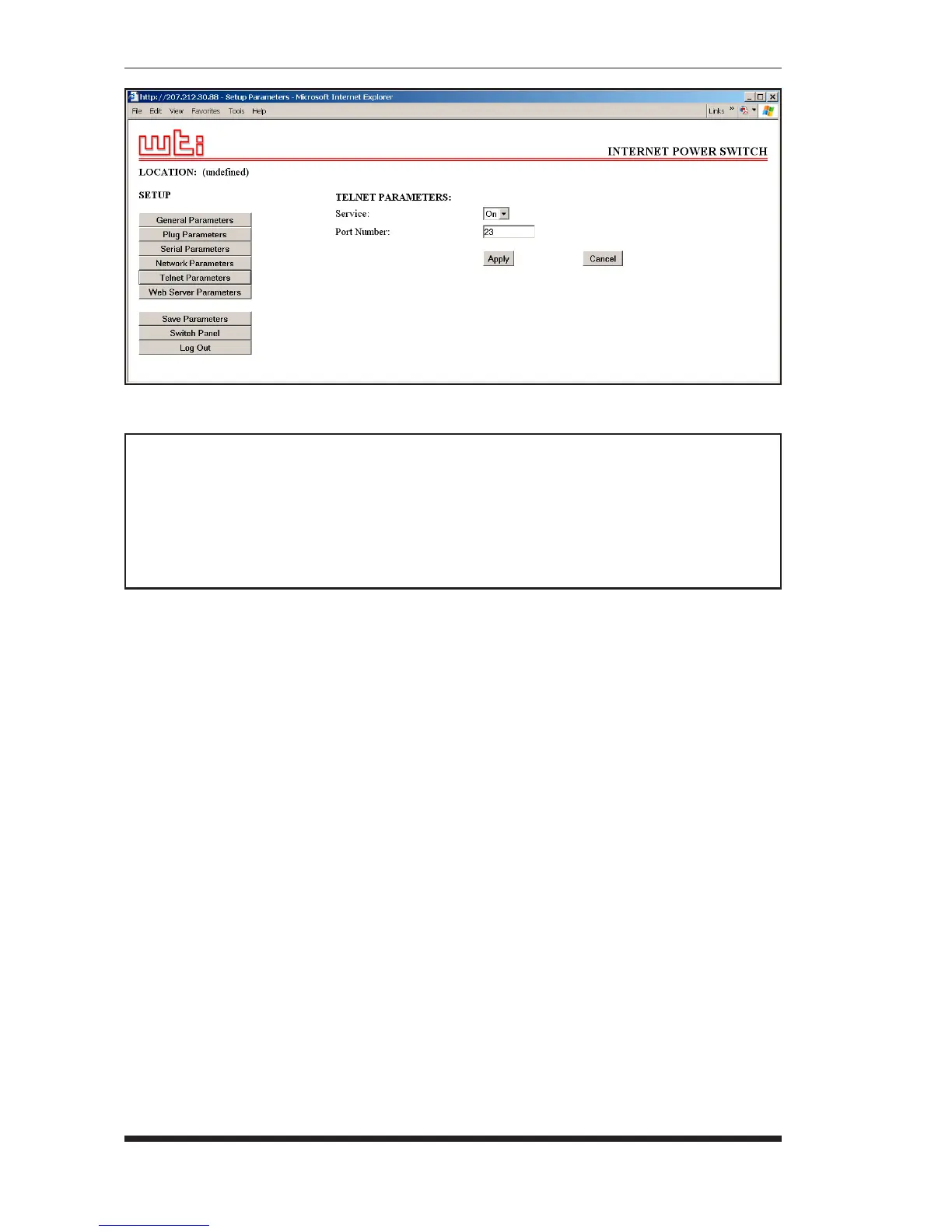
• Web Browser Interface: Click the "Setup" button to access the
configuration menus, and then click the "Telnet Parameters" button to
display the menu shown in Figure 5.12.
• Text Interface: Type /T and press [Enter]. The Telnet Parameters
Menu will be displayed as shown in Figure 5.13.
The Telnet Parameters Menus allow the following parameters to be defined.
Please note that all parameters listed here are available via both the Web
Browser Interface and Text Interface.
• Service: Enables/Disables Telnet communication with the IPS unit.
When this item is "Off," user’s will not be able to contact the unit via
Telnet. (Default = On.)
• Port Number: Selects the TCP/IP port number that will be used for
Telnet connections. (Default = 23.)
Figure 5.12: Telnet Parameters Menu - Web Browser Interface
TELNET PARAMETERS:
1. Service: On
2. Telnet Port #: 23
Enter Selection,
Press <ESC> to Exit ...
Figure 5.13: Telnet Parameters Menu - Text Interface


 To Next Page