Need help?
Do you have a question about the WYBOT Osprey 700 and is the answer not in the manual?
Details the functions of the power button and the status of the indicator light.
Key operational advice and safety considerations for using the cleaner in the pool.
Step-by-step guide for removing and cleaning the filter basket.
Instructions for charging the cleaner, including LED indicators for charging status.
Explanation of the different color and status combinations of the charger indicator light.
Guidance on attaching floating blocks to enhance the cleaner's wall-climbing performance.
Specifies the recommended chemical and temperature ranges for pool water.
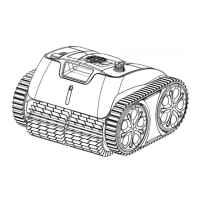
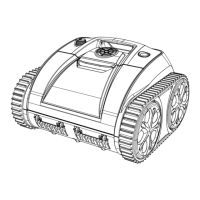
The Wybot Osprey 700 is a new type of rechargeable robotic pool cleaner designed for automatic cleaning of swimming pools. It is cordless and easy to use, offering a convenient solution for pool maintenance.
The primary function of the Osprey 700 is to autonomously clean swimming pools. It operates by moving across the pool floor, collecting debris and filtering the water. The cleaner is equipped with a filter basket that captures dirt and particles, ensuring a cleaner pool environment. It is designed to work without being tethered by a power cord, providing greater flexibility and ease of movement within the pool.
To begin using the Osprey 700, users should first read the entire manual to ensure proper operation and avoid any loss or injury due to improper use. The cleaner is powered on by pressing the power button, which will illuminate a blue light to indicate that the device is active. Pressing the button again will turn the cleaner off, indicated by a red light.
Before placing the cleaner in the pool, it is crucial to ensure that the charging port is dry and the cleaner is switched off if it has just been charged. When ready for cleaning, the cleaner should be gently placed into the pool with its bottom facing the wall. It is recommended to hold the robot and power it on. After powering on, the cleaner will wait for approximately 20 seconds to empty any trapped air inside. This step is essential for the robot to function effectively and immerse properly onto the pool floor.
During operation, a flashing blue light indicates that the cleaner is actively working. The Osprey 700 is designed to clean the pool floor. Once its cleaning cycle is complete or its battery is low, the cleaner will automatically move to the pool edge. A flashing yellow light indicates a low battery and that the cleaner is initiating its self-parking sequence. A steady yellow light signifies that the self-parking is finished. At this point, a retrieving hook, included in the packing list, can be used to safely lift the cleaner out of the pool.
The cleaner should not be operated when people are in the pool, and children should never be allowed to ride on it or play with it as a toy. It is also important not to power on the cleaner when it is out of the water. The cleaner should not be operated while the pool filter is running.
Regular maintenance is key to ensuring the longevity and optimal performance of the Osprey 700. After each use, the filter tray (or filter basket) must be cleaned and washed. To access the filter basket, the top cover of the robot needs to be opened. The cleaner should be placed aside the pool, and the top cover can then be opened to reveal the filter basket. The filter basket can be easily taken out, washed thoroughly, and then re-installed by reversing the steps.
Charging the battery is another important maintenance aspect. After removing the cleaner from the pool and ensuring it is powered off and its charging port is dry, the original and authorized power charger should be attached to the charging socket. A red light on the charger indicates that charging is in progress, while a green light signifies that the battery is fully charged. It is crucial not to overcharge the cleaner, as this can reduce battery life. The cleaner should be charged indoors, at least 3 meters (approximately 10 feet) away from the edge of the pool. The charging environment temperature should be between 5°C (41°F) and 35°C (95°F). If the cleaner needs to be stored for a long period (over 6 months), it should be charged to maintain battery life.
The cleaner should be stored in a cool and ventilated place, away from direct sunlight or any heat source. It should never be covered with anything that could cause internal electrical components to overheat.
For specific pool conditions, the manual provides guidelines for pH, temperature, salt, and chlorine levels to ensure the cleaner operates effectively and safely. The pH should be between 7.0-7.4, temperature between 10°C (50°F) and 35°C (95°F), salt content should not exceed 5,000 ppm, and chlorine should not exceed 2 ppm.
In cases where the robot struggles to climb pool walls as it used to, floating blocks can be installed. This involves opening the filter cover, picking up the filter basket, tearing off the protective film on the back of the floater, sticking the floaters in the designated positions, and then re-installing the filter basket and closing the filter cover. However, if the robot is performing well, these instructions can be ignored.
Only professionals are authorized to disassemble the sealed driving kit of the cleaner. Any unauthorized repairs or alterations will void the warranty. If any problems are encountered with the Wybot product, customer service should be contacted for assistance.
 General
| 2. Rated Working Voltage | 10.8V |
|---|---|
| 3. Power | 65W |
| 5. Charger Input | 100-240V, 50-60Hz |
| 6. Charger Output | 10.8V/1.8A |
| 4. Run Time | Max. 90min for one cycle |
| 10. Flow rate | approx.10m3/h(2642gal/h) |
| 11. Filter Density | 180 μm |
| 12. Moving Speed | approx. 36ft/min(11m/min) |
| 7. Battery Capacity | 8600mAh/8800mAh |
| 8. Charging Time | 6-7 Hours |
| 9. Pool Size | Up to 861sq.ft (80m2) |
| 13. Waterproof Grade | IPX8 |
| 14. Charging Environment Temperature | 41 ℉-95 ℉(5℃-35℃) |
| 15. Max Water Depth | 8.2ft(2.5m) |
| 18. Storage Condition | 41 ℉-95 ℉(5℃-35℃), RH≤75% |
 Weight and Dimensions
| 16. Product Size | 14.6(L)14.1(W)9.4(H) inches 372(L)360(W)240(H) mm |
|---|---|
| 17. Weight | 17.64lbs (8KG) |

 To Next Page