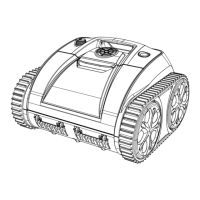
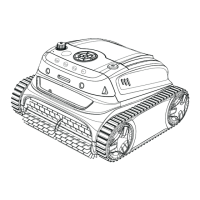
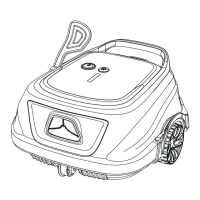
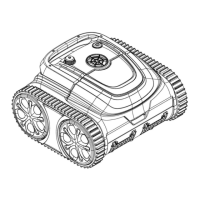
The WYBOT C1 Pro/Max (OS7010/OS7010 Max) is a robotic pool cleaner designed for efficient, low-power consumption, and thorough pool cleaning. It features a unique appearance and reliable functions, including one-button activation, powerful suction and scrubbing, fine filtration, smart navigation, remote control, and high compatibility with various pool shapes and construction materials.
Function Description
The WYBOT C1 Pro/Max is designed to automate pool cleaning, freeing users from manual labor. It operates autonomously within the pool, scrubbing surfaces and filtering debris.
Key Functions:
- Cleaning Modes: The device offers three cleaning modes:
- Full Pool Cleaning: Cleans walls, floor, and waterline (or wall then floor). Users can define specific modes via the app.
- Floor Cleaning: Cleans the floor only, with options for Turbo floor or ECO floor modes via the app.
- Wall Cleaning: Cleans walls only.
- Smart Navigation: The cleaner employs smart navigation to cover the pool efficiently.
- Powerful Suction and Scrubbing: Equipped with scrubbing brushes, it effectively loosens dirt and debris, directing them into the filter basket. The pump sucks debris and pumps out water through a window.
- Filtration: A fine filter basket collects dirt and debris, which needs to be washed after each use.
- Remote Control & App Connectivity: The device can be controlled via the WYBOT App, available on Google Play or App Store. The app allows users to select cleaning modes, preset cleaning cycles, and monitor device status.
- Auto Calibration: Upon submersion, the cleaner performs an auto-calibration for about 20 seconds on the floor, indicated by a flashing blue light, before starting to clean.
- Automatic Stop: The device automatically moves to stop by the edge of the wall when cleaning is finished or the battery is low.
- Cycle Timer: Users can schedule cleaning cycles via the app, with options for 120min (default), 60min, 40min, and 30min cycles, each with specific intervals between cleanings.
Important Technical Specifications
The WYBOT C1 Pro/Max comes in two models: OS7010 (Pro) and OS7010 Max (Max), with slight differences in pool size coverage, runtime, and battery capacity.
General Specifications:
- Dimensions: 372(L)x360(W)x240(H) mm for both models.
- Weight: 7.8kg for both models.
- Power: 65W for both models.
- Water Resistance: IPX8 for both models.
- App Connection: Available for both models.
- OTA Update: Available for both models.
Model-Specific Specifications:
| Feature |
WYBOT C1 Pro (OS7010) |
WYBOT C1 Max (OS7010 Max) |
| Pool Size |
Max. 150 m² |
Max. 200 m² |
| Depth |
13ft (4m) |
13ft (4m) |
| Runtime |
120min.~150min. |
180min.~210min. |
| Charging Time |
2.5 hours |
3.5 hours |
| Charger Input |
100-240V, 50-60Hz |
100-240V, 50-60Hz |
| Charger Output |
25.2V/2.6A |
25.2V/2.6A |
| Battery Capacity |
4600mAh |
7800mAh |
| Filter |
180μm |
180μm |
| Flow Rate |
11.5 m³/H |
11.5 m³/H |
| Moving Speed |
11m/min |
11m/min |
Recommended Water Conditions:
- Chlorine: Max 4mg/L
- pH: 7.0 - 7.8
- Temperature: 41-95 °F (5-35 °C)
- NaCl: Maximum 5000 PPM
Usage Features
Getting Started:
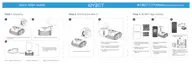
- Charging: The device has a lithium-ion rechargeable battery. It must be charged before first use and when the battery is low. The charging port must be dry before charging. The adaptor has a blue light indicator for power supply status. The device's LED indicator flashes yellow during charging and turns solid yellow when fully charged.
- Charging Environment: Best temperature is 32°F-95°F (0°C-35°C), RH at 5%-95%.
- Safety: Keep the device and adaptor away from direct sunshine or water when charging. Ensure the device is at least 3m (approx. 10ft) from the pool edge.
- Power On/Off: Turn on/off the device by pressing the on/off button. The LED indicator will display a solid blue light when the device is on. A flashing yellow light indicates low battery.
- Submersion: Hold the handle and submerge the cleaner into the pool within 3 minutes. Do not release it until no bubbles come out.
- Optimal Cleaning Performance: Ensure the water depth of the pool is at least 19.5 inches (50 cm) high from the top of the device.
- Retrieval: To retrieve the cleaner, insert the included hook into a pool rod and lift the cleaner out of the pool. Take it out vertically to quickly drain water from inside.
LED Indicator Status:
- Solid Blue: Power On
- Flashing Blue: Under working
- Solid Purple: Connecting to App
- Flashing Yellow: Charging in progress, low battery, or under self-parking in the pool
- Solid Yellow: Fully charged/battery level
- Solid or Flashing Red: Fault
Maintenance Features
Filter Cleaning:
- Access: Hold the filter cover handle, press, and open it.
- Removal: Take out the filter basket.
- Cleaning: Empty all debris and rinse the filter basket with clean water.
- Reassembly: After rinsing, put the filter basket back into the cleaner and close the cover.
- Important: Ensure the device is powered off when opening the top cover. Clean the filter basket before it dries.
Device Storage:
- Power Off: Ensure the device is powered off.
- Drying: Dry out the cleaner and filter basket completely.
- Charging: Fully charge the battery before storage.
- Location: Store the cleaner in a cool and ventilated place, away from direct sunshine, heat sources, frost, and squeezing. The ambient temperature should be between 5°C/41°F and 45°C/113°F.
- Long-Term Storage: Charge the cleaner every three months to maintain optimal battery life.
Safety and Care:
- Accessories: Use only accessories recommended or sold by WYBOTICS Co., Ltd.
- Charging Port: Dry the charging port after each cleaning to prevent electric shock.
- Charger: Use only the original and authorized power charger. Do not use a cord-damaged charger or extension cords.
- Operation: Do not charge the cleaner when it is running. Do not enter the pool when the cleaner is working.
- Children: Never allow children to ride on, play with, operate, or maintain the device.
- Flammable Environments: Never expose or charge the device in flammable environments.
- Disassembly: Only licensed professionals can disassemble the sealing parts of the cleaner. Unauthorized disassembly voids the warranty.
- Damage: Do not operate the device if the top cover or scrubbing brushes are broken, or if there is any liquid leakage from the sealing part.
- Filter Running: Do not operate the cleaner while the pool filter is running.
- Overcharging: Do not overcharge the cleaner, as this will reduce battery life.
Warranty:
- All WYBOT pool cleaners are inspected and licensed per local laws.
- The warranty duration for battery, motor, and PCB is two (2) years from the purchase date. Consumable parts (filter basket, brush, wheels, etc.) are beyond warranty.
- The warranty applies only to original buyers and is not valid for resale or other transfers.
- Damages caused by improper use, unauthorized repair, or disassembly are not covered.
- The order number or record must be presented for any warranty claim or repair.

 Need help?
 General

 To Next Page