40
41
Selecting a proper location should be taken into consideration before setting your de-
vice up, for example the distance to the next power outlet, avoiding areas where the
device may be exposed to direct sunlight, vibration, dust, heat, cold and moisture, as
well as keeping it away from transformers or motors.
at and even surface.
› Make sure ventilation openings are not blocked on the device and that proper ventilation is
provided during operation.
› Do not drill extra holes or screw any extra screws for mounting purposes into the case.
› Always ensure a safe and stable installation and keep away from objects that might fall onto it.
cant danger and accidents.
› Given the variety of paints and polishes used on furniture today does not excluded the fact
that a chemical reaction may be caused, leaving visible residue on furniture, when the mounting
feet of the device have been placed on furniture. Therefore, never place the device on furniture
surfaces without using proper protection.
3
Setting up
Chapter 4 ConnectionsChapter 3 Setting up
Ensure that the power cable is unplugged before connecting further components.
Components already connected to the device should also be unplugged from the po-
wer supply.
Make sure connections have been made accurately, this means for example left to left and right
to right.
Connecting cables to jacks
Use standard, shielded audio cables when connecting audio sources. Other cables may cause
interference. Only connect devices equipped with the appropriate jacks, in order to avoid
distortion and mismatching, which in turn could cause damage to the device.
Connect the white audio plugs with the left/white (L) jacks.
Connect the red audio plugs with the right/red (R) jacks.
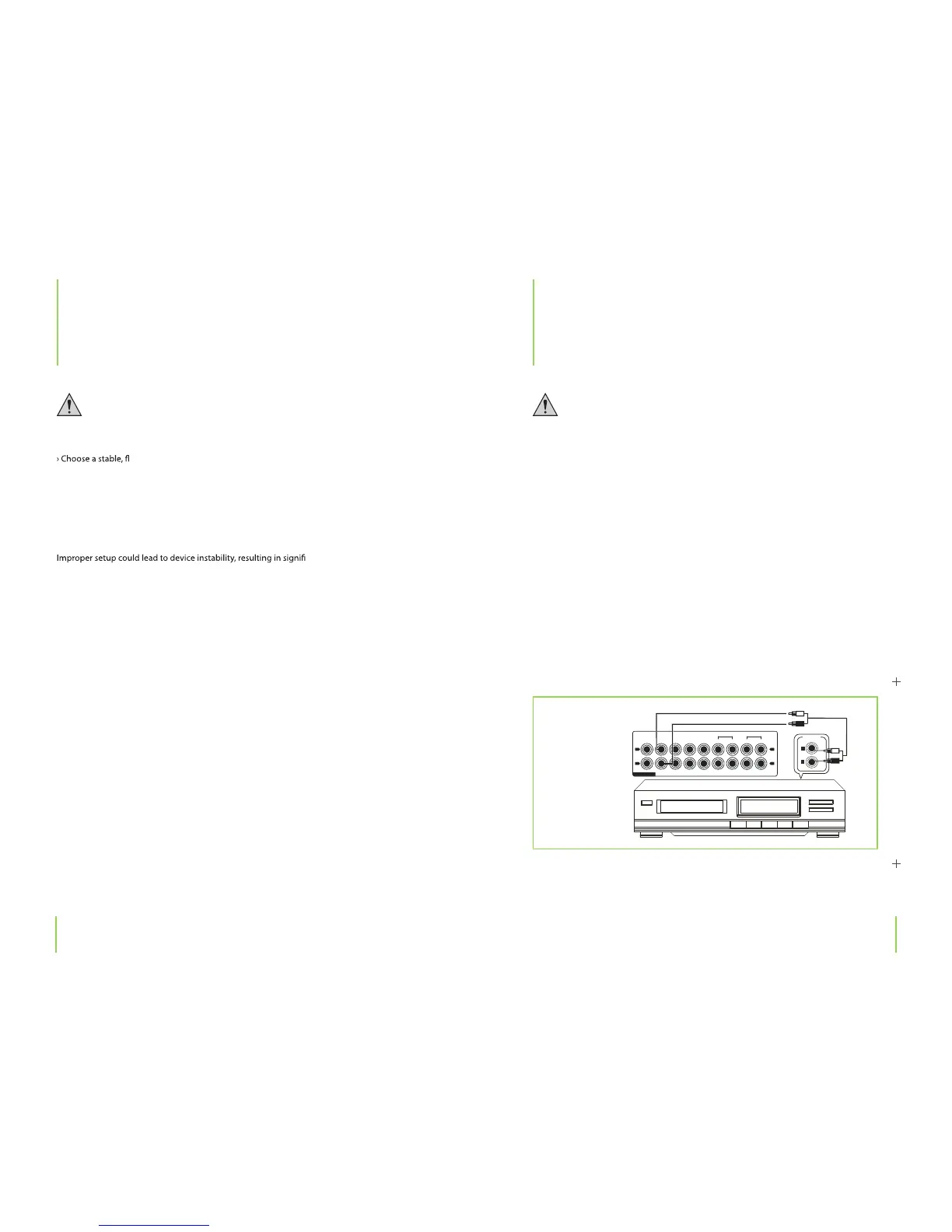
Connecting a CD player
CD player
› Connect your CD player’s outputs with the CD jacks.
4
Connections
PHONO CD AV1 AV2
TUNER
TAPE
PLAY REC
EQ
PLAY REC
OUTPUT
L
R
AUDIO
L
R
L
R
This will damage the device.


 To Next Page