42
43
AV1/AV2 connections
› You can use these connections to connect an AV source, such as a TV, DVD player, etc.
› Connect the outputs on your AV device with the AV1 or AV2 jack as well.
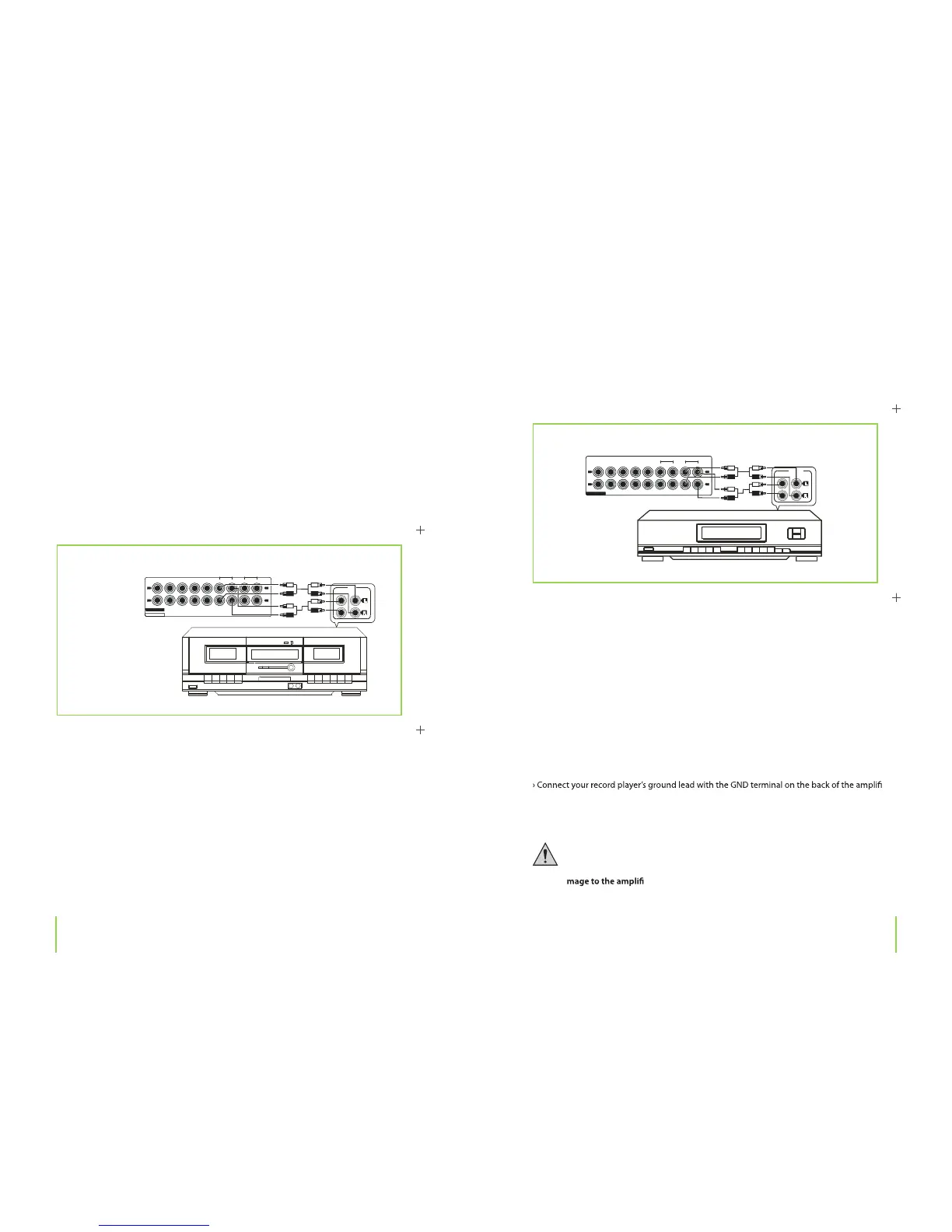
Connecting a tape deck
Tape deck
› Connect your tape deck’s outputs (usually marked PLAY or LINE OUT) with the TAPE PLAY
jacks.
› Connect your tape deck‘s recording inputs (usually marked REC or LINE IN) with the TAPE REC
jacks.
Chapter 4 Connections
LI N E
(I N)RE C
PL AY ( O U T)
A
B
CERYALPRENUTDCONOHP
TA P E
PL A Y R E C
EQ
L
R
AU DI O
AV 1 A V 2
L
R
Connecting an equalizer
Equalizer connections
› An equalizer or signal processor can be connected to these jacks.
› Connect your equalizer‘s outputs (usually marked OUTPUT or LINE OUT) with the EQ PLAY
jacks.
› Connect your equalizer’s inputs (usually marked INPUT or LINE IN) with the EQ REC jacks.
Connecting a record player
› Connect your record player’s outputs with the PHONO jacks.
er.
› Should interference occur during record playback, loosen the connection on a trial basis
again.
The PHONO jacks are only intended for record players. Do not connect line devices
(CD players, radios, etc.) to these connections under any circumstances; there is
otherwise the danger of overamplifying the PHONO input, which could cause da-
er or the loudspeakers.
Chapter 4 Connections
OU T PU T
(I N ) REC PL A Y (O U T )
CERYALPRENUTDCONOHP
TA P E
PL A Y R E C
EQ
L
R
AU D I O
AV 1 A V 2
L
R


 To Next Page