Need help?
Do you have a question about the XCHARGE C2EU and is the answer not in the manual?
Configure communication protocol settings like OCPP, URL, model, and vendor.
Configure APN settings, check internet connection, and SIM card status.
Search and edit the local whitelist using ADB and SQL commands.
Add a card to the local whitelist using ADB and SQL commands.
Add a card to the local blacklist using ADB and SQL commands.
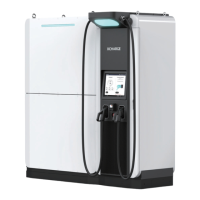
The C2EU device is a charging station that offers a range of functionalities for electric vehicle charging, along with features for software updates, connectivity, and local authentication management. This service manual focuses on the software aspects of the device, providing detailed instructions for its maintenance and configuration.
The C2EU primarily functions as an electric vehicle charging station. Its core operation involves managing the charging process, which includes communication with a backend system, handling local authentication for users, and maintaining operational logs. The device supports the OCPP (Open Charge Point Protocol) for communication with a central management system, allowing for remote control, monitoring, and data exchange. It also incorporates local authentication capabilities, enabling users to initiate charging sessions using RFID cards or other authorized methods without necessarily relying on a constant backend connection. The device's firmware and driver software are designed to be upgradable, ensuring that the charging station can adapt to new features, security updates, and protocol enhancements over time.
The C2EU offers several usage features that enhance its operational flexibility and user experience. For connectivity, the device supports both wired LAN and cellular (SIM card) connections, allowing it to communicate with the OCPP backend. Users can configure APN settings for cellular connectivity, ensuring proper network access. The device's interface allows for the display of current firmware versions and operational status, which can be accessed by pressing the home button for a few seconds. This provides quick diagnostic information.
For charging operations, the C2EU can be configured to operate under specific communication protocols, such as OCPP, and requires the input of URL, model, and vendor information for backend integration. This setup is performed through a graphical interface accessible via a wired mouse connected to the charging station. The device also supports a local whitelist for authentication, which means that authorized users can be added to a local database on the charger itself. This feature is particularly useful in scenarios where continuous internet connectivity might be unreliable or for private charging installations where a backend system is not always necessary for authentication. Conversely, a blacklist can also be managed locally to prevent unauthorized access.
The C2EU is designed with several maintenance features that facilitate its upkeep, troubleshooting, and software management.
.apk file to the device's /system/app directory. After the update, the device's firmware version can be verified through the user interface..zip file containing the new driver and a command file to the /cache/recovery/ directory. The device then needs to be rebooted into recovery mode to finalize the driver update.apns-conf.xml file can be pushed to the device's /system/etc directory using ADB. This process involves deleting existing telephony database files (telephony.db and telephony.db-journal) before pushing the new configuration.ocpp_cfg.json) can also be updated via ADB, by pushing the new file to /data/data/com.xcharge.charger/files/ocpp_cfg.json. This allows for flexible adjustments to OCPP parameters without requiring a full firmware update.charger_app.log) that are essential for troubleshooting. These logs can be pulled from the device to a connected laptop using the ADB tool. The device stores multiple log files, allowing for historical analysis of its operation.content.db), and use SQL queries to search for existing entries in the tb_auth_info table. Individual entries can be updated to change their status (e.g., "Accepted," "Blocked," "Expired," "Invalid," "ConcurrentTx") or other parameters.tb_auth_info table with an "Accepted" status.tb_auth_info table with an "Invalid" status, or by updating the status of an existing entry to "Invalid."adb remount are crucial for ensuring proper read/write access to the device's file system during maintenance operations.reboot recovery for driver updates or simply by disconnecting and reconnecting the power.These features collectively ensure that the C2EU charging station is not only functional but also maintainable, allowing for efficient management of its software, connectivity, and user authentication systems.
 General
| Number of Charging Guns | 2 |
|---|---|
| Connector Type | Type 2 |
| IP Rating | IP54 |
| Compatibility | All EVs with Type 2 connector |
| Mounting Type | Wall-mounted |
| Charging Standard | IEC 61851 |
| Protection | Overvoltage protection, Overcurrent protection, Short circuit protection, Overtemperature protection |
| Communication Interface | OCPP 1.6 |
| Output Current | 32 A |
| Operating Temperature | -30°C to +55°C |

 To Next Page