Number Jam location
6 Manual feeder
7 Multipurpose feeder
The multipurpose feeder is available only
in some printer models.
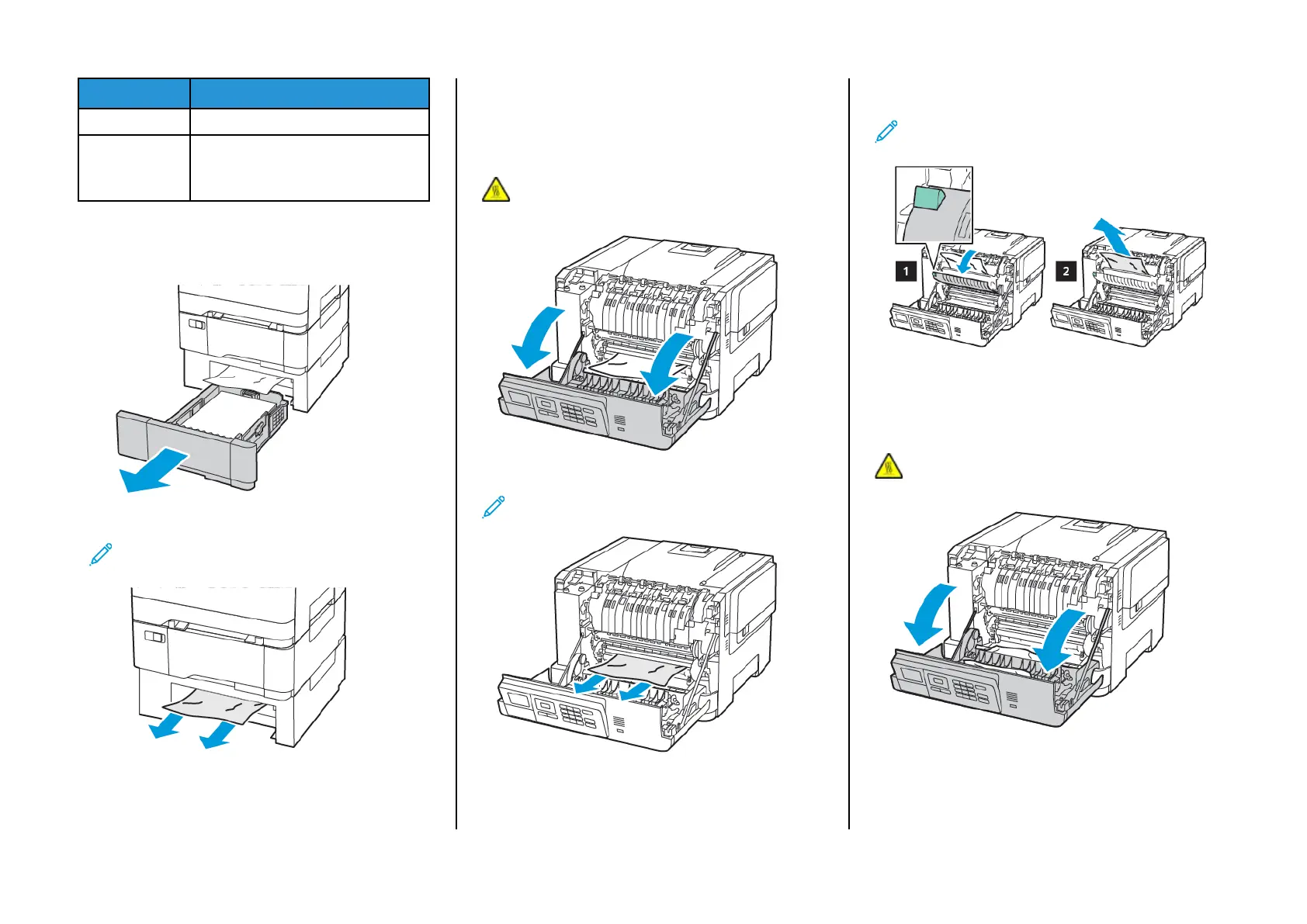
PPaappeerr jjaamm iinn ttrraayyss
1. Remove the tray.
2. Remove the jammed paper.
Note: Make sure that all paper fragments are removed.
3. Insert the tray.
PPaappeerr JJaammss iinn DDoooorr AA
Paper jam in the fuser
1. Open door A.
CAUTION—HOT SURFACE: The inside of the printer might
be hot. To reduce the risk of injury from a hot component,
allow the surface to cool before touching it.
2. Remove the jammed paper.
Note: Make sure that all paper fragments are removed.
3. Open the fuser access door, and then remove the jammed
paper.
Note: Make sure that all paper fragments are removed.
4. Close door A.
Paper jam in the duplex unit
1. Open door A.
CAUTION—HOT SURFACE: The inside of the printer
might be hot. To reduce the risk of injury from a hot
component, allow the surface to cool before touching it.
6





 To Next Page