10
5.13 Overspeed Alert:
This function is using for the owner to control the target’s speed.
5.13.1 Set up: Send SMS speed+password+space+080 to the unit (suppose the speed
is 80km/h), and it will reply “speed ok!”. When the target moves exceeding 80 km/h, the
unit will send SMS speed+080!+Geo-info to the authorized numbers.
It
will
keep
sending
such
an
alert
every
3
minutes.
5.13.2 Cancel: Send SMS nospeed+password to deactivate the overspeed alert
Remark: It is recommended that the speed alarm is set at not less than 50km/h. For
below that rate, it may cause the excursion of the GPS signal influenced by clounds etc.
Response SMS format: speed+080!+Geo-info (suppose the speed is 80km/h).
The tracker will check the speed in 10 minutes interval and alarm if it is overspeed.
5.14 IMEI Checking:
Send SMS imei+password to the unit to check the IMEI number of the tracker.
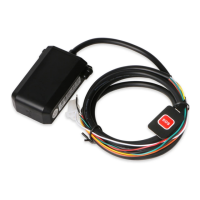
5.15 SOS Button
Press the SOS for 3 second, it will send “ help me !+ Geo-info ” to all the authorized
numbers every 3 minutes. It will stop sending such a SMS when any authorized number
reply SMS ”help me!” to the tracker.
5.16 Low Battery Alert
It begins to send SMS to the user every 30minutes when the the battery voltage is 3.7V.
SMS format: low battery+Geo-info.
PDF 文件使用 "pdfFactory Pro" 试用版本创建 www.fineprint.cn


 To Next Page