Need help?
Do you have a question about the XFX nForce 750a and is the answer not in the manual?
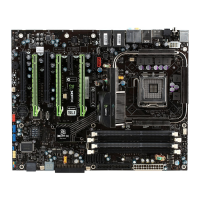
Details the technical specifications of the XFX nForce 750a SLI Motherboard.
Step-by-step instructions for securely mounting the motherboard into the chassis.
Comprehensive guide for installing the CPU and its associated cooling solution.
Detailed steps for correctly seating the CPU into its socket.
Instructions for properly mounting the CPU cooler onto the installed CPU.
Guide to installing RAM modules (DIMMs) into the motherboard slots.
Information on installing expansion cards into PCI and PCI Express slots.
Instructions for resetting BIOS settings to default by clearing CMOS memory.
Explanation of the ATX power connectors required to power the motherboard.
Overview of the CMOS Setup Utility interface and navigation.
Configuration options for advanced system settings.
Settings related to CPU performance, frequency, and features.
Configures the system's boot order and boot device priority.
Settings for overclocking CPU, memory, and other system components.
Options for saving, discarding, and exiting the BIOS setup utility.
 General
| Brand | XFX |
|---|---|
| Model | nForce 750a |
| Category | Motherboard |
| Language | English |

 To Next Page