Need help?
Do you have a question about the XFX nForce 780i 3-Way SLI and is the answer not in the manual?
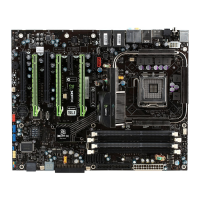
Details the physical specifications, features, and requirements of the XFX nForce 780i SLI Motherboard.
Lists and describes the components included in the motherboard kit for installation and unpacking.
Essential safety guidelines to follow during the motherboard and component installation process.
Step-by-step instructions for installing the CPU and its associated cooling fan.
Instructions for installing DDR2 memory modules into the motherboard slots.
Procedure for installing the I/O shield and securing the motherboard into the computer chassis.
Details on connecting power supply cables and internal system headers to the motherboard.
Instructions for connecting power supply connectors and external interfaces like USB and SATA.
Guide to entering the BIOS Setup Utility and navigating its main menu and options.
Setting basic system configurations like date, time, and storage device parameters.
Setting advanced system features, boot sequence, and boot device priorities.
Optimizing system performance, configuring clocks, voltages, and memory timings.
Configuring onboard peripherals like IDE, SATA, USB, LAN, and audio interfaces.
Configuring power management features, sleep states, and power-on options.
Managing Plug-and-Play and PCI configurations.
Monitoring real-time system status, including temperature, voltages, and fan speed.
Introduction to NVIDIA's software utilities for system monitoring, performance tuning, and control.
Adjusting CPU, motherboard, memory, and GPU settings through the NVIDIA Control Panel.
Steps for setting up and verifying NVIDIA's 3-Way SLI technology for multi-GPU setups.
Guide to setting up SLI connectors, installing drivers, and enabling NVIDIA SLI technology.
Reference list of Award POST codes and their meanings for system boot diagnostics.
 General
| Chipset | NVIDIA nForce 780i SLI |
|---|---|
| Socket | LGA 775 |
| Form Factor | ATX |
| Memory Type | DDR2 |
| Memory Slots | 4 |
| Maximum Memory | 8 GB |
| PCI-E x16 Slots | 3 |
| SLI Support | Yes |
| SATA Ports | 6 |
| IDE Ports | 1 |
| LAN | Gigabit Ethernet |
| Audio Chipset | Realtek ALC883 |
| RAID Support | 0, 1, 5 |

 To Next Page