05
04
CONNECTING TO A PC/MAC
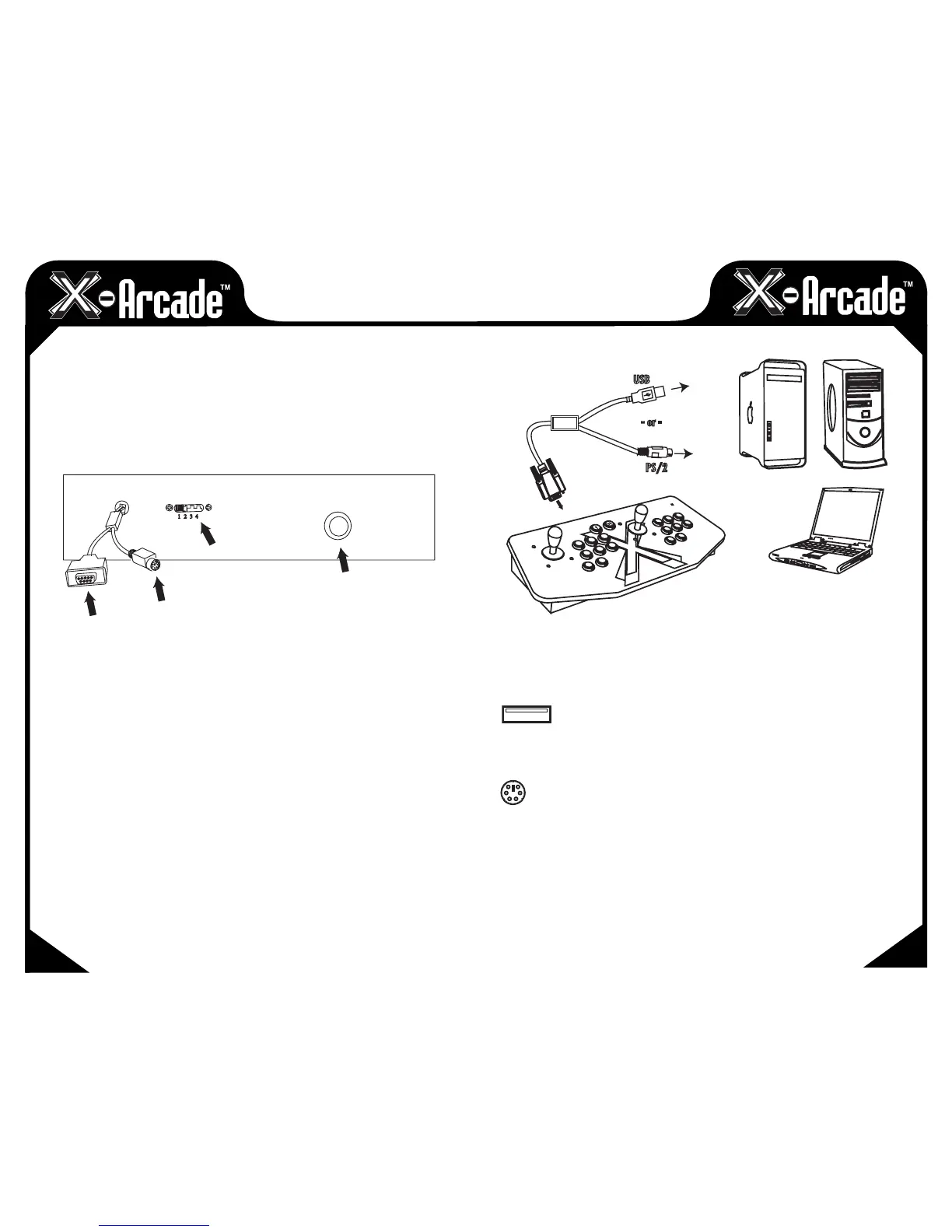
Serial Port:
This port is used for connection to either a PC/Mac™ or game console as follows:
• TheCOMPUTER CABLE is plugged in for connection to a PS/2 Keyboard port or USB port. The
PS/2 keyboard connector is purple in color for connection to the purple keyboard port on a PC.
• TheSERIAL CABLE plugs into a Console X-Adapter™ (sold separately) for console use.
PS/2 Keyboard Input (For PC/Mac™ use only):
This is where you PLUG IN a PS/2 Keyboard for PS/2 connection or programming.
NOTE: This is not used when connected to a game console.
Programming Switch/Button (PC/Mac™ only):
This is the MEMORY Manager switch for PC/Mac™ use only, it has no function on game consoles.
MODE 1 is default and NOT PROGRAMMABLE.Modes2,3,and4areprogrammable.ToLoada
MODE, make sure to PRESS LOAD BUTTON TWICE! Modesarecounted1-4asinpicture.Moreinfoon
programmingonpage8.
Connection:
NOTE: Optionally connect to a PC via either the PS/2 keyboard port or a USB port, YOU DO NOT
NEED TO CONNECT BOTH!
USB Port Connection
1) Plug the X-Arcade™'s included Computer Cable into any USB port on your PC/Mac™ or USB hub.
2) You can connect any other PS/2 or USB keyboard into the PC as well.
PS/2 Port Connection (PC ONLY)
WHEN USING THE PS/2 KEYBOARD PORT CONNECTION, YOU MUST HAVE A
KEYBOARD PLUGGED INTO THE X-ARCADE™ BEFORE TURNING ON THE PC.
1) Turn off your computer! Always turn off your computer before connecting or disconnecting
any non-USB hardware.
2) Unplug your keyboard from the back of your computer.
3) Plug your keyboard (PS/2 connector) into the X-Arcade™.
4) Plug the purple X-Arcade™ Computer Cable into your computer's purple PS/2 keyboard port.
BACK VIEW
123
4
Serial Port
Keyboard Input
Programming Switch
Programming Button
PC CABLE
- or
-
USB
PS/2
X-ARCADE
CONTROLLER


 To Next Page