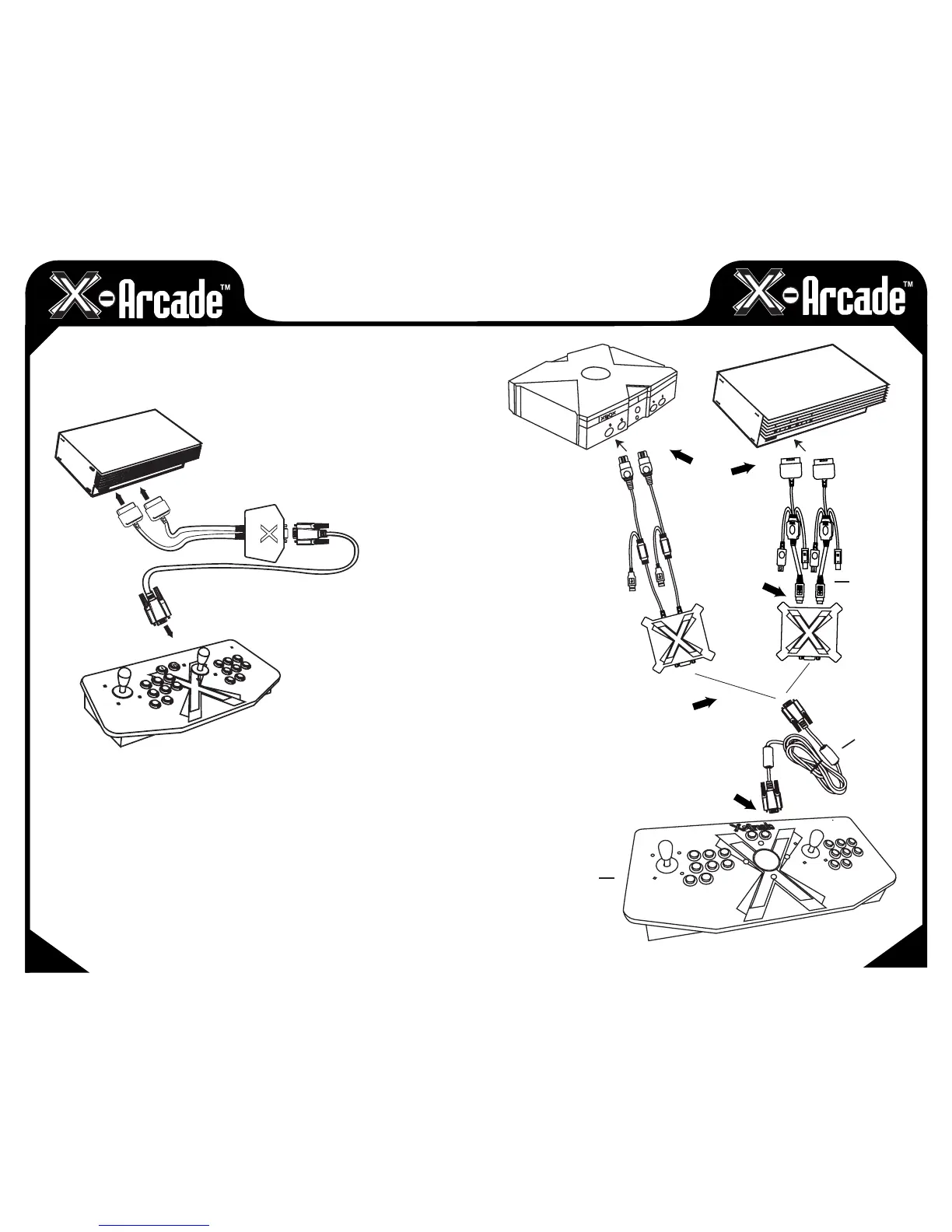
CONNECTING TO A GAME
CONSOLE
MAKE SURE YOUR GAME CONSOLE IS POWERED OFF BEFORE ATTEMPTING TO
CONNECT ANYTHING TO IT.
1) Plug the black console/serial cable into the serial port on the X-Arcade™.
2) Plug the other end of the black console/serial cable into serial port on the game console X-
Adapter.
3) InsertthegameconsoleX-Adaptercordslabeled“P1”and“P2”intoyourgamesystem’s
respective“player”controllerports.(Onlythe"P1"sideisusedfortheSolo™controller.)
4) Power on the game console, a red LED should light on the X-Arcade™.
5) PLAY!
CONSOLE
CONTROLLER
PORTS
SERIAL
CABLE
1P
2P
X-ARCADE
CONTROLLER
13
12
X-ADAPTER
X-ARCADE
TM
CONTROLLER
CONSOLE CABLE
X-ADAPTER
GAME CONSOLE
1
2
4
X-ADAPTER
CABLES
3


 To Next Page