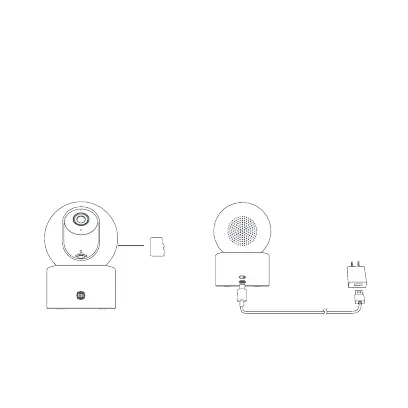
04
CAUTION:
Unplug the camera when inserting or removing the microSD card. Please use
a microSD card from a qualified brand (the camera supports a microSD card
with a maximum capacity of 256 GB and the FAT32 format only, the microSD
card may need to be formatted to the FAT32 format before use via Settings >
Manage storage on the camera’s plug-in page in the Mi Home/Xiaomi Home
app). It is recommended that the microSD card has a read/write speed of no
less than U1/Class 10.
• Turning on
Plug the power adapter cable into the power port on the camera, and the
camera will automatically turn on.
When the indicator keeps in orange and a voice notification is heard, the
camera is successfully turned on.
microSD






 To Next Page