0504
Method 1 Network Configuration via Xiaomi Home App
Method 2 Network Configuration via Web Browser
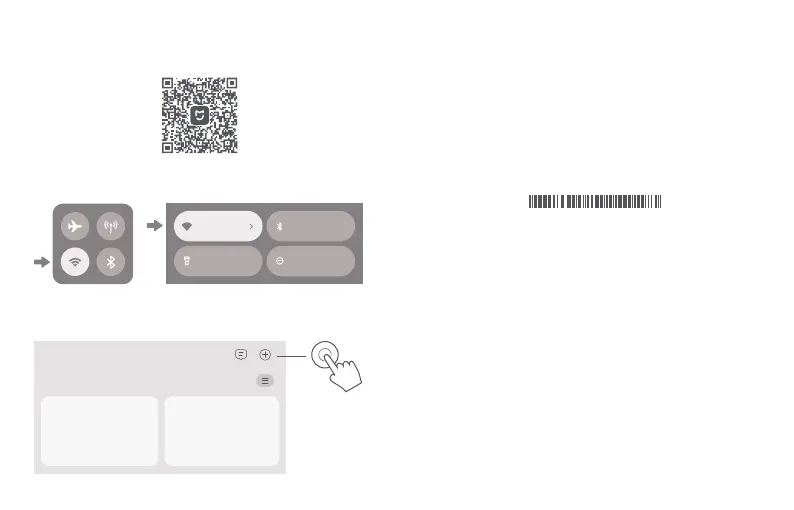
1. Scan QR code to download Xiaomi Home app. Or search for "Xiaomi
Home" in the app store to download and install it.
2. Swipe down from the top of the screen to access the Control Center
(iOS) or Quick Settings (Android), and turn on Wi-Fi.
For the product of 2-pack or 3-pack version, the routers in the box
have been pre-paired when leaving the factory. When the network
configuration of one router is completed, just power on the rest of
routers and they will Mesh networking automatically.
After completing the network configuration, you can also add the router
via the Xiaomi Home app. Refer to the QR code in the Method 1 to
download and install the Xiaomi Home app. Make sure that the settings
of country or region in Xiaomi Home app is not Chinese mainland;
otherwise, adding the router will be failed.
·
·
1. Check the Wi-Fi name on the label at the bottom of the router and then
connect your phone or computer to the Wi-Fi.
Wi-Fi Name: minet_rn09_xxxx
SN: XXXXX/XXXXXXXXXX
3. Open Xiaomi Home app, tap "+" on the upper right, choose the right
product model, and then follow the instructions to complete the network
configuration.
Smarthome
2. Then an automatic redirection will take you to the network setup page.
If not, open the web browser and enter miwifi.com or 192.168.31.1.
Note: When using the HTTPS protocol, a warning message may be
promoted on the webpage. However, the connection between the browser
and the Xiaomi router's settings page (miwifi.com) is safe.
3. Follow the instructions on the setup page to complete the network
configuration.
Note: Contact your Internet service provider to get the details if you are
not familiar with the Internet connection type.
4. After the configuration of the router is completed, the Wi-Fi module will
restart. Try to search the Wi-Fi again later.
Notes:
The version of the app might have been updated, please follow the
instructions based on the current app version.
For the product of 2-pack or 3-pack version, the routers in the box
have been pre-paired when leaving the factory. When the network
configuration of one router is completed, just power on the rest of
routers and they will Mesh networking automatically.
·
·
Notes:
Internet Bluetooth
Flashlight Do Not Disturb









 To Next Page