11
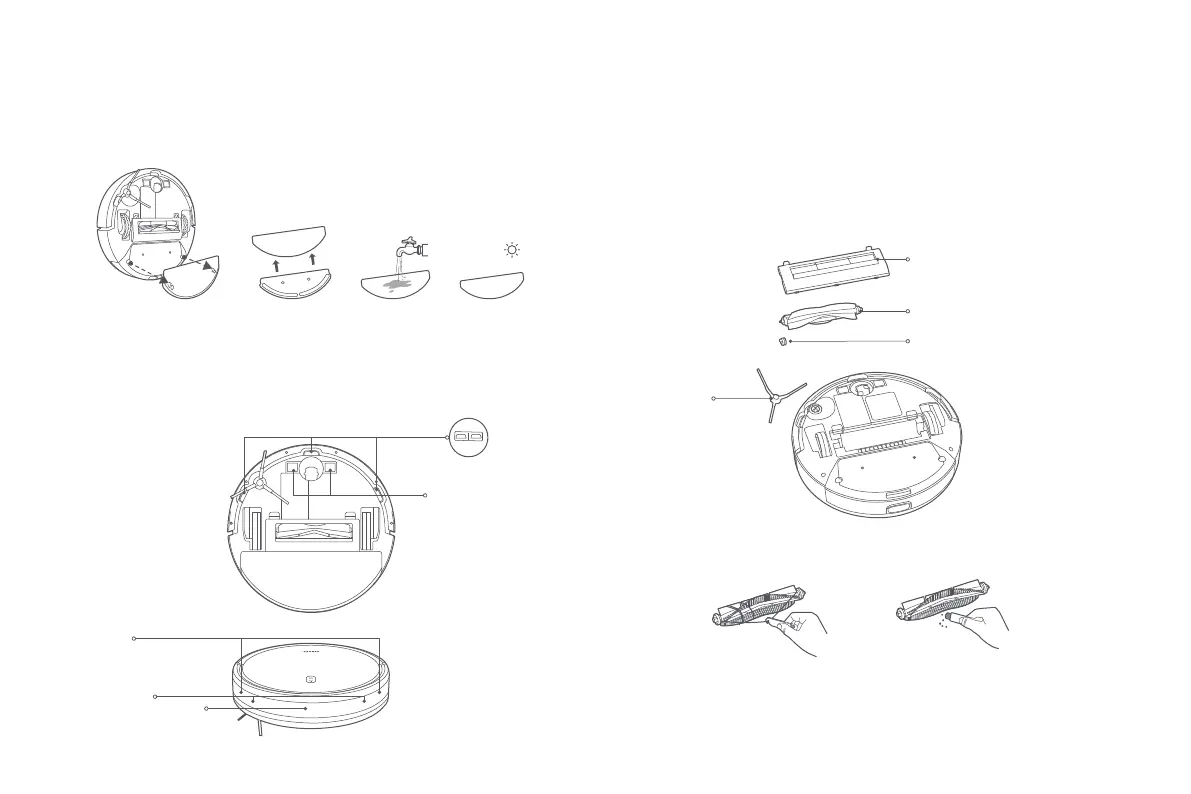
Remove the mop pad from the mop pad holder. Wash it and let it air dry.
Mop Pad Brush and Side Brush
Cleaning the Brush
Cut the hair Remove dirt and debris
It is recommended to clean sensors and charging contacts every three months
with a so cloth.
Sensors and Charging Contacts
Cliff Sensor
Charging Contacts
Collision Sensor
Infrared Obstacle Sensor
Edge Sensor
Š š
Ţ
ş
1. Remove the side brush.
2. Remove the brush cover, take out the brush, and pull out the brush bearing.
3. Use the cleaning brush to clean.
Brush Cover
Brush
Brush Bearing
Side Brush










 To Next Page