06
Indicator Status Descriptions
Turned on/Working normally/Charging completed/Standby
Charging (baery level ≥ 20%)/Turning on
Returning to charge/Updating firmware/Connecting to the network
Turned off/In sleep
Wi-Fi disconnected
Reseing Wi-Fi/Error
Charging (baery level < 20%)
White
Breathing white
Blinking white
Off
Yellow
Blinking yellow
Breathing yellow
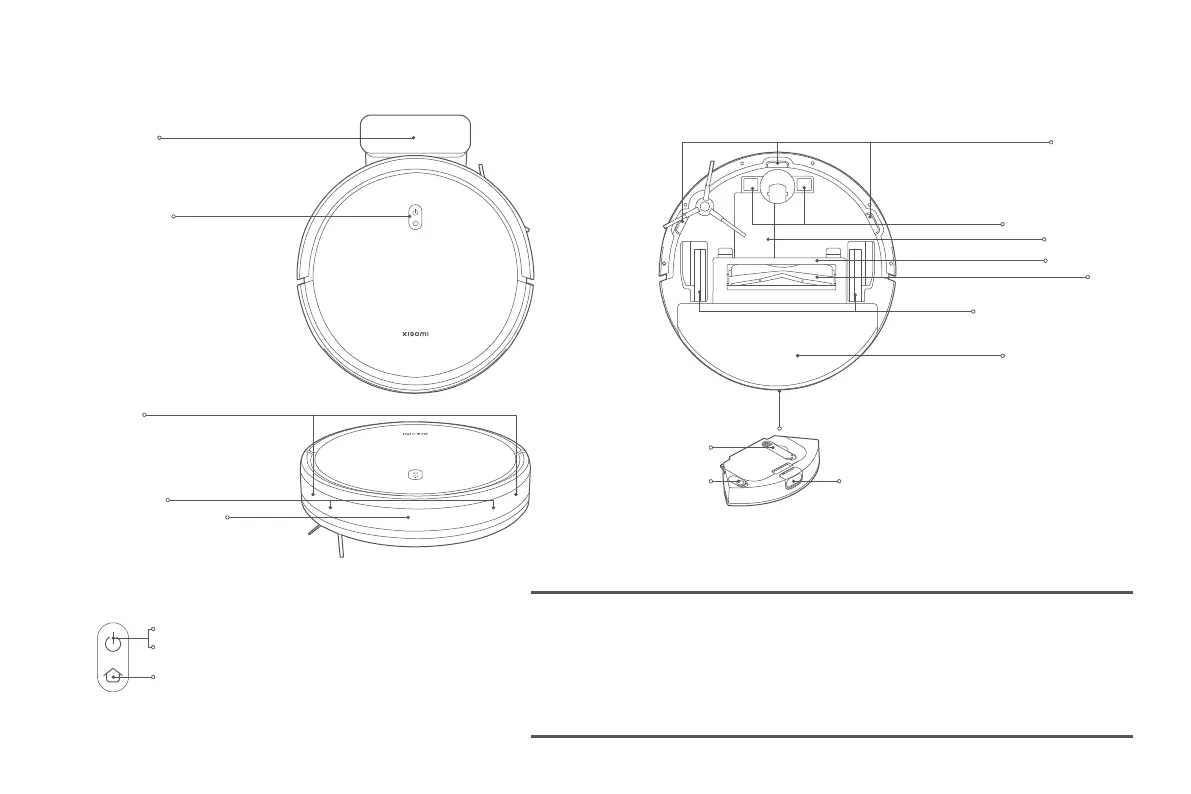
Buon/Indicator
Collision Sensor
Infrared Obstacle Sensor
Edge Sensor
Charging Dock
Mop Pad Assembly
Le Wheel/Right Wheel
Brush
Brush Cover
Baery Pack
Cliff Sensor
Charging Contacts
2-in-1 Dust Compartment with Water Tank
Release Buon
Cleaning Brush
Plug
Press and hold for three seconds to turn on or off
Press to start or pause cleaning
Press to return to charge or stop docking










 To Next Page