5
Indicator Light
Steady blue on: connected/device status is normal
Flashing blue: network error
Flashing orange rapidly: waiting for connection
Flashing orange slowly: system upgrade in progress
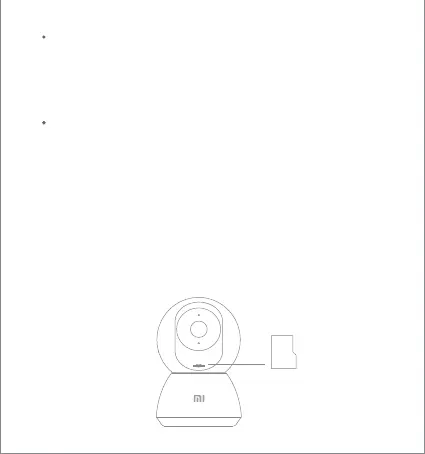
Installing a MicroSD Card
Make sure that the power to the security camera is already disconnected.
Adjust the camera lens upward until the MicroSD slot is revealed, then
insert the MicroSD card into the slot (the side with contact points must
be facing down).
Note: Please turn off the security camera's power supply before inserting
or removing the MicroSD card. Please use a genuine MicroSD card
manufactured by a qualified supplier and make sure that thestorage
capacity is 64 GB or less, with a reading/writing speed of no less than
U1/Class 10.
Installing a MicroSD Card
MicroSD





 To Next Page