4
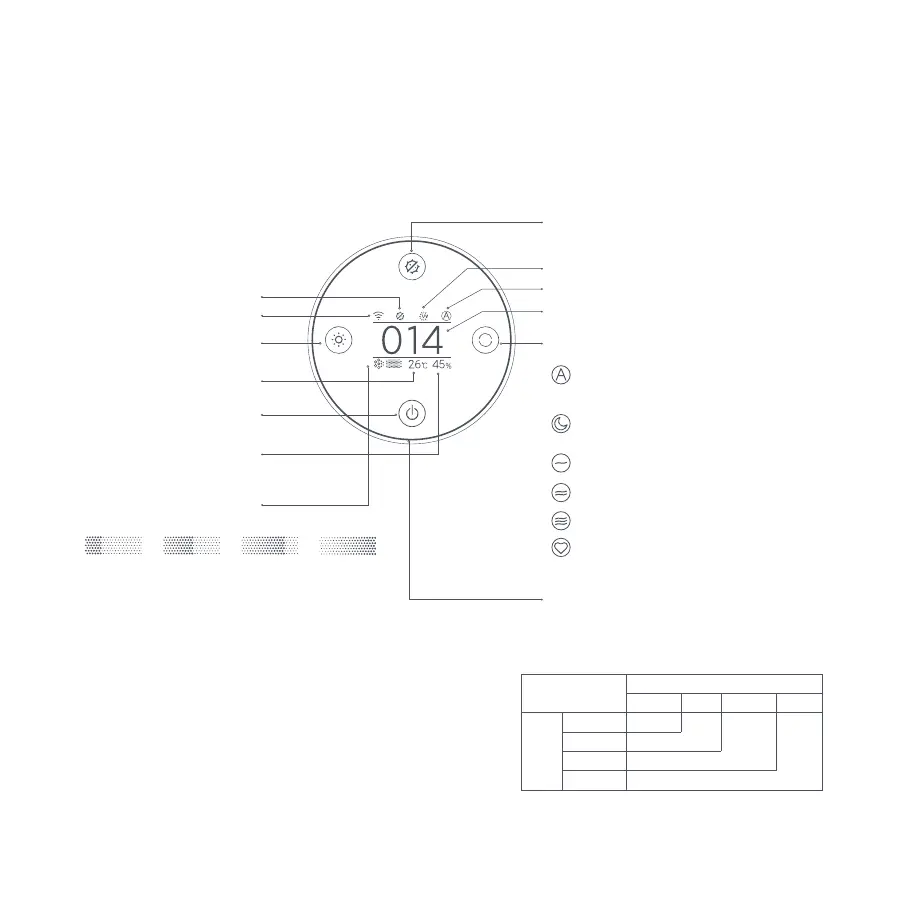
Display Instructions
Temperature
Humidity
Automatic: Automatically switch modes
according to the indoor air quality.
Sleep: Ultra-low noise for a comfortable
sleeping environment.
Manual: Set and save the coverage area in
the app to adjust the purifying efficiency.
Speed 1: Low speed
Speed 2: Medium speed
Speed 3: High speed
Mode Switch Button
Mode
PM2.5 Value
Plasma On/Off Button
Display On/Off Button
On/Standby Button
Wi-Fi Indicator
Plasma Indicator
UV Indicator
Air Quality Indicator
The indicator displays green, yellow, orange or red
based on the highest concentration of fine particles
(PM2.5) and coarse particles (PM10-2.5) in the air.
PM2.5
Value
Coarse Particles
1–20 μg/m³ Green
Excellent Good Moderate Poor
Yellow
Orange
Red
21–35 μg/m³
36–55 μg/m³
>55 μg/m³
Coarse Particles Indicator
Excellent Good Moderate Poor
Note: Coarse particles have an aerodynamic diameter
ranging from 2.5 to 10 µm (PM10–PM2.5). Examples of
coarse particles include dust, pollen, spores, and fly ash.




 To Next Page