7
Filter life notification
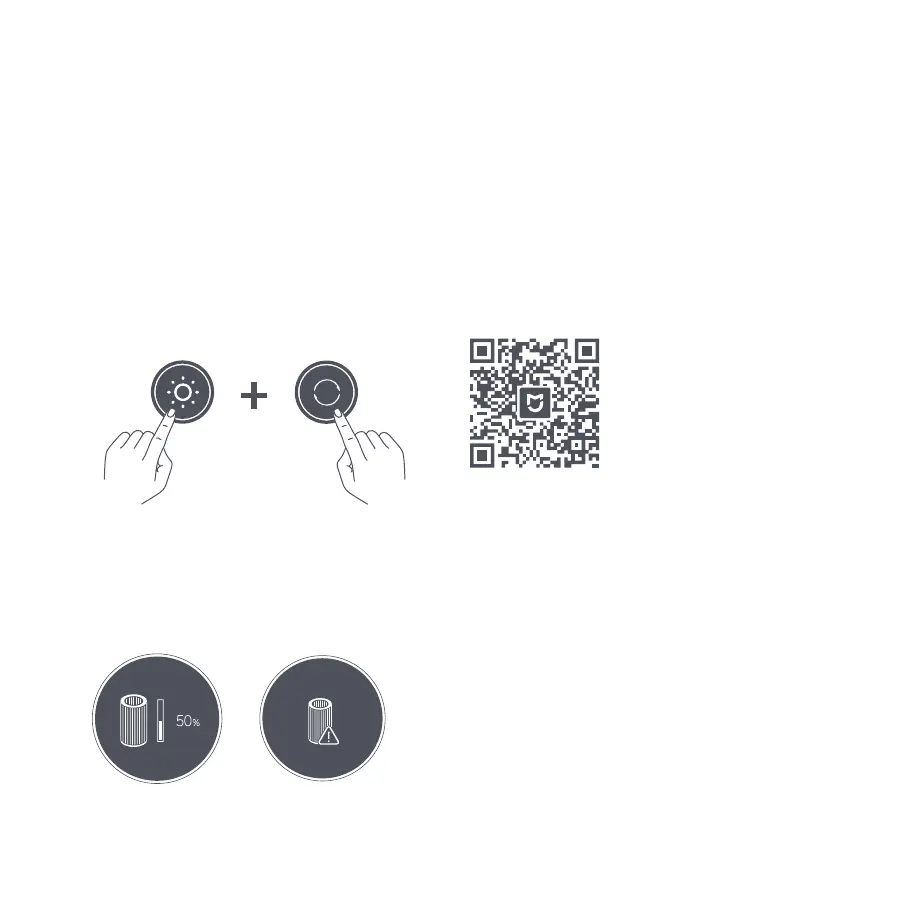
The display will show the remaining service time of the
filter when the purifier is turned on.
The display will show a warning icon if no genuine filter
is detected.
Filter service time
remaining notification
Not a genuine filter
warning
025
Connecting with the Mi Home/Xiaomi Home App
Scan the QR code to download and install the app. You will be directed to the
connection setup page if the app is installed already. Or search for "Mi Home/
Xiaomi Home" in the app store to download and install it.
Open the Mi Home/Xiaomi Home app, tap "+" on the upper right, and then
follow the instructions to add your device.
*The app is referred to as Xiaomi Home app in Europe (except for Russia). The
name of the app displayed on your device should be taken as the default.
Note: The version of the app might have been updated, please follow the
instructions based on the current app version.
This product works with the Mi Home/Xiaomi Home app*.
Control your device with Mi Home/Xiaomi Home app.
D29D97D
Simultaneously press and hold the mode switch button
on the display and the display on/off button for 7
seconds. The purifier will make a notification sound and
the Wi-Fi will be disabled.
While Wi-Fi is off, simultaneously press and hold the
mode switch button on the display and the display
on/off button for 7 seconds. The purifier will make a
notification sound and the Wi-Fi will be enabled.
Enabling/Disabling Wi-Fi




 To Next Page