Bluetooth headset volume / gain levels
The DTX1 intercom system works with dierent brands of Bluetooth headsets. For this
reason, the levels of the microphone gain and earpiece volume sometimes need to be
adjusted for normal operation. Once the levels are adjusted, they will be saved to the
Base Station's memory. You don't need to change them again unless you need to, or if
you replace your headset with a new one.
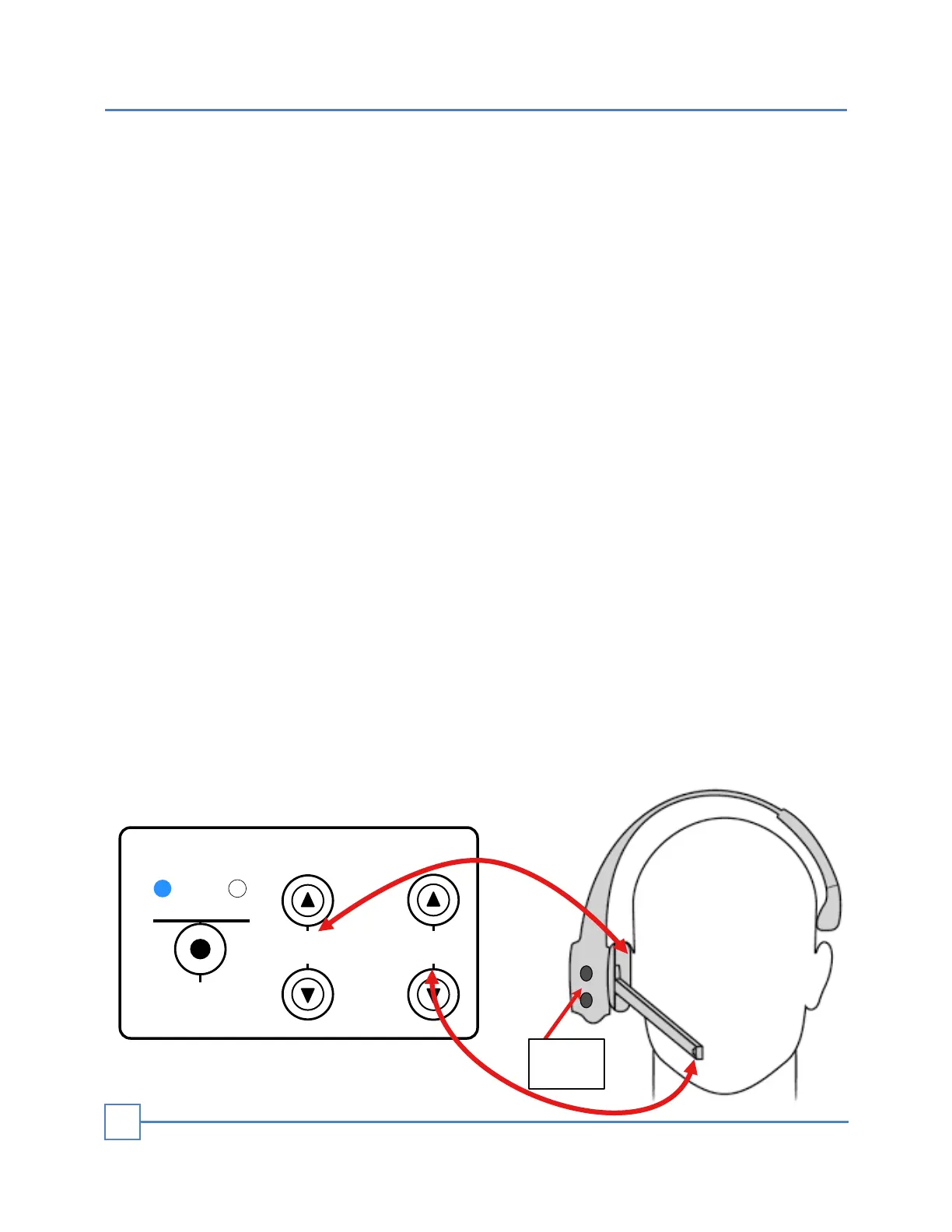
Mic Gain: Adjust the MIC GAIN when you have to raise or lower your normal voice when
you speak to the customer. This will increase or decrease the output volume of your
voice, controlling the gain or sensitivity of the microphone’s Bluetooth headset.
For best results, keep the microphone gain as low as possible to prevent your headset
from picking up too much background noise.
Speaker Gain: Adjust the headset (earpiece) gain when you have trouble hearing the
customer. Do this if the volume is too low or too high (distorted).
+
DESKTOP
MIC
SPEAKER
BLUETOOTH HEADSETS LEVEL
12V. DC
SPEAKER
GAIN
2
MIC
GAIN
1
SELECT
+
-
Volume
control
To adjust the MIC gain and earpiece volume levels: Set the Base Station Main Front
volume controllers in normal level operation.
• Either drive a car to the speaker post or use the override function to open the drive-
thru audio communication and simulate a customer.
• Select the headset you want to adjust (headset 1 or headset 2).
• Adjust the MIC GAIN pushing the up or down buttons and ask the people in the drive-
thru if they can hear you clearly.
• Set the built-in headset's volume control to about 75%. Then, adjust the Base Station
SPEAKER GAIN so that you can hear the customer when they talk. Keep this as low
as possible to avoid background noise.
NOTE - Level Buttons: There are 14 positions on the level buttons. Each press of a
button will produce a “beep” sound. When you reach the highest or lowest level, you will
hear a “double beep”.
HEADSETS VOLUME
6


 To Next Page
 Loading...