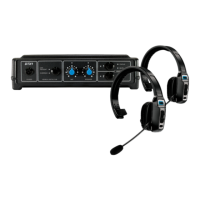
BLUETOOTH HEADSETS COMPATIBILITY TEST
The DTX1 system supports two dierent Bluetooth over-the-head headsets, including
dierent types, such as single ear earphones, earpieces, and earbuds. These devices
can also be used as listen-only devices to monitor the drive-thru communication. You
can mix headset brands and types and adjust them individually to be appropriate for
your use case.
To check compatibility, pair the headset with the DTX1 Base Station (see "Pairing" on
page 5). If the pairing is successful, test the headset as follows:
• Enable the vehicle detector override function to simulate a car being present and
open the drive-thru audio.
• Press the multi-function button on your new Bluetooth headset to answer the drive-
thru call.
• Press the multi-function button to toggle the headset mute function on and o.
• If everything works properly, you may need to adjust the volume levels to suit your
needs (see page 6).
DESKTOP MICROPHONE & SPEAKER BASE
If your headset is broken, out of batteries, or impractical to use, you can use the Desktop
Mic & Speaker Base. It has a built-in audio amplier with a volume control, a directional
microphone that reduces noise, hands-free and push-to-talk mute buttons, and a ashing
light and volume-adjustable beep sound to alert you when a car is present in the drive-
thru lane.
To connect the Desktop Mic & Speaker Base, plug it into the Ethernet jack marked
Desktop Mic Speaker on the back of the DTX1 Base Station.
NOTE: Don’t connect any device (PC, router, etc) to the Base Station Ethernet jack,
other than the Desktop Mic Base. This jack has voltages that can damage your
equipment.
Hands-Free Button: Tap this button to answer a drive-thru call and maintain a hands-free
conversation with the customer. Tap again to mute the microphone.
Push-to-Talk Button: Press and hold this button as you speak with the customer. The
microphone will mute when you release the button. We highly recommend using the
push-to-talk drive-thru communication option because it prevents you from accidentally
leaving the microphone open after nishing taking orders.
Speaker volume control: Adjust this control to your preference. Try to keep the volume
as low as possible to avoid background noise, echo, or feedback.
Car Alert Beep volume: Adjust this control to increase or decrease the beep sound when
a car is detected in the drive-thru lane.
DESKTOP MIC - SPEAKER
7


 To Next Page
 Loading...