6
8 Touch screen LCD with capacitive touch screen
9 NFC reader Scanning area for NFC tags
10 USB cover
Open the cover to access the USB
connector
11 Right side key
Congurable shortcut key. Default as Back
key
13
Expansion slot
cover
Remove cover for the add-on module
connection
14 Speaker Mono speaker
15 Battery cover
Remove the battery cover to access the
battery
16 Battery cover lock Slide down to release the battery cover
17 Charging plates Contact plates for charging in the cradle
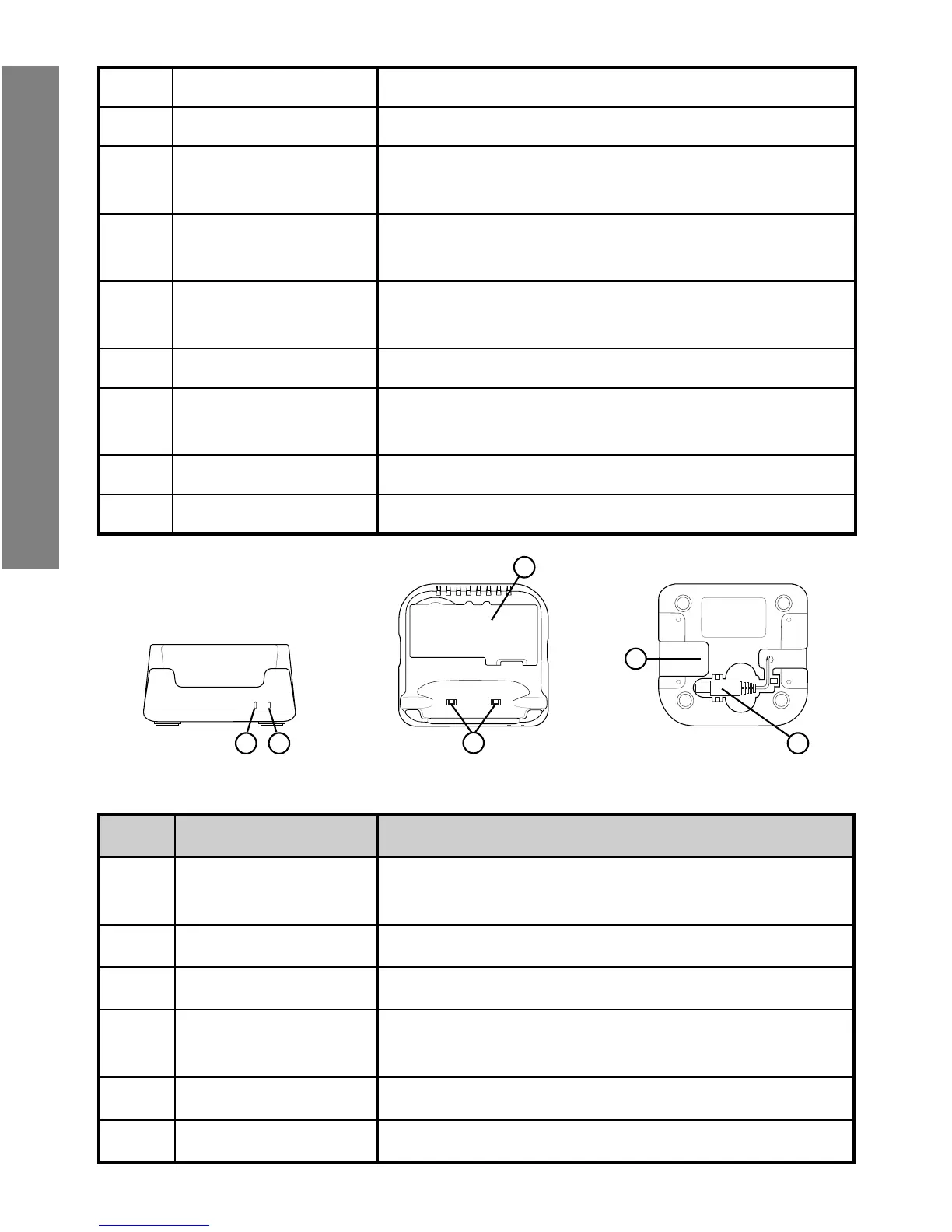
1 2 4
6
5
No. Item Description
1
Spare battery
LED
Spare battery charging status indicator
2 Power LED Cradle power connection indicator
3 Battery slot To charge spare battery
4
Charging contact
plates
To charge the device
5 DC jack Connect AC/DC Adaptor or DC power cable
6 DC power cable Power cable for cascading cradles
Getting Started


 To Next Page