EasyManua.ls Logo

XROCKER 2.0 WIRED - User Manual

Default Icon
24 pages
Print Icon
To Next Page IconTo Next Page
Loading...
1
2.0 WIRED
IMPORTANT: You must keep your original retail receipt as proof of purchase.
NEED HELP?
EMAIL:SUPPORT@XROCKERGAMING.COM
BESOIN D'AIDE?
COURRIEL:SUPPORT@XROCKERGAMING.COM
¿
NECESITAS AYUDA?
CORREO ELECTNICO:SUPPORT@XROCKERGAMING.COM

Other manuals for XROCKER 2.0 WIRED

Question and Answer IconNeed help?

Do you have a question about the XROCKER 2.0 WIRED and is the answer not in the manual?

Summary

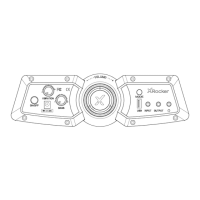
Control Panel Overview

Volume Control

Dial to turn the chair on/off and adjust speaker volume.

Wired Connection Guide: TV

Connecting to TV

Connect B1 cable to TV headphone socket for audio. Adjust volume to 50%.

Connect by Controller: PS4 Systems

PS4 Controller Connection

Connect B1 cable to PS4 controller headset socket.

PS4 Audio Settings

Adjust settings to 'Output to headphones' and 'All audio'. Maximize volume.

Troubleshooting Tips

No Power

Check power cable connection and source. Wiggle cable if lights flicker.

No Sound

Test with phone, confirm device configuration, check TV for headphone socket.

Health and Safety Information

Power Supply Safety Information

XROCKER 2.0 WIRED Specifications

General IconGeneral
BrandXROCKER
Model2.0 WIRED
CategoryVideo Gaming Accessories
LanguageEnglish

Related product manuals