11
Hardware Monitor
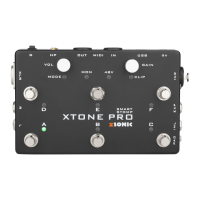
XTONE Pro features hardware zero latency monitoring that can be turn on/off by long press the E foot switch, and can be used to observe the current switch
status via the MON indicator.
After the hardware monitoring function is turned on, the signals on the input interface INL and INR will be transfer directly to all output interfaces of XTONE Pro
without any latency.
Phantom Power
On the INR input of XTONE Pro, it has +48V phantom power. Long press the F foot switch to turn on/off, and use the 48V indicator to observe the current
switch status.
When using a condenser microphone, please turn on the phantom power. When using a dynamic microphone or other input, turn off the phantom power to
reduce unwanted noise.
Compatible Device
iOS device: All iPhone/iPad/iPod that has Lightning and USB-TypeC interface;
Windows device: Windows 7, 8, 8.1, 10;
Mac device: OS X 10.6 and above;
Android device: Not supported.


 To Next Page