18
MIDI Command Mode
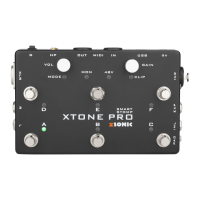
XTONE Pro has 3 MIDI command modes, press A+B switch to mode 1, press A+C to mode 2, press B+C to mode 3. When the switch is successful, mode 1
blinking green
, mode 2 blinking blue, mode 3 blinking red.
Different APP may use different command modes, If you find an abnormality when using foot switch, you should try switching to the other two control
modes.
Mode 1,For JamUp, BIAS FX, AmpKit+, etc. Most other software effects also work for this mode.
Mode 2,For Guitar Rig(Disable Hold Mode), Amplitube(Switch Presets), VocaLive(Switch Presets), etc.
Mode 3,For Guitar Rig(Enable Hold Mode), ToneStack, AmpliTube(Toggle Mode), VocaLive(Toggle Mode), etc.
For JamUp, BIAS FX, AmpKit+, etc.
For Guitar Rig(Disable Hold Mode),
Amplitube(Switch Presets),
VocaLive(Switch Presets),
etc.
For Guitar Rig(Enable Hold Mode),
ToneStack, AmpliTube(Toggle
Mode), VocaLive(Toggle Mode),
etc.


 To Next Page