What do i need to use Xtreamer Prodigy 4k?!
In order to start using the Xtreamer Prodigy 4K you need:
High-denition TV
- A high-denition TV capable of displaying 720p or 1080p video.
Cables
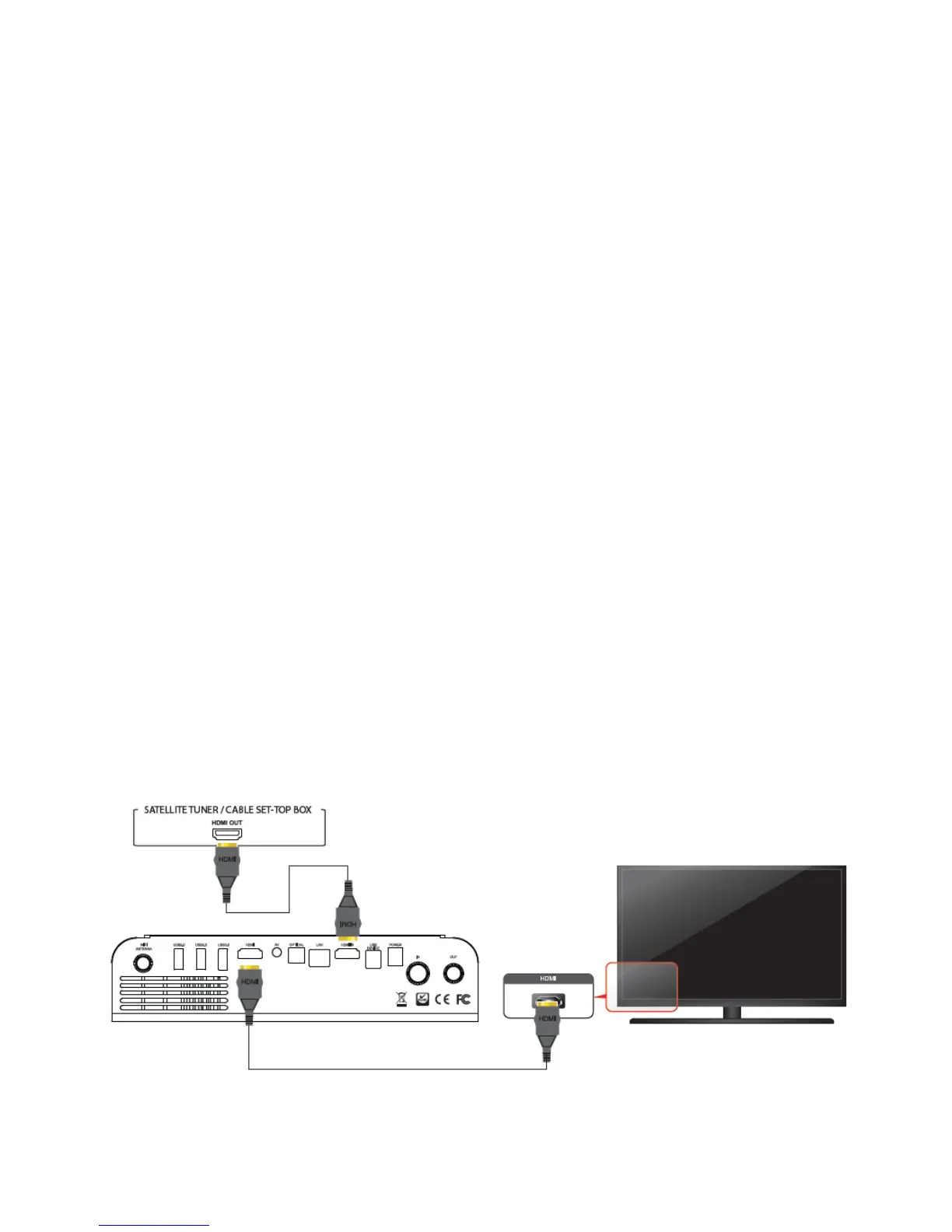
- An HDMI cable to connect Xtreamer Prodigy 4K to your TV.
- An optical audio cable (optional) to connect to an amplier or a receiver.
Network
- A Wi-Fi wireless network (wireless video streaming requires 802.11a, g, or n), or Ethernet (wired) !
network connection.
- A broadband Internet connection.
Software and accounts!
- No additional software is required for you to use Xtreamer Prodigy 4K. !
- Gmail (Google) account is required in order to use the full functionality of your Xtreamer Prodigy
4K and access Google Play Store.!
!
Please note that some online services (such as Netix, Hulu etc) require a separate account and, in
some cases, a subscription.
Note: You can access and control your device remotely using AirDroid or any similar application.!
!
Connecting the Xtreamer Prodigy 4K!
HDMI connection



 To Next Page