3
Machine Set-Up
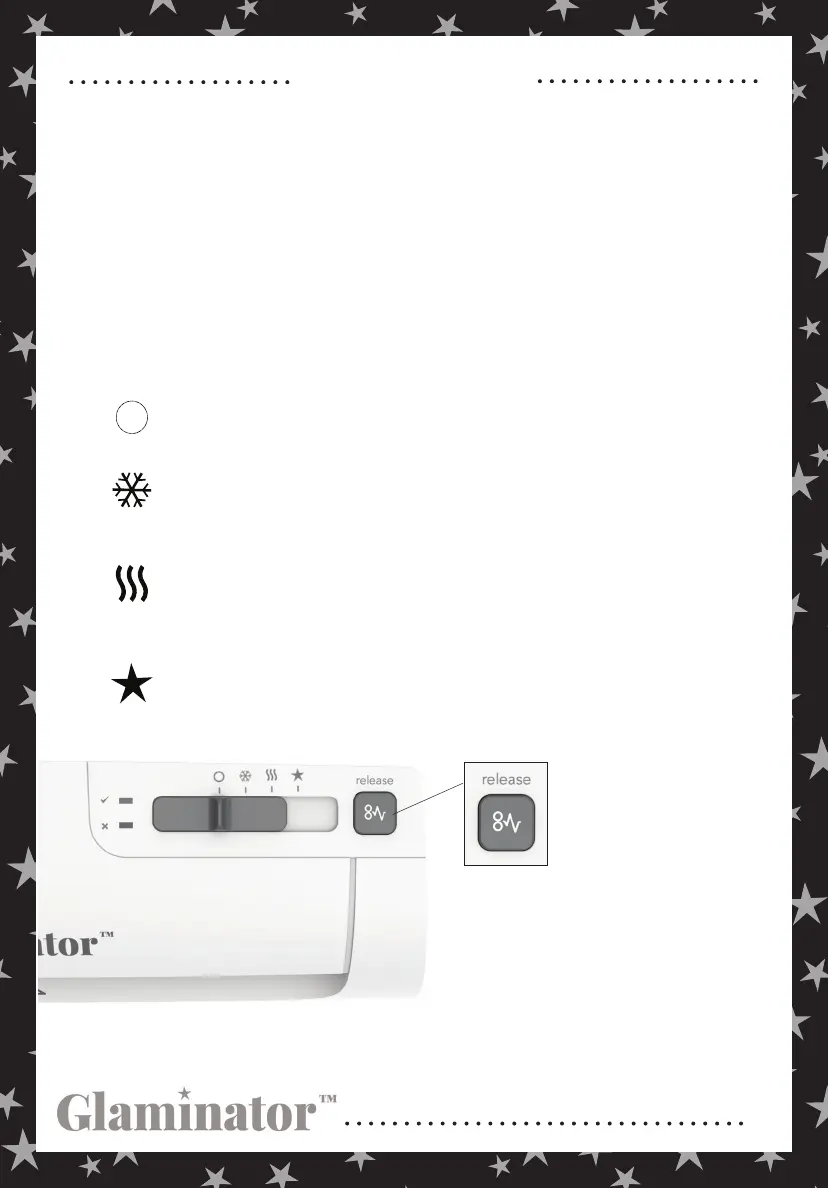
OFF
COLD LAMINATION
THERMAL LAMINATION
FOIL APPLICATION
Machine is off and inactive.
Machine rollers are active. Use this setting with self-adhesive or pressure sensitive
pouches, not included with your machine. 3 mil pouches are recommended.
Machine rollers and heat are active. Use this setting with standard lamination
pouches, not included with your machine. 3 mil pouches are recommended.
Machine rollers and heat are active. Use this setting to apply foil to your projects.
Additional foil and transfer carriers sold separately.
Note: if your materials
are misfed through the
machine, press and hold
the release button and pull
the materials towards you
The electrical outlet should be installed near the equipment and easily accessible.
Remove the plastic and styrofoam from your machine.
1
Once plugged in, the machine will respond with a single beep and a sequence of
brief fl ashes across the panel.
2
To use the laminator, move the slider from the "” to one of the setting icons.
See individual icon descriptions below. When the slider is positioned on the
thermal lamination or foil application settings, the laminator will start to warm
up. An orange light will illuminate to the right of the “.” When the laminator is
ready to use, the green light next to the "” will illuminate and the machine will
beep twice.
3
and out of the machine. Feed a clean
piece of paper through the machine
before continuing to ensure that your
rollers are clean.
Your machine may emit a slight odor during the initial operation. This odor is normal and will diminish after a few hours of
operation. For safety reasons, this machine will automatically stop heating after 30 minutes of no activity. At this time, you will
see a green and orange light to indicate this state. Reset to “” before your next usage.


 To Next Page