01
04
06
08
11
14
02
05
03
07
10
09
12
15
13
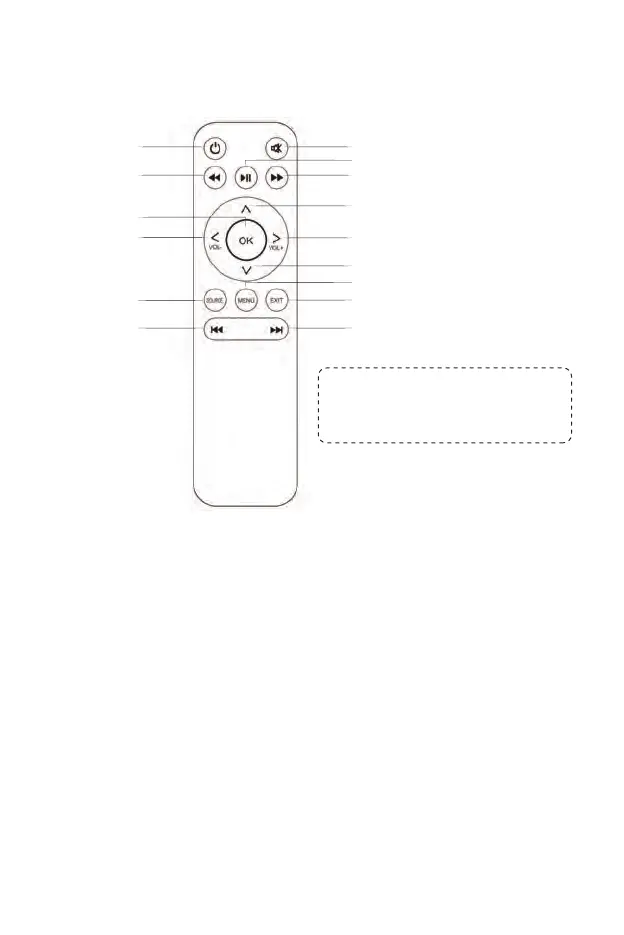
1. Power: Press this switch when turning on or off the power
2. Mute:Turns the sound on or off
3. Fast Forward Button: Move forward at a speed faster than that at
which it would usually be played
4. Fast Rewind Button: Move rewind at a speed faster than that at which
it would usually be played
5. Play Button: Play or Pause
6. OK Button: Confirm
7/8. Volume Keys: Volume up / volume down
7/8/9/10. Arrows Key: Move the pointer up, down, left and right
11. Source: Change the signal source
12. Menu: Call or exit the projector main menu
13. Exit
14. Previous
15. Next
While using the remote control,
point it toward IR receiver.
(Batteries not included)
Remote control



 To Next Page