PART 7 Activation Procedure
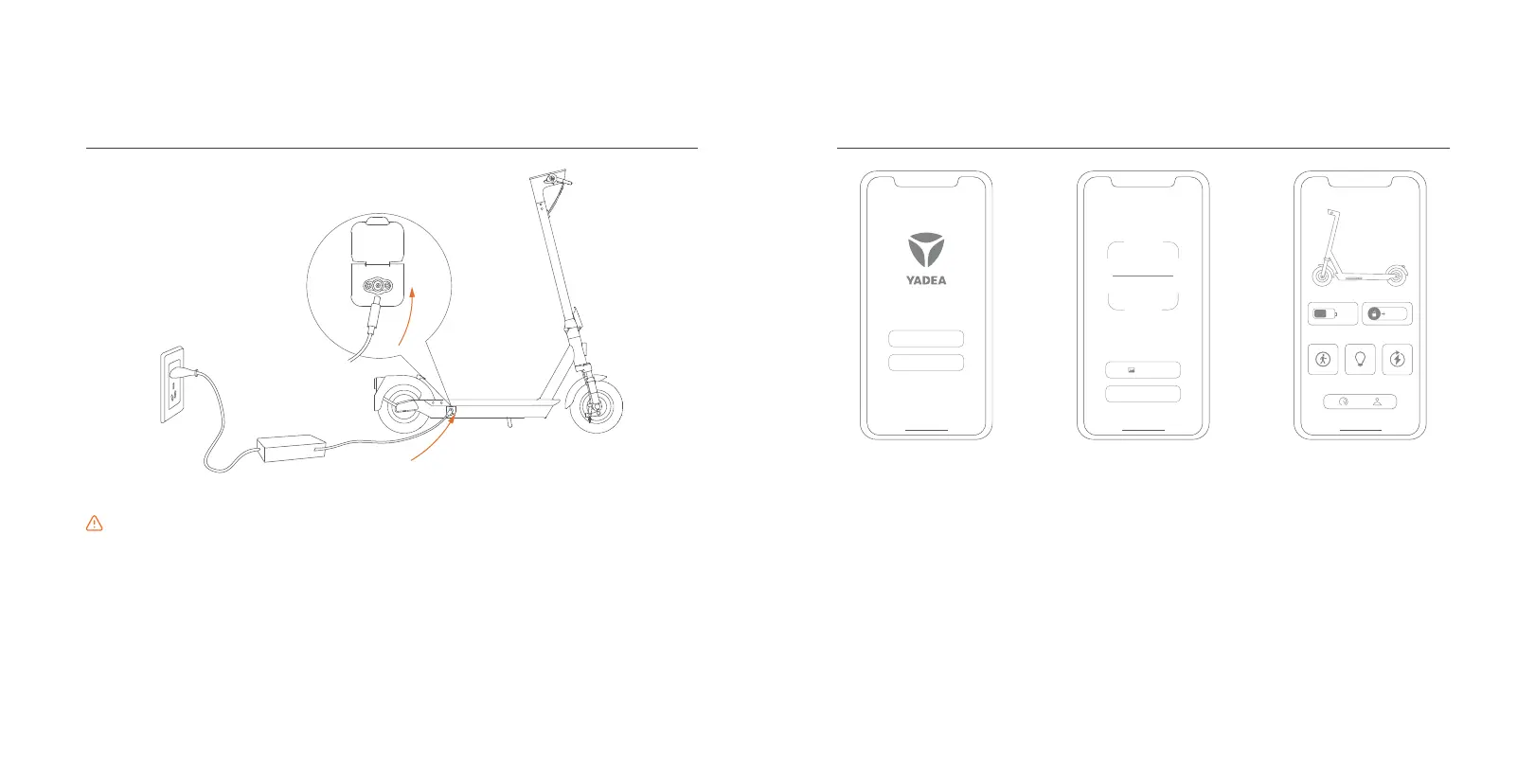
Open the charging port cap and connect the charger properly.
PART 6 Charging method
• Please charge the scooter with Yadea original charger, and do not use any charger of other
brand and Model.
• Do not connect the power supply and charger if the charger or power socket is wet.
• If the red indicator on the charger is steady on, the battery is under charging. If the green
indicator is steady on, the battery is fully charged and the power supply should be
disconnected promptly.
• The charging port cap should be covered tightly when not charging or after charging.
• It is recommended to place the scooter outdoors to charge, but to protect it from rain and sun
exposure.
Attention
Login
Europe
VIA BLUETOOTH
Photos
1. Open the “Yadea”
APP.Follow the prompts
on the APP screen to
complete account
registration and login.
2. Scan the QR code on
the scooter body, or find
the device via
Bluetooth, and bind the
scooter.
3. The scooter is activated
successfully. Please start
your ride.
11
12


 To Next Page