EasyManua.ls Logo

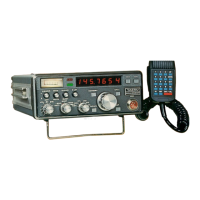
Yaesu CPU-2500R - User Manual

Yaesu CPU-2500R
46 pages
Print Icon
To Next Page IconTo Next Page
Loading...
Question and Answer IconNeed help?

Do you have a question about the Yaesu CPU-2500R and is the answer not in the manual?

Summary

CPU-2500 R Transceiver Overview

Technical Specifications

Front Panel Controls and Indicators

Front Panel Controls

Description of controls like VOL, SQL, TX OFFSET, MEMORY SELECTOR, MEMORY, etc.

Front Panel Indicators and Other Functions

Explanation of BUSY, ON AIR lamps, SCAN STOP, 5 UP, CALL buttons, and MIC jack.

Rear Apron and Cabinet Switches

Rear Panel Connections

Antenna, external speaker, backup switch, and power connections.

Underside Cabinet Switches

Switches on the cabinet bottom for power and mode selection.

Installation Procedures

Mobile Installation

Instructions for mounting and connecting the transceiver in a vehicle.

Base Station Installation

Setting up the transceiver for base station operation with a stand.

Antenna Considerations

Guidance on selecting and connecting antennas for optimal performance.

Operation

Initial Setup and Frequency Selection

Initial checks, VOL/SQL adjustment, and frequency selection via dial.

Memory and Scanner Operations

Storing, recalling frequencies, and using scanner modes.

Keyboard Microphone Operation

Advanced operations using the keyboard microphone for programming and control.

Error Correction and Troubleshooting

Guidance on correcting input errors and common operational issues.

Repeater Operation

Setting up and using the transceiver for repeater communication.

Optional Tone Squelch Operation

Configuring and using the optional tone squelch for selective communication.

CPU-2500 R Block Diagram

Circuit Theory

Transmitter Circuitry

Explanation of the transmitter's signal generation, modulation, and amplification.

Receiver Circuitry

Explanation of the receiver's signal reception, mixing, and demodulation.

Heterodyne Oscillator and PLL

Description of the heterodyne oscillator and Phase Lock Loop synthesizer.

PLL Control and Display Units

How the CPU controls the PLL and drives the digital display.

Power Supply Requirements

Maintenance and Alignment

General Precautions

Important safety precautions to prevent damage to the transceiver.

Routine Maintenance and Cleaning

Procedures for keeping the transceiver clean and in good working order.

Performance Checks

Steps to verify transmitter output and receiver sensitivity.

Receiver Alignment

Detailed steps for aligning the receiver RF amplifier and IF stages.

Transmitter Alignment

Procedures for aligning the transmitter's 10.7MHz, mixer, and output stages.

PLL Alignment

Steps for aligning the PLL oscillator, multiplier stages, and unlock circuit.

Component Information

Transistor & IC Connections

Pinout diagrams and connection information for transistors and integrated circuits.

Complete Parts List

Summary

CPU-2500 R Transceiver Overview

Technical Specifications

Front Panel Controls and Indicators

Front Panel Controls

Description of controls like VOL, SQL, TX OFFSET, MEMORY SELECTOR, MEMORY, etc.

Front Panel Indicators and Other Functions

Explanation of BUSY, ON AIR lamps, SCAN STOP, 5 UP, CALL buttons, and MIC jack.

Rear Apron and Cabinet Switches

Rear Panel Connections

Antenna, external speaker, backup switch, and power connections.

Underside Cabinet Switches

Switches on the cabinet bottom for power and mode selection.

Installation Procedures

Mobile Installation

Instructions for mounting and connecting the transceiver in a vehicle.

Base Station Installation

Setting up the transceiver for base station operation with a stand.

Antenna Considerations

Guidance on selecting and connecting antennas for optimal performance.

Operation

Initial Setup and Frequency Selection

Initial checks, VOL/SQL adjustment, and frequency selection via dial.

Memory and Scanner Operations

Storing, recalling frequencies, and using scanner modes.

Keyboard Microphone Operation

Advanced operations using the keyboard microphone for programming and control.

Error Correction and Troubleshooting

Guidance on correcting input errors and common operational issues.

Repeater Operation

Setting up and using the transceiver for repeater communication.

Optional Tone Squelch Operation

Configuring and using the optional tone squelch for selective communication.

CPU-2500 R Block Diagram

Circuit Theory

Transmitter Circuitry

Explanation of the transmitter's signal generation, modulation, and amplification.

Receiver Circuitry

Explanation of the receiver's signal reception, mixing, and demodulation.

Heterodyne Oscillator and PLL

Description of the heterodyne oscillator and Phase Lock Loop synthesizer.

PLL Control and Display Units

How the CPU controls the PLL and drives the digital display.

Power Supply Requirements

Maintenance and Alignment

General Precautions

Important safety precautions to prevent damage to the transceiver.

Routine Maintenance and Cleaning

Procedures for keeping the transceiver clean and in good working order.

Performance Checks

Steps to verify transmitter output and receiver sensitivity.

Receiver Alignment

Detailed steps for aligning the receiver RF amplifier and IF stages.

Transmitter Alignment

Procedures for aligning the transmitter's 10.7MHz, mixer, and output stages.

PLL Alignment

Steps for aligning the PLL oscillator, multiplier stages, and unlock circuit.

Component Information

Transistor & IC Connections

Pinout diagrams and connection information for transistors and integrated circuits.

Complete Parts List

Yaesu CPU-2500R Specifications

General IconGeneral
BrandYaesu
ModelCPU-2500R
CategoryTransceiver
LanguageEnglish

Related product manuals