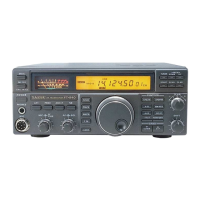
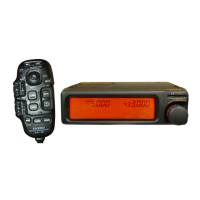
The Elecraft KPA/KAT500 Power Combo is a sophisticated system designed to enhance the performance and operational flexibility of Yaesu FT-857/897 series radios, as well as the FT-990/991 models. This combo integrates a power amplifier (KPA500) and an automatic antenna tuner (KAT500) to provide a seamless and optimized radio experience, particularly for amateur radio enthusiasts.
Function Description
The core function of the KPA/KAT500 Power Combo is to amplify the radio's output power and efficiently match the antenna impedance for optimal signal transmission.
- KPA500 Power Amplifier: This component is responsible for increasing the transmit power of the connected Yaesu radio. By boosting the signal, it allows for stronger and more reliable communications, especially over longer distances or in challenging propagation conditions. The amplifier works in conjunction with the tuner to ensure that the amplified signal is delivered effectively to the antenna.
- KAT500 Automatic Antenna Tuner: The KAT500 is an intelligent antenna tuner that automatically adjusts the impedance of the antenna to match the output impedance of the radio and amplifier. This matching process is crucial for maximizing power transfer to the antenna, minimizing reflected power (SWR), and protecting the radio and amplifier from damage. The tuner features multiple antenna ports, allowing users to connect and switch between different antennas, each with its own stored tuning memories. It can operate in both Manual (MAN) and Automatic (AUTO) modes, offering flexibility based on user preference and operating conditions. In MAN mode, the user initiates the tuning process, while in AUTO mode, the tuner can automatically initiate a full tune cycle if the SWR exceeds a predefined threshold during transmission.
- Integration with Yaesu Radios: The system is specifically designed to interface with Yaesu FT-857/897 and FT-990/991 radios. This integration is achieved through the radio's "Linear" jack, utilizing the "TX GND" signal for keying the amplifier. This setup enables "Basic Mode" operation, where the combo responds to the radio's transmit commands.
Usage Features
The KPA/KAT500 Power Combo offers several features designed to simplify operation and enhance the user experience:
- Basic Mode Operation: When connected to compatible Yaesu radios, the combo operates in Basic Mode, where the amplifier and tuner respond to the radio's transmit keying signal. This ensures synchronized operation without complex manual intervention.
- Flexible Antenna Connections: The KAT500 provides multiple antenna ports (ANT 1, ANT 2, ANT 3), allowing users to connect up to three different antennas. This is particularly useful for operators who use various antennas for different bands or purposes. The tuner stores separate tuning memories for each antenna port, eliminating the need to re-tune when switching between them.
- Intuitive Tuning Process ("Training the Tuner"): The system employs a "Training the Tuner" process to build a comprehensive set of tuning memories. This involves:
- Band-Specific Tuning: Users are guided to tune the KAT500 at various points (lowest, highest, and middle frequencies) within each operating band where their antenna is effective. This creates a detailed map of tuning solutions across the band.
- Multiple Antenna Training: The training process can be repeated for each connected antenna, ensuring that the tuner has optimal settings stored for all configurations.
- Memory Storage: Once a full tune cycle is completed and a low SWR is achieved, the KAT500 automatically memorizes the tuning elements. This allows for rapid recall of settings when returning to a previously tuned frequency or band.
- RTTY Mode for Training: The manual recommends using RTTY mode on the radio during the training process, typically at an RF output level of about 25 watts, to provide a steady-state signal for the tuner.
- MAN vs. AUTO Mode:
- MAN (Manual) Mode: In this mode, the user manually initiates the tuning process by tapping the TUNE button on the KAT500. This provides precise control over when tuning occurs. Elecraft generally recommends MAN mode for most users, especially when the tuner is co-located with the operator.
- AUTO (Automatic) Mode: This mode offers an additional layer of automation. If the SWR rises above a user-defined threshold (e.g., 1.8:1) during transmission, the KAT500 will automatically initiate a full tune cycle. This is particularly beneficial for remote operations or in situations where SWR can fluctuate due to environmental factors. Users can configure SWR thresholds for each antenna port via the KAT500 Utility.
- Software Utility for Configuration: The Elecraft KAT500 Utility software provides a graphical interface for managing and configuring the tuner. This utility allows users to:
- Optimize for KPA500: A dedicated button in the Configuration tab simplifies the setup for interoperability with the KPA500.
- Save/Restore Configuration: Users can save their trained tuning memories and other settings to a file and restore them as needed, providing a backup and easy transfer of configurations.
- Display Fault Table: The utility can display a fault table, which is useful for diagnosing any issues that may arise.
- Reset to Factory Default: An option to reset the tuner to its factory default settings is available.
- Adjust Parameters: Parameters such as VSWR thresholds, amplifier key interrupt power, auto fine tune, tune on QSY, initial power, idle sleep, and antenna settings can be adjusted.
- Visual Feedback: The KAT500 provides visual indicators, such as the MAN light, to show its operational status (e.g., solid for ready, flashing for awaiting RF during tuning).
- Protection Features: The system is designed to protect the radio and amplifier. The amplifier key line can be interrupted if transmit power exceeds a set maximum, and the tuner's function of minimizing SWR helps safeguard the equipment.
Maintenance Features
While the manual primarily focuses on operational setup, some aspects touch upon maintenance or best practices that contribute to the longevity and reliability of the system:
- Configuration Backup: The ability to save and restore the KAT500's configuration via the utility acts as a crucial maintenance feature. It ensures that valuable tuning memories are not lost and can be easily reloaded if settings are inadvertently changed or if the unit needs to be reset.
- Fault Diagnosis: The "Display Fault Table" feature in the KAT500 Utility is a diagnostic tool that aids in troubleshooting. By providing information on any detected faults, it helps users or technicians identify and address potential issues, contributing to effective maintenance.
- Regular Training/Re-training: Although not strictly "maintenance" in the traditional sense, the recommendation to "Train the Tuner" regularly, especially when operating in new parts of a band or with different antennas, ensures optimal performance and prevents the system from operating inefficiently. This proactive approach helps maintain the tuner's effectiveness.
- Proper Cabling: The manual emphasizes the importance of correct cabling as shown in the general cabling requirements diagram. Ensuring secure and appropriate connections (e.g., RF patch cables, adapter cables) is fundamental to the system's reliable operation and prevents damage due to incorrect wiring.
- KPA500 STBY Mode during Tuning: The instruction to place the KPA500 into STBY mode while training the tuner is a protective measure. It prevents the amplifier from operating at full power during the tuning process, which could potentially stress the amplifier or the antenna if the SWR is high during initial tuning attempts.
- Disabling Internal Tuner (FT990/991): For FT990/991 radios, the instruction to disable the internal tuner is a maintenance-related best practice. Running two tuners in series can lead to inefficiencies or unexpected behavior, so ensuring only the KAT500 is active for tuning is important for optimal performance and system health.
In summary, the Elecraft KPA/KAT500 Power Combo is a robust and intelligent system designed to provide amateur radio operators with enhanced power and efficient antenna matching, all while offering user-friendly configuration and operational flexibility. Its integration with Yaesu radios, comprehensive tuning capabilities, and diagnostic tools make it a valuable asset for improving radio communication performance.

 Need help?
 General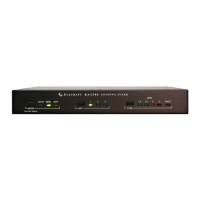

 To Next Page