4
Initial Settings for APRS
®
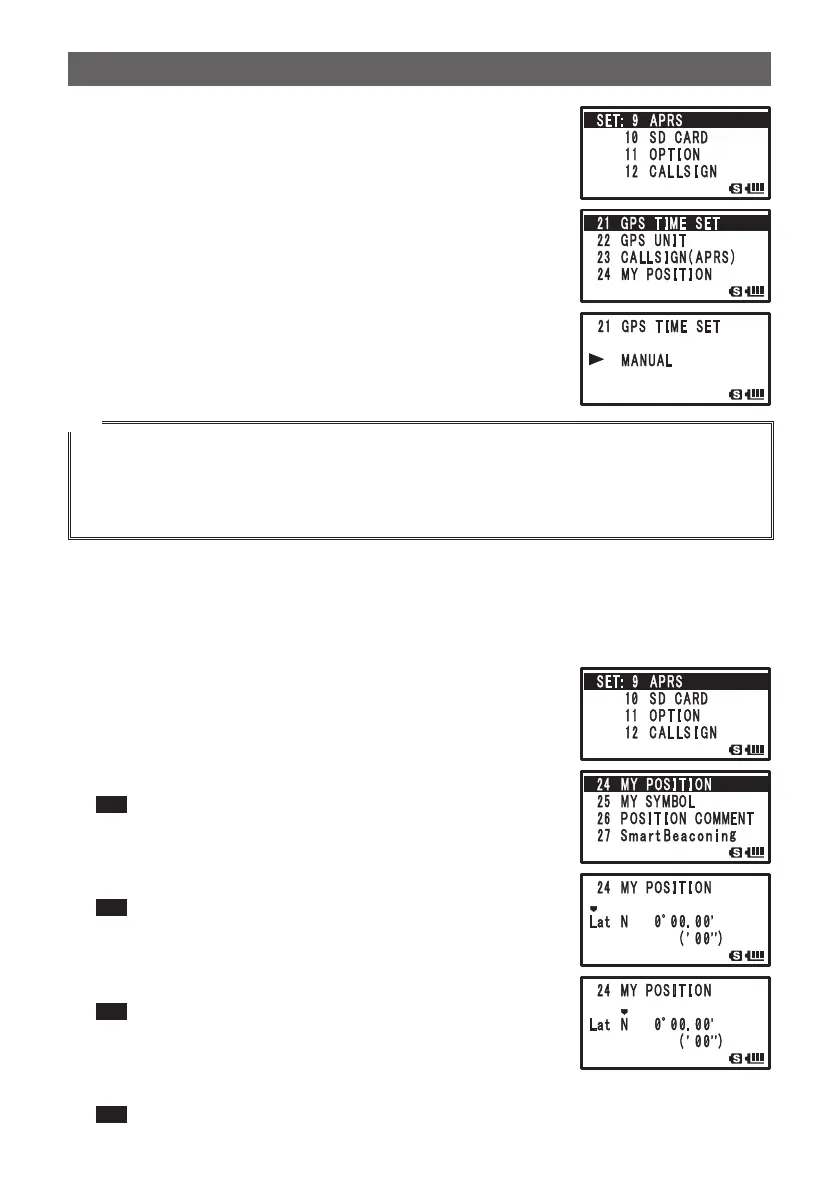
1 Press M over 1 second.
Enters the Set mode.
2 Turn O to select [9 APRS].
3 Press H.
4 Turn O to select [21 GPS TIME SET].
5 Press H.
6 Turn O to select [MANUAL].
7 Press M.
GPS TIME SET is set to MANUAL.
8 Press p.
Exits from the Set mode.
Tip
• I-GATE and Digipeater through connection to a PC cannot be operated.
• You can change the unit of APRS data by selecting [9 APRS] [11 GPS UNIT].
• Even if the internal clock is set to MANUAL, if the GPS function is used, time data will be obtained
from GPS and the precise time will be displayed. This function can be set to OFF (MANUAL) by
selecting [9 APRS] [21 GPS TIME SET].
O Position Information Setting (Datum: WGS-84)
Manually enter the position information of your station.
1 Press M over 1 second.
Enters the Set mode.
2 Turn O to select [9 APRS].
3 Press H.
4 Turn O to select [24 MY POSITION].
5 Press H.
GPS setting items appear on the LCD.
Tip Default: GPS
6 Turn O to select [Lat].
7 Press H.
The cursor moves to setting item for latitude.
Tip Pressing F returns the cursor to the previous item.
8 Turn O to set [N (north latitude)] or [S (south latitude)].
9 Press H.
The cursor moves to the setting items for [Degree].
Tip Pressing F returns the cursor to the previous item.
10
Turn O to set [Degree].
11
Press H.
The cursor moves the setting item for [Minute].
Tip Pressing F returns the cursor to the previous item.


 To Next Page