VX-6R OPERATING MANUAL72
Operation (Accessing an FRG Node)
1. Press the
[
F/W
]
key, then press the
[
0
(
SET
)]
key to enter the Set mode.
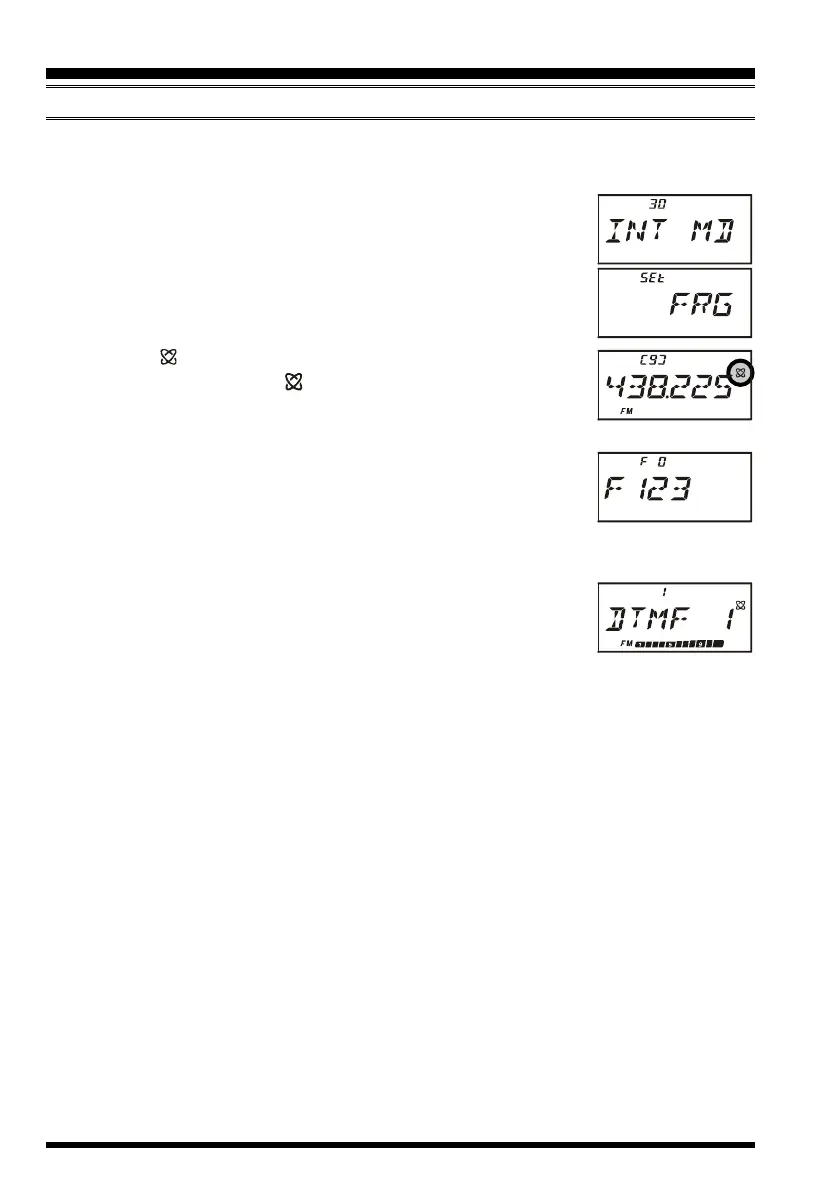
2. Rotate the DIAL knob to select Set Mode Item 30: INT MD.
3. Press the
[
0
(
SET
)]
key to enable adjustment of this Set Mode
Item.
4. Rotate the DIAL knob to set this Set Mode Item to “FRG” (thus
activating the “Other Internet Link System” mode).
5. Press the PTT switch to save the new settings.
6. Press the
[ (
LK
)
TXPO
]
key momentarily to activate the Internet
Connection feature. The “ ” icon will appear in the upper right
corner of the display.
7. Rotate the DIAL knob while pressing the
[
0
(
SET
)]
key to select the Internet Memory
register number (F 0 ~ F63) corresponding to the Internet link
repeater to which you wish to establish an Internet link, then
press the PTT switch momentarily to lock in the selected access
number.
8. Once the Internet Connection feature is activated per step 7 above, you may now press
the
[
0
(
SET
)]
key, while you are transmitting, to send out the
selected DTMF string (to establish the link to the desired Internet-
link mode).
9. To return to the WIRES™ mode, repeat steps 1 - 5 above, selecting “SRG” in step 4.
INTERNET CONNECTION FEATURE
FRG
(
“FRIENDLY RADIO GROUP”
)
MODE



 To Next Page