6
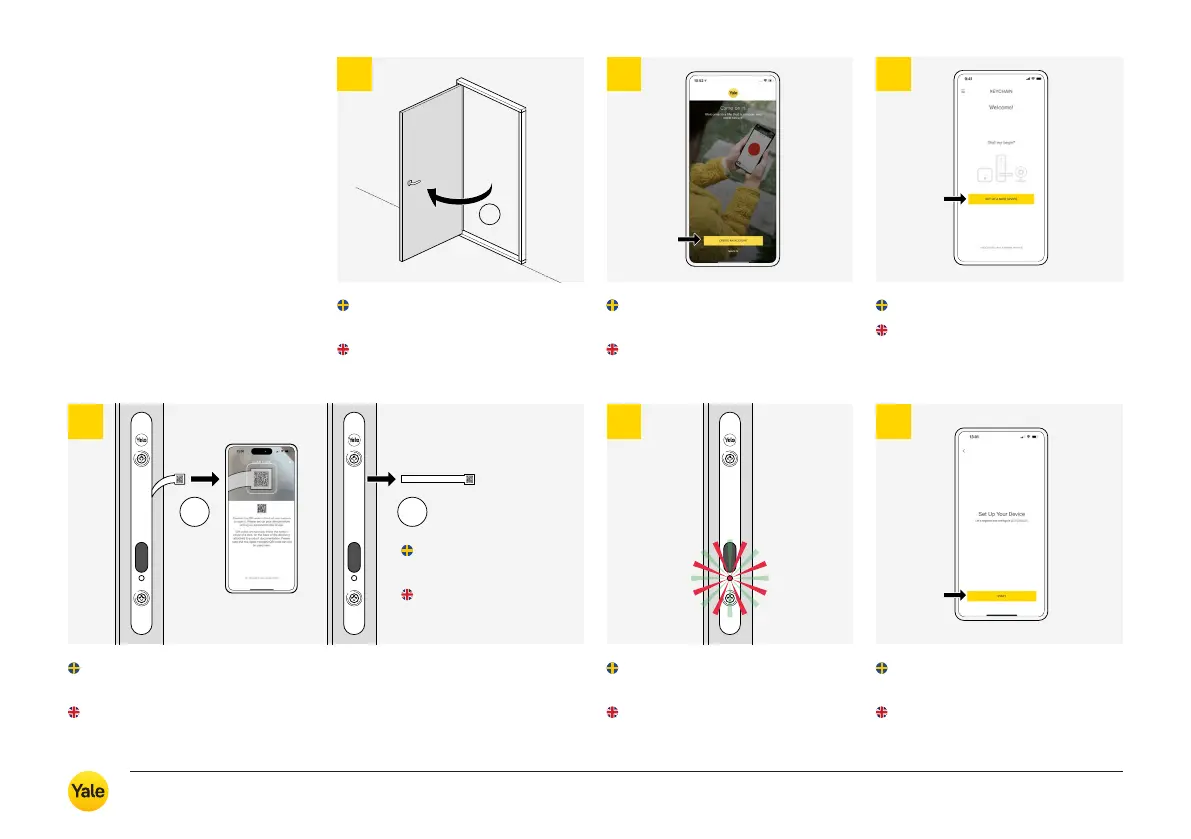
Följ instruktionerna i appen
och slutför driftsättningen.
Follow the instructions in the
app to complete the installation.
Yale Home
Följ instruktionerna i appen
(Skapa konto).
Follow the instructions in the app
(Create an account).
Låt dörren vara öppen när
låset driftsätts.
Leave the door open during
when the lock is commissioned.
!
21
5
Låset blinkar till vid driftsättning,
både rött och grönt.
The lock flashes on commis sio-
ning, both red and green.
1
2
4
Scanna QR-koden på batterisparfliken när du blir ombedd.
Ta sedan bort batterisparfliken enligt instruktionerna i appen.
Scan the QR code on the battery saver tab when prompted.
Then remove the battery saver tab following the instructions in the app.
QR-kod finns även
under batteripacket.
QR code is also
under the battery pack.
Följ instruktionerna i appen
(Skapa konto).
Follow the instructions in the app
(Create an account).
Välj ”Installera en ny enhet”.
Select ”Set up a new device”.
3
Yale Durus – Användarmanual / User guide
13



 To Next Page