Secure mode
In secure mode, the door is locked from both the inside and
outside. It is not possible to unlock using the thumb turn on
the inside, or from the outside using a key.
Secure mode is locked and unlocked using the Yale Home* app or in
combination with Yale Dot**. When the door is opened, secure mode
is deactivated.
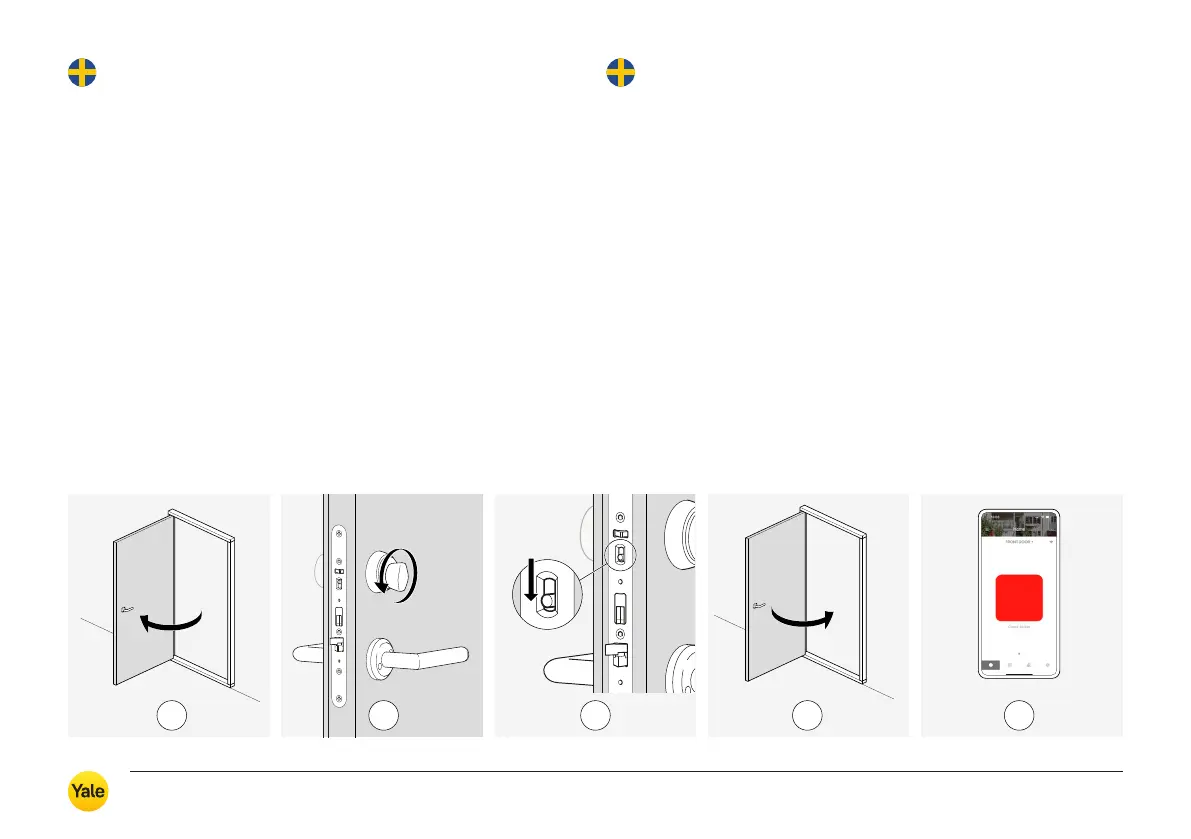
Follow the steps below to lock the door in secure mode:
1. Open the door.
2. Turn the thumb turn fully in the direction of locking.
3. Press down the button on the lock faceplate.
4. Close the door.
5. * Alt. 1. Lock using the app; a red square icon will appear when
the door is locked.
** Alt. 2. Lock by tapping your smartphone on Yale Dot, located in
the immediate vicinity of the lock (< 0.5 m). Requires NFC enabled
and unlocked smartphone screen. The red square icon will appear
when the door is locked.
1 3 4 52
Bortasäkring
Vid bortasäkert läge är dörren låst från både in och utsidan.
Det är inte möjligt att låsa upp med vredet från insidan eller
från utsidan med eventuell nyckel.
Låsning och upplåsning av bortasäkert läge görs med appen Yale Home*
eller i kombination med Yale Dot**. När dörren öppnas avaktiveras
bortasäkert läge.
Följ stegen nedan för att låsa i bortasäkert läge:
1. Öppna dörren.
2. Vrid vredet i låsriktningen (till stopp).
3. Tryck ned knappen på låsets stolpe .
4. Stäng dörren.
5. * Alt 1. Lås med appen, fyrkantig röd symbol ska synas i appen när
dörren är låst.
** Alt 2. Lås genom att lägga telefonen mot Yale Dot, placerad i
direkt närhet till låset (< 0,5 m). Kräver aktiverad NFC och upplåst
skärmlås på telefonen. Fyrkantig röd symbol ska synas i appen när
dörren är låst.
Yale Durus – Användarmanual / User guide
20



 To Next Page