28
Turning the power on
CAUTION
Be sure to lower the volume level to minimum before
turning the power on.
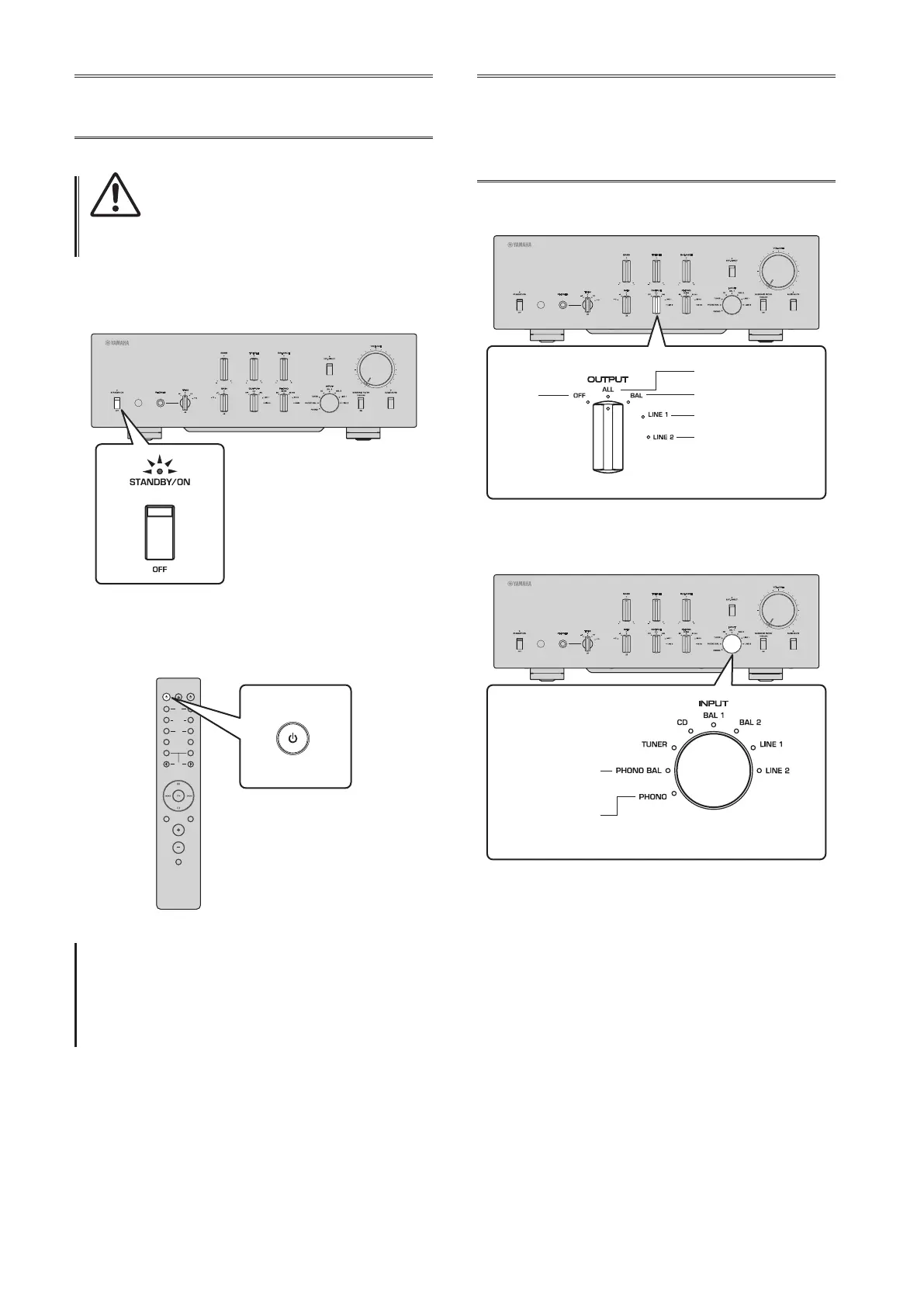
Turn the power on by setting the STANDBY/ON/OFF
(Power) switch on the front panel to STANDBY/ON.
If the unit is in standby mode, you can also turn the
power on using the remote control.
AMPCD
BAL
PHONO
LINE
CD
TUNERBAND
PRESET
SOURCE LAYER
EXT.DIRECT
BAL UNBAL
21
21
OPEN/CLOSE
VOLUME
MUTE
AMP
NOTICE
Turn on the power to all components in the following
sequence: power amplier, preamplier (this unit), other
components (such as a CD player and tuner).
Reverse this sequence when you turn the power o.
Selecting the input
and output
Select a pair of output jacks using the OUTPUT selector.
All jacks
Only BAL jacks
Only LINE 1 jacks
Only LINE 2 jacks
O
Select the audio source using the INPUT selector.
PHONO jacks
(balanced)
PHONO jacks
(unbalanced)
The corresponding indicators will light up.


 To Next Page