EasyManua.ls Logo

Yamaha C-80 - Turntable Connection Guide; Tuner and Tape Deck Connections; Digital Audio & AUX Terminal Connections; Power Amplifier Hookup Options

Yamaha C-80
10 pages
Print Icon
To Next Page IconTo Next Page
To Previous Page IconTo Previous Page
Loading...
ES
ECON
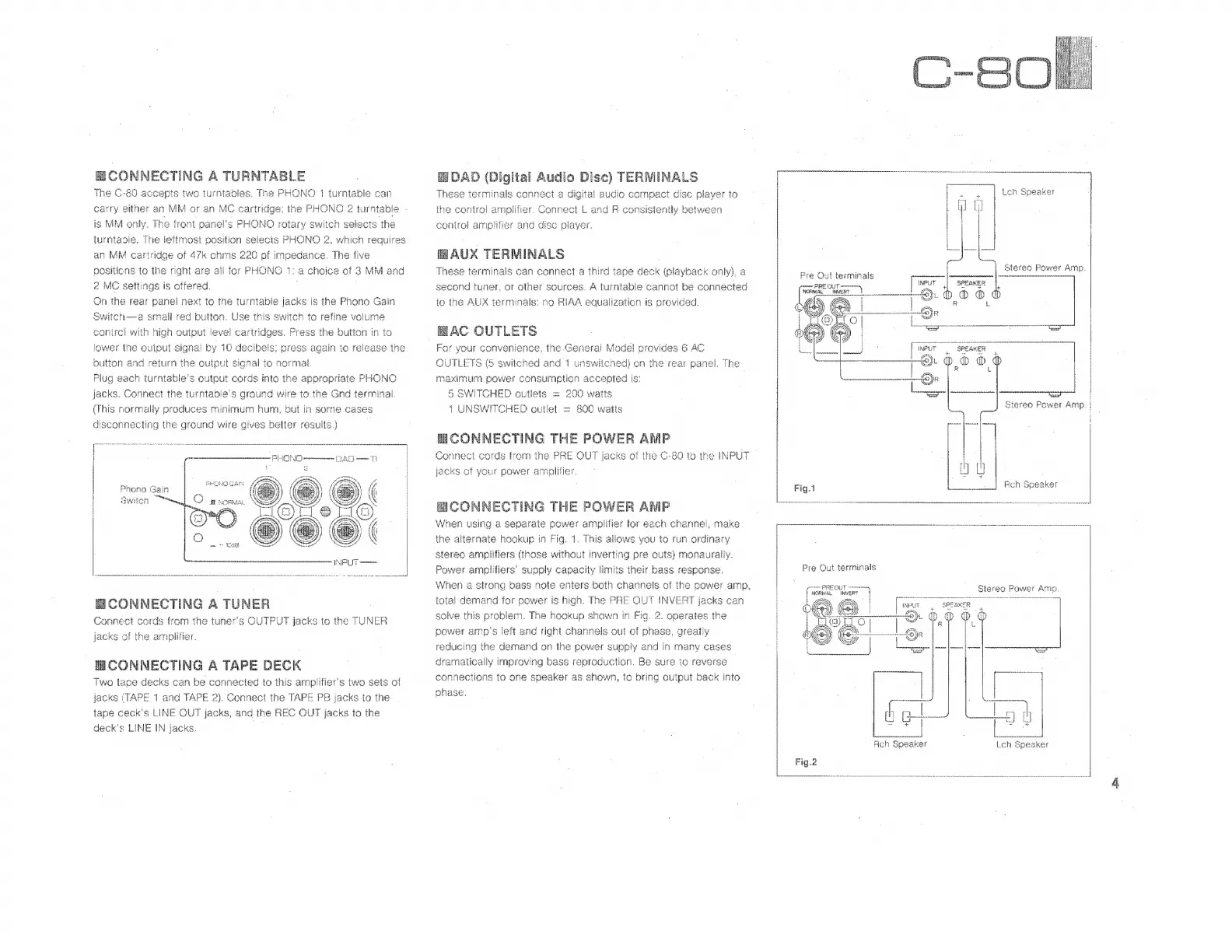
NECTING
A
TURNTABLE
The
C
C-80
accepts
two
turntables.
The
PHONO
1
turntable
can
carry
either
an
MM
or
an
MC
cartridge;
the
PHONO
2
turntable
-
is
MM
only.
The
front
oanel's
PHONO
rotary
switch
selects
the
turniasie.
The
lefimost
position
selects
PHONO
2,
which
requires
an
MM
cartridge
of
47k
ohms
220
pf
impedance.
The
(Ne
positions
to
the
right
are
all
for
PHONO
1:
a
choice
of
3
MM
and
2
MC
settings
is
offered.
On
the
rear
panel
next
to
the
turntable
jacks
is
the
Phono
Gain
Switch—a
small
red
button.
Use
this
switch
to
refine
volume
control
with
high
output
level
¢
cartridges,
Press
the
button
in
to
lower
the
output
signa!
by
10
decibels;
press
again
to
release
the
button
and
return
the
out
iB
signal
to
normal
Plug
each
turntable's
output
cords
into
the
appropriate
PHONO
jacks.
Connect
the
turntabie
s
ground
wire
to
the
Gnd
terminal.
(This
normally
produces
minimum
hum,
but
in
some
cases
disconnecting
the
ground
wire
gives
better
results.)
|
Phono
Gain
i
Üulaetmim
7799
i
owiten
Pra
E
CONNECTING
A
TUNER
Connect
cords
from
the
tuners
OUTPUT
jacks
to
the
TUNER
jacks
of
the
amplifier.
B
CONNECTING
A
TAPE
DEC
K
Two
tape
decks
can
be
connected
to
this
ampifier's
two
sets
of
jacks
‘TAPE
1
and
TAPE
2).
Connect
the
TAPE
PB
jacks
to
the
tape
ceck's
LINE
OUT
jacks,
and
the
B
QUT
jacks
to
the
deck's
LINE
IN
jacks.
Digital
Audio
Disc)
TERMINALS
tinals
connect
a
digital
audio
cc
oe
disc
pleyer
to
the
control
amplifier.
Connect
L
and
R
consistently
between
conirol
amplifier
and
disc
player.
HAUX
TERMINALS
|
These
terminals
can
connect
a
third
tape
deck
(playback
only),
a
second
tuner,
or
other
sources.
A
turntable
cannot
be
connected
io
ihe
AUX
terminals:
no
RIAA
equalization
is
provided.
E
AC
OUTLETS
|
For
your
convenience,
the
General
Model
provides
6
AC
OUTLETS
(5
switched
and
1
unswitched)
on
the
rea
r
panel.
The
maximum
power
geo
accepted
is:
5
SWITCHED
outlets
=
200
watts
1
UNSWITCHED
outlet
=
800
watts
HCONNECTING
THE
doi
AMP
Connect
cords
from
the
PRE
OUT
s
of
the
C-BO
to
the
INPUT
jacks
of
your
power
amnlitier.
mco
NNECTINC
i
THE
POWER
ANP
When
using
a
oo
power
amplifier
for
each
channel,
make
the
alternate
hookup
in
Fig.
1.
This
allows
vou
to
run
ordinary
stereo
amplifiers
(those
without
inverting
pre
outs)
monauraliy.
Power
amplifiers’
supply
capacity
limits
their
bass
response.
When
a
strong
bass
note
enters
both
channels
of
the
power
amp,
total
demand
for
power
is
high.
The
PRE
OUT
INVERT
jacks
can
solve
this
Med
The
hookup
shown
in
Fig.
2.
operates
the
power
amp's
left
and
right
channels
out
of
phase,
greatly
reducing
the
demand
on
the
power
supply
and
in
many
cases
dramatically
improving
bass
reproduction.
Be
sure
lo
reverse
connections
to
one
speaker
as
shown,
to
bring
output
back
into
phase,
ce
&
ve
1
Pre
Qut
terminals
c
PRE
QUT
emy
Dos
ORMAL
INV
(SRE
1
s
2l
f
ate
Vi
$
AO)
|
Ap
as
Luces
wee
Stereo
Power
Amp.
|
Speaker
Stereo
Fower
Amp.
Leh
Speaker

Related product manuals