EasyManua.ls Logo

Yamaha C-80 - Operational Features and Usage; Volume and Balance Controls; Loudness Control and Muting; Rack Mounting Adaptors

Yamaha C-80
10 pages
Print Icon
To Next Page IconTo Next Page
To Previous Page IconTo Previous Page
Loading...
D
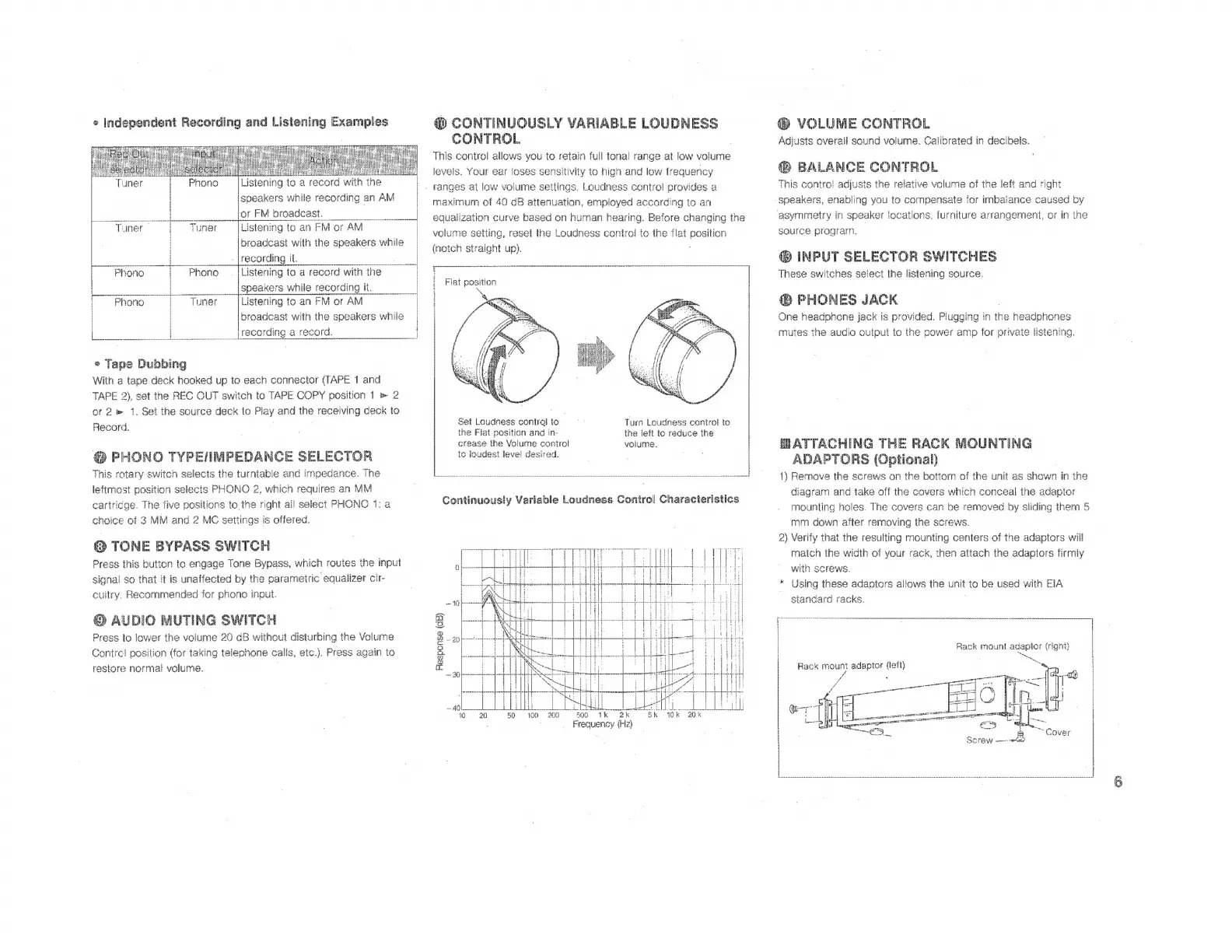
CONTINUOUSLY
VARIABLE
LOUDNESS
VOLUME
CONTROL
AN
CONTROL
|
Adjusts
overall
sound
volume.
Calibrated
in
decibels.
This
control
allows
vou
to
retain
full
tonal
range
at
low
volume
m
levels.
Your
ear
loses
sensitivity
to
high
and
low
frequency
(D
BALANCE
CONTROL
e
independent
Recording
and
Listening
Examples
;
E
MM
UE
i
eee
:
M
;
i
FAA
Phono
Listening
toa
record
with
ihe
|
.
ranges
at
low
volume
settings.
Loudness
control
provides
a
Mis
contro:
adjusts
the
relative
volume
ot
the
let
and
right
^od
T:
r
i
a
i
i
;
>
:
z
it
e
e
M
ie
^
R
by
speakers
while
recording
an
AM
|
maximum
of
40
dB
attenuation,
employed
according
to
an
speakers,
enabling
you
to
compensate
for
imbalance
caused
by
——
a:
EE
or
FM
broadcast.
1
|
equaiization
curve
based
on
human
hear
ina.
Before
changing
ihe
asymmetry
in
speaker
locations,
furniture
arrangement,
or
in
ihe
Tuner
|
Tuner
Listening
to
an
FM
or
AM
|
volume
setting,
reset
the
Loudness
control
to
the
flat
position
source
program.
Pene
®
INPUT
SELECTOR
SWITCHES
broadcast
with
the
speakers
while
recording
it.
“Phono
Phono
.|Listening
to
a
record
with
the
We
MH
E
TT
These
switches
select
the
listening
source.
ina
;
Flat
position
:
|
speakers
while
recording
it,
;
|
Phono
|
Tuner
Listening
to
an
FM
or
AM
|
D
PHONES
JACK
One
headphone
jack
is
provided.
Plugging
in
the
headphones
mutes
the
audio
output
to
the
power
amp
for
private
listening.
broadcast
with
the
speakers
while
>
Tape
Dubbing
With
a
tape
deck
hooked
up
to
each
connector
(TAPE
1
and
TAPE
2),
set
the
REC
OUT
switch
to
TAPE
COPY
position
1
e
2
ot
2
»
1.
Set
the
source
deck
to
Play
and
the
receiving
deck
to
Babord
l
Set
Loudness
control
to
is
Turn
Loudness
control
to
A
the
Fiat
position
and
in-
the
left
to
reduce
the
.
crease
the
Volume
control
volume.
MATTACHING
THE
RACK
MOU
NTING
@
PHONO
TYPEIIMPEDANCE
SELECTOR
to
loudest
level
desired.
|
|
m
ADAPTORS
(Optional)
This
rotary
switch
selects
the
turntable
and
impedance.
The
TR
———————————————————————''À''Iü
€t
=
f
1)
Remove
the
screws
on
tha
bottom
of
the
unit
as
shown
in
tha
leftmost
position
selects
PHONO
2,
which
requires
an
MM
e
T
:
P
;
diagram
and
take
off
the
covers
which
conceal
the
adaptor
cartricge.
The
five
positions
to
the
right
all
select
PHONO
1:
a
Continuously
Variable
Loudness
Control
Characteristics
mounting
holes.
The
covers
can
be
removed
by
sliding
them
5
l
mm
down
after
removing
the
screws.
NM
2)
Verify
that
the
resulting
mounting
centers
of
the
adaptors
will
HT]
LH
IM
match
the
width
of
your
rack,
then
attach
the
adaptors
firmly
with
screws.
choice
of
3
MM
and
2
MC
settings
is
offered.
Press
this
button
to
engage
Tone
Bypass,
which
routes
the
input
signal
so
that
it
is
unaffected
by
the
parametric
equalizer
cir-
cuitry.
Recommended
for
phono
input.
Q
AUDIO
MUTING
SWITCH
Press
to
lower
the
volume
20
dB
without
disturbing
the
Volume
Contrel
position
(for
taking
telephone
calls,
etc.).
Press
again
to
restore
normal
volume.
*
Using
these
adaptors
allows
the
unit
to
be
used
with
EIA
standard
racks.
Back
mount
adaptor
(right)
E"
esponse
(dB)
H
Rack
mount
adaptor
(left)
a
I
Ress
ii
43
10.
20
50
100
200
7CB0
1k
2k
5k
0k
20k
Frequency
(Hz

Related product manuals