EasyManua.ls Logo

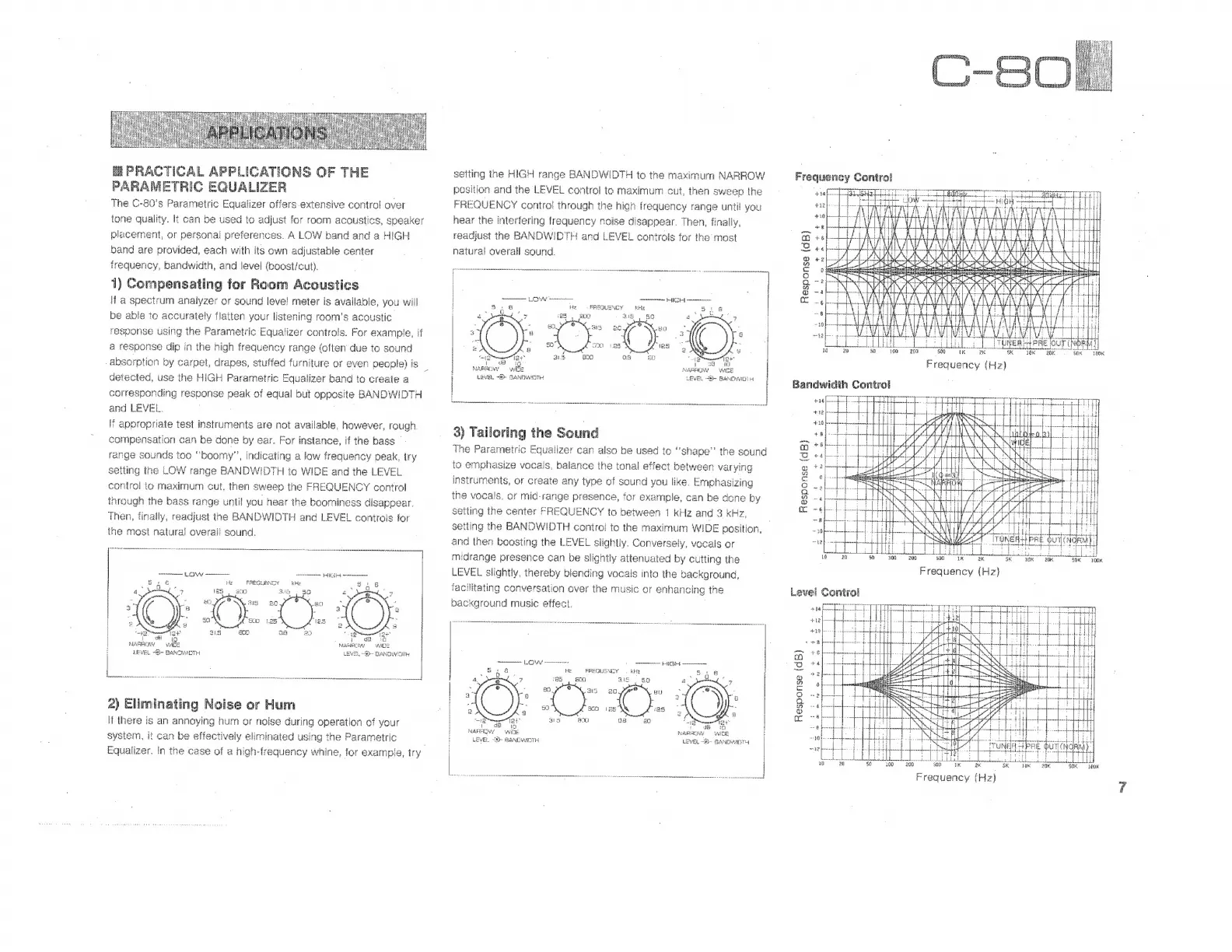
Yamaha C-80 - Parametric Equalizer Applications; Room Acoustics Compensation; Noise and Hum Elimination; Sound Tailoring Techniques

Yamaha C-80
10 pages
Print Icon
To Next Page IconTo Next Page
To Previous Page IconTo Previous Page
Loading...
EE
PRACTICAL
APPLICATIONS
OF
THE
PARAMETRIC
EQUALIZER
The
C-80's
Parametric
Equalizer
offers
extensive
control
over
tone
quality.
It
can
be
used
to
adjust
for
room
acoustics,
speaker
placement,
or
personal
preferences.
A
LOW
band
and
a
HIGH
band
are
provided,
each
with
its
own
adjustable
center
frequency,
bandwidth,
and
level
(boost/cut).
|
1)
Compensating
for
Room
Acoustics
i
à
spectrum
analyzer
or
sound
leve!
meter
is
available,
you
will
be
able
to
accurately
flatten
your
listening
room's
acoustic.
response
using
the
Parametric
Equalizer
controls.
For
example,
if
a
response
dip
in
the
high
frequency
range
(often
due
to
sound
absorption
by
carpet,
drapes,
stuffed
furniture
or
even
people)
is
:
detected,
use
the
HIGH
Parametric
Equalizer
band
to
create
a
corresponding
response
peak
of
equal
but
opposite
BANDWIDTH
and
LEVEL.
22
T
appropriate
test
instruments
are
not
available,
however,
rough.
compensation
can
be
done
by
ear.
For
instance,
if
the
bass
-
range
sounds
too
“boomy”,
indicating
a
low
frequency
peak,
try
setting
the
LOW
range
BANDWIDTH
to
WIDE
and
the
LEVEL
control
to
maximum
cut,
then
sweep
the
FREQUENCY
control
through
the
bass
range
until
you
hear
the
boominess
disappear.
then,
finally,
readjust
the
BANDWIDTH
and
LEVEL
controis
for
the
most
natural
overall
sound.
A
MESES
M
E
mm
c
dedi
mem
Hz
SREGUESICY
kHz
>
5
a
i
de
MARA
WE
LEVEL
De
DANDNVDTH
2)
Eliminating
Noise
or
Hum
it
there
is
an
annoying
hum
or
noise
during
operation
of
your
system,
it
can
be
effectively
eliminated
using
the
Parametric
Equalizer.
In
the
case
of
a
high-frequency
whine,
for
example,
try
setting
the
HIGH
range
BANDWIDTH
to
the
maximum
NARROW
position
and
the
LEVEL
control
to
maximum
cut,
then
sweep
the
FREQUENCY
control
through
the
high
frequency
range
until
you
hear
the
interfering
frequency
noise
disappear.
Then,
fínally,
readjust
the
BANDWIDTH
and
LEVEL
controls
for
the
most
natural
overall
sound.
sued
+g
Response
(dB)
TES
za
iJ
NARROW
NARROW
WIDE
LEVEL
“Er
BANDIT
LEVEL
8
BARCAYID
i
.
te
dj
bee
|
LA
A
e
PA
mm
=
§
|
i
Hz.
FREQUENCY
kHz
$18
$
F
E
E
:
i
“1G
:
20.
SS
|
B
E
E
E
8
j
~
tae
m
es
Pe
ej
"
dl
E
inda
25
2
ü
¿0
28
Da
a
^42
PES
E
H
3)
Tailoring
the
Sound
n
The
Parametric
Equalizer
can
also
be
used
to
"shape"
the
sound
i
ta
emphasize
vocais,
balance
the
tonal
effect
between
varying
instruments,
or
create
any
type
of
sound
you
like.
Emphasizing
the
vocals,
or
mid-range
presence,
for
example,
can
be
done
by
setting
the
center
FREQUENCY
to
between
1
kHz
and
3
kHz,
setting
the
BANDWIDTH
controi
to
the
maximum
WIDE
position,
and
then
boosting
the
LEVEL
slightly.
Conversely,
vocals
or
midrange
presence
can
be
slightly
attenuated
by
cutting
the
LEVEL
slightly,
thereby
blending
vocals
into
the
background,
facilitating
conversation
over
the
music
or
enhancing
the
Level
Control
background
music
effect.
POP
EAS
LEVEL
BANDWIDTH
¡A
E
o
C0
M
A
anne
|
SS
FREQUENCY.
kb
i
d
H
too
3i
BO
a
"
eN
|
as
ag.
"X
ug
O
ella
il
-
A
NENNEN
l
XO
Lg
25
a
|
|
BU
08
20
E
ES
Frequency
Control
it
x
eoo
eco
X
b
:
E.
Frequency
(Hz)
Bandwidth
Control
n
E
ASSES
Hie
)
md,
190
200
E
on
Frequency
(Hz)
Ie
pp
pre
pi
d
dre
eens
ee

Related product manuals