EasyManua.ls Logo

Yamaha DD-12 - The Super Session Player

Yamaha DD-12
24 pages
Print Icon
To Next Page IconTo Next Page
To Previous Page IconTo Previous Page
Loading...
^.
PAD
5:
3.
Manual
Percussion
You
can
start
playing
the
DD-12
as
soon
as
you
turn
the
POWER
switch
(8)
ON
and
raise
the
VOLUME
contro!
(9)
to
an
appropriate
level.
Play
the
percussion
pads
(5)
with
the
supplied
percussion
sticks
or
your
hands.
The
scraper
©)
is
played
by
running
the
tip
of
a
percussion
stick
or
a
finger
back
and
forth
across
its
length.
Finally,
play
the
foot
pedal
by
tapping
on
it
with
the
toes
of
your
foot.
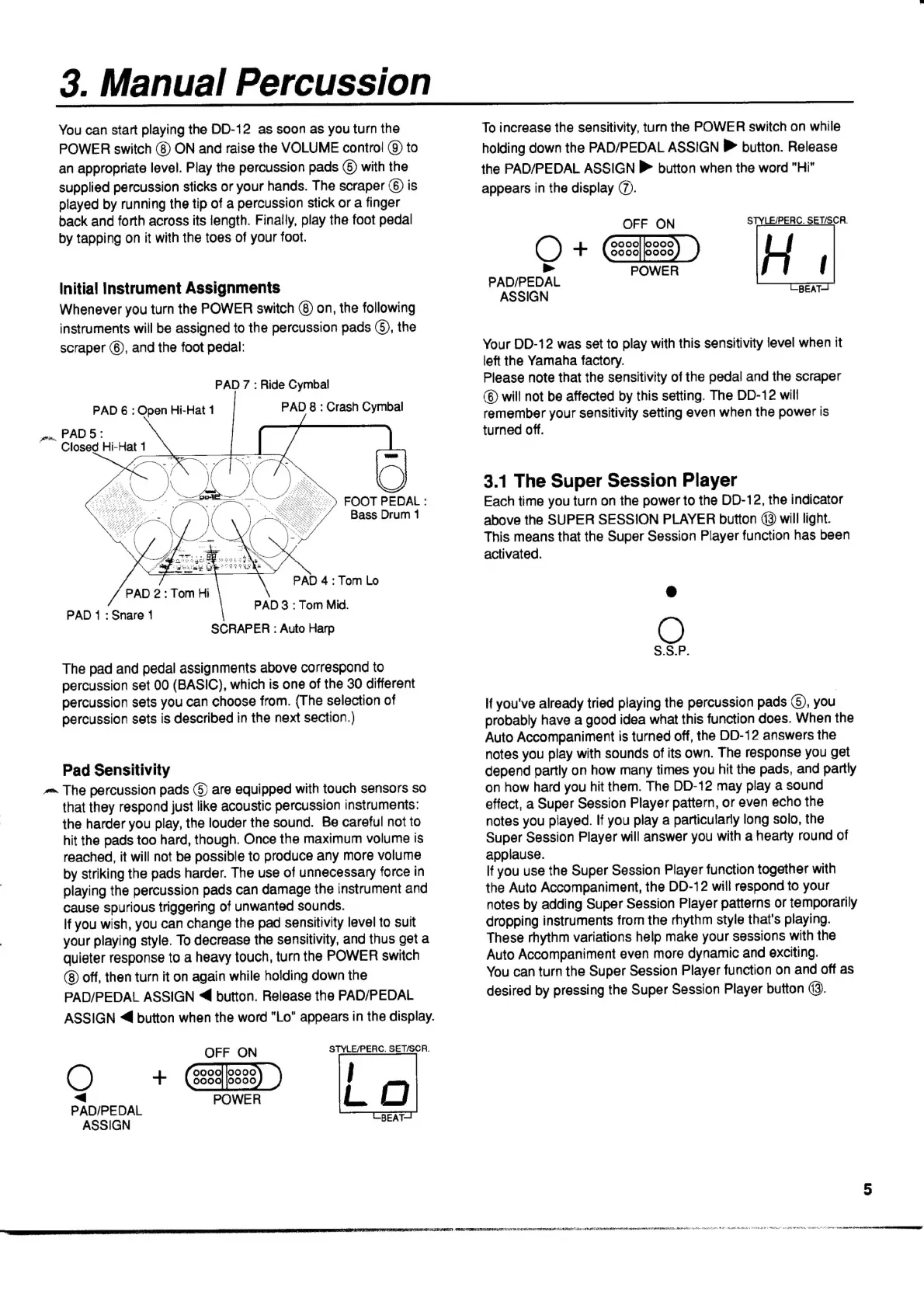
Initial
Instrument
Assignments
Whenever
you
turn
the
POWER
switch
(8)
on,
the
following
instruments
will
be
assigned
to
the
percussion
pads
©),
the
scraper
(6),
and
the
foot
pedal:
PAD
7
:
Ride
Cymbal
PAD
6
:
Open
Hi-Hat
1
PAD
8
:
Crash
Cymbal
Closed
Hi-Hat
1
Су
FOOT
PEDAL
:
Bass
Drum
1
PAD
4:
Tom
Lo
PAD
3
:
Tom
Mid.
SCRAPER
:
Auto
Harp
PAD
2:
Tom
Hi
PAD
1
:
Snare
1
The
pad
and
pedal
assignments
above
correspond
to
percussion
set
00
(BASIC),
which
is
one
of
the
30
different
percussion
sets
you
can
choose
from.
(The
selection
of
percussion
sets
is
described
in
the
next
section.)
Pad
Sensitivity
^
The
percussion
pads
(5)
are
equipped
with
touch
sensors
so
that
they
respond
just
like
acoustic
percussion
instruments:
the
harder
you
play,
the
louder
the
sound.
Be
careful
not
to
hit
the
pads
too
hard,
though.
Once
the
maximum
volume
is
reached,
it
will
not
be
possible
to
produce
any
more
volume
by
striking
the
pads
harder.
The
use
of
unnecessary
force
in
playing
the
percussion
pads
can
damage
the
instrument
and
cause
spurious
triggering
of
unwanted
sounds.
If
you
wish,
you
can
change
the
pad
sensitivity
level
to
suit
your
playing
style.
To
decrease
the
sensitivity,
and
thus
get
a
quieter
response
to
a
heavy
touch,
turn
the
POWER
switch
off,
then
turn
it
on
again
while
holding
down
the
PAD/PEDAL
ASSIGN
«€
button.
Release
the
PAD/PEDAL
ASSIGN
4
button
when
the
word
"Lo"
appears
in
the
display.
OFF
ON
STYLE/PERC.
SET/SCR.
C)
+
(55995)
)
j
PAD/PEDAL
ee
L
О
ASSIGN
mpi
Hie
OMNE
PRES
MN
RIRE
EAER
VON
SEM
IMRT
NEN
OS
OU
ЫАР
em
Ide
A
M
dU
er
EAE
THIER
NEE
TINY
RR
pe
rid
jenen
tt
t
goma
TEAT
ea
vs
А.
ene
Soe
oP
gn
EEA
Sas
зу!
эЛ
NS
eaa
ius
To
increase
the
sensitivity,
turn
the
POWER
switch
on
while
holding
down
the
PAD/PEDAL
ASSIGN
№
button.
Release
the
PAD/PEDAL
ASSIGN
№»
button
when
the
word
"Hi"
appears
in
the
display
(7).
OFF
ON
STYLE/PERC.
SET/SCR.
Q+
GED
H
»
POWER
(
PAD/PEDAL
=
ASSIGN
Ben
Your
DD-12
was
set
to
play
with
this
sensitivity
level
when
it
left
the
Yamaha
factory.
Please
note
that
the
sensitivity
of
the
pedal
and
the
scraper
(6)
will
not
be
affected
by
this
setting.
The
DD-12
will
remember
your
sensitivity
setting
even
when
the
power
is
turned
off.
3.1
The
Super
Session
Player
Each
time
you
turn
on
the
power
to
the
DD-12,
the
indicator
above
the
SUPER
SESSION
PLAYER
button
13
will
light.
This
means
that
the
Super
Session
Player
function
has
been
activated.
C)
S.S.P.
If
you've
already
tried
playing
the
percussion
pads
(5),
you
probably
have
a
good
idea
what
this
function
does.
When
the
Auto
Accompaniment
is
turned
off,
the
DD-12
answers
the
notes
you
play
with
sounds
of
its
own.
The
response
you
get
depend
partly
on
how
many
times
you
hit
the
pads,
and
partly
on
how
hard
you
hit
them.
The
DD-12
may
play
a
sound
effect,
a
Super
Session
Player
pattern,
or
even
echo
the
notes
you
played.
If
you
play
a
particularly
long
solo,
the
Super
Session
Player
will
answer
you
with
a
hearty
round
of
applause.
If
you
use
the
Super
Session
Player
function
together
with
the
Auto
Accompaniment,
the
DD-12
will
respond
to
your
notes
by
adding
Super
Session
Player
patterns
or
temporarily
dropping
instruments
from
the
rhythm
style
that's
playing.
These
rhythm
variations
help
make
your
sessions
with
the
Auto
Accompaniment
even
more
dynamic
and
exciting.
You
can
turn
the
Super
Session
Player
function
on
and
off
as
desired
by
pressing
the
Super
Session
Player
button
(3).
+
Tere
trae
e
dri
OR