EasyManua.ls Logo

Yamaha DD-12 - Custom Percussion Бе1Їз

Yamaha DD-12
24 pages
Print Icon
To Next Page IconTo Next Page
To Previous Page IconTo Previous Page
Loading...
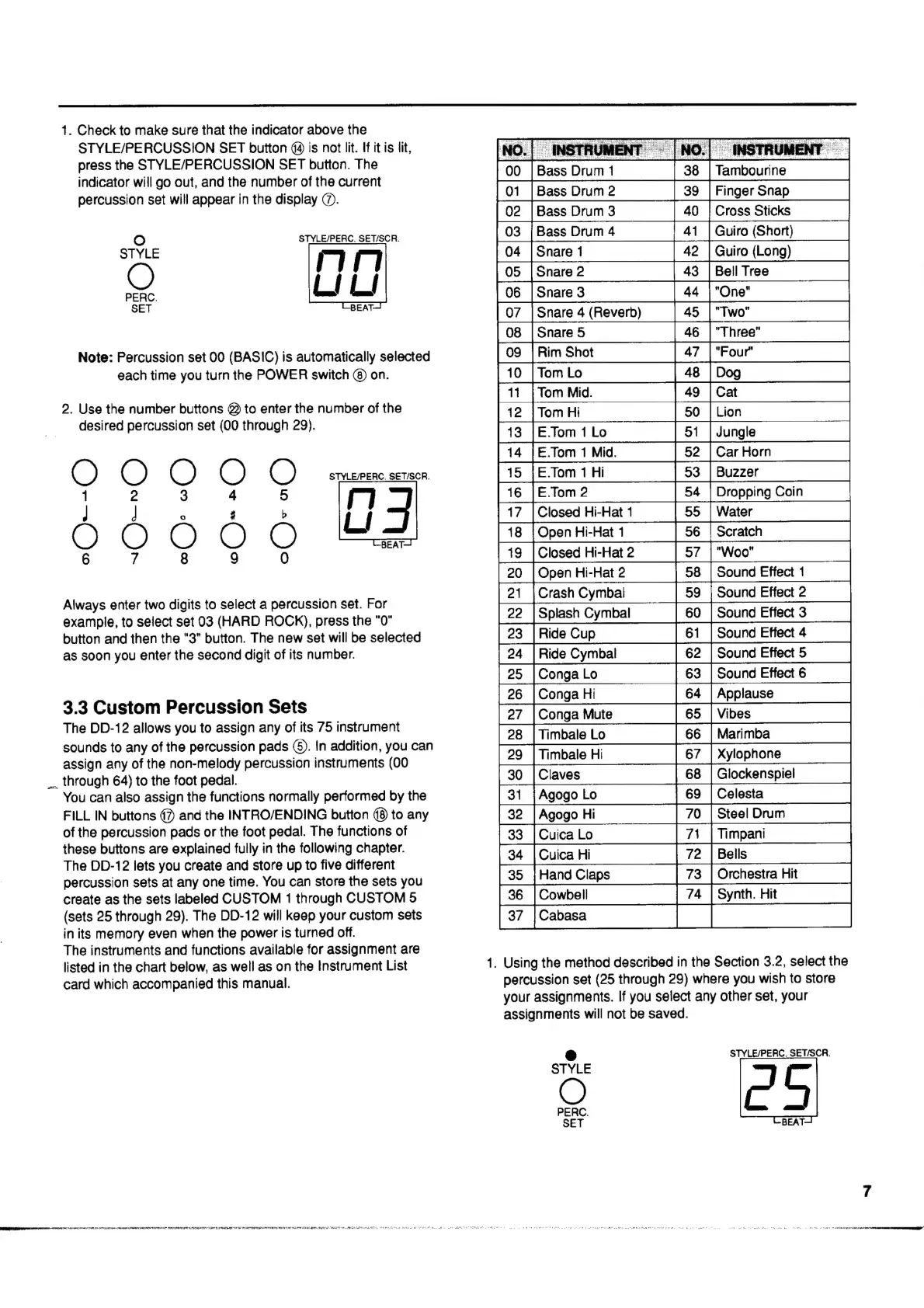
1.
Check
to
make
sure
that
the
indicator
above
the
STYLE/PERCUSSION
SET
button
(4
is
not
lit.
If
it
is
lit,
2.
Use
the
number
buttons
@
to
enter
the
number
of
the
desired
percussion
set
(00
through
29).
E:
О
3
E.Tom
1
Lo
E.Tom
1
Mid.
15
|E.Tom
1
Hi
16
|E.Tom2
17
|Closed
Hi-Hat
1
8
|Open
Hi-Hat
1
9
|Closed
Hi-Hat
2
Open
Hi-Hat
2
Crash
Cymbal
Splash
Cymbal
Ride
Cup
Ride
Cymbal
Conga
Lo
Conga
Hi
Conga
Mute
Timbale
Lo
Timbale
Hi
Claves
Agogo
Lo
Agogo
Hi
Cuica
Lo
Cuica
Hi
Hand
Claps
Cowbell
Cabasa
ngle
ar
Horn
Buzzer
Dropping
Coin
Water
Scratch
7
|
"Woo"
8
|
Sound
Effect
1
Sound
Effect
2
Sound
Effect
3
Sound
Effect
4
Sound
Effect
5
Sound
Effect
6
Applause
Vibes
Marimba
Xylophone
Glockenspiel
Celesta
Steel
Drum
Timpani
4
ress
the
STYLE/PERCUSSION
SET
button.
The
i
oe
асс,
will
go
out,
and
the
number
of
the
current
[00
|BassDrumi
|38
|
Tambourine
—
—
|
percussion
set
will
appear
in
the
display
@.
O
STYLE/PERC.
SET/SCR.
Guiro
(Short)
STYLE
rn
С)
[05
[Snae2
—
|
43
M
LI
LI
[o
[Snares
"4
[Ow
[08
|Snare5
—
|46
|"Three"
—
|
Note:
Percussion
set
00
(BASIC)
is
automatically
selected
|09
|RimShot
|47
"Рош"
—
—
each
time
you
turn
the
POWER
switch
(8)
on.
M
eleg
n
|
_52_
53
О
О
О
О
О
ља
on
3
сә
оо
33
Ix
3
л
ee
{
|
„А
5
|.
сл
Always
enter
two
digits
to
select
a
percussion
set.
For
example,
to
select
set
03
(HARD
ROCK),
press
the
"0"
button
and
then
the
"3"
button.
The
new
set
will
be
selected
as
soon
you
enter
the
second
digit
of
its
number.
^N
№
о?
—
M
A
3.3
Custom
Percussion
Sets
The
DD-12
allows
you
to
assign
any
of
its
75
instrument
sounds
to
any
of
the
percussion
pads
(5).
In
addition,
you
can
assign
any
of
the
non-melody
percussion
instruments
(00
_.
through
64)
to
the
foot
pedal.
You
can
also
assign
the
functions
normally
performed
by
the
FILL
IN
buttons
07)
and
the
INTRO/ENDING
button
(8
to
any
of
the
percussion
pads
or
the
foot
pedal.
The
functions
of
these
buttons
are
explained
fully
in
the
following
chapter.
The
DD-12
lets
you
create
and
store
up
to
five
different
percussion
sets
at
any
one
time.
You
can
store
the
sets
you
create
as
the
sets
labeled
CUSTOM
1
through
CUSTOM
5
(sets
25
through
29).
The
DD-12
will
keep
your
custom
sets
in
its
memory
even
when
the
power
is
turned
off.
The
instruments
and
functions
available
for
assignment
are
listed
in
the
chart
below,
as
well
as
on
the
Instrument
List
1.
Using
the
method
described
in
the
Section
3.2,
select
the
card
which
accompanied
this
manual.
percussion
set
(25
through
29)
where
you
wish
to
store
your
assignments.
If
you
select
any
other
set,
your
assignments
will
not
be
saved.
«o
|
œ
67
©
GC
|G
|
о
|
о
о
|
NO]
PO]
PO
BLOM)
+)
Oo
~
CO
E
D
5
6
37
3
rchestra
Hit
ynth.
Hit
М
|
=
L3
STYLE/PERC,
SET/SCR.
Q
C
5
PERC.
SET
BEAT:
SPP
eT
rr
ern
mem
aaa
МУ
a
aaa
i
aaa
RS
Mp
EYE
aaa
femi
di
cU
i
T
wa.
SE
o
з
aa
M