1
2
3
4
5
6
7
8
9
10
11
7-14
J0C
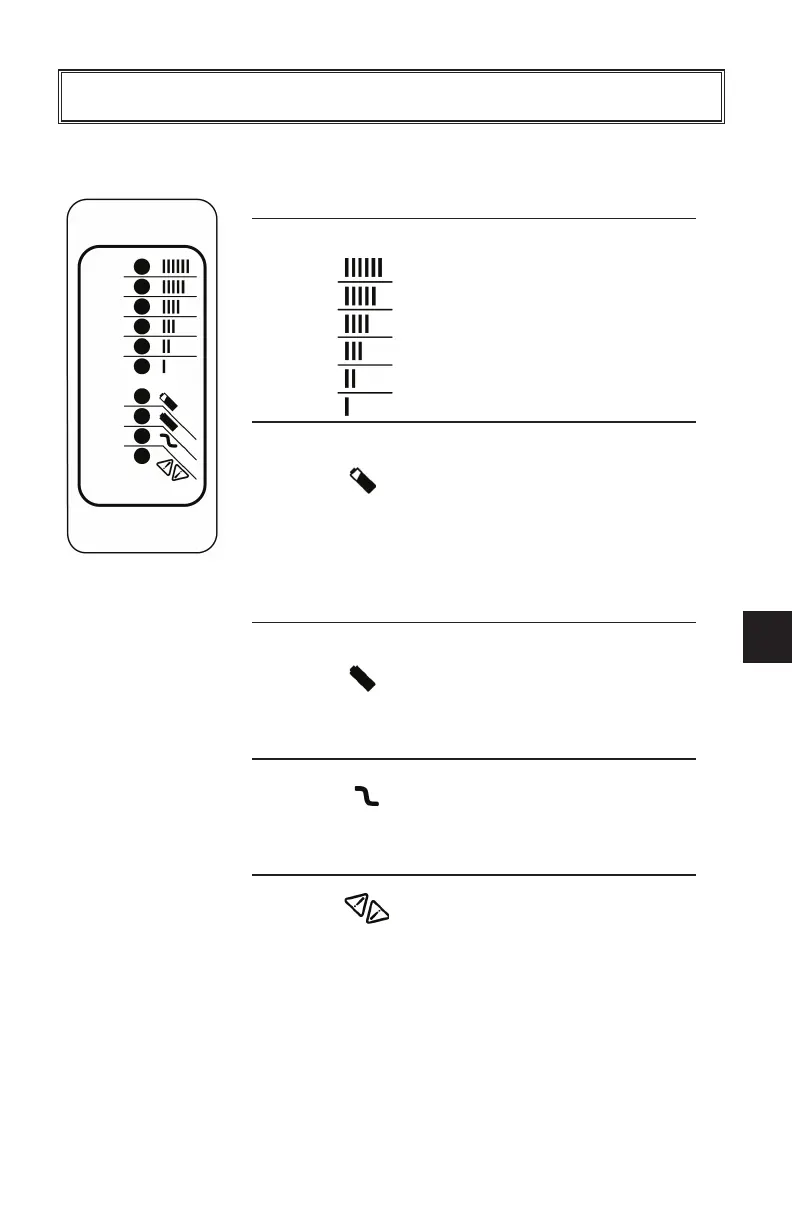
Under normal charge circumstances, the LEDs operate as follows:
To reset charger after 100% charge (Green LED), disconnect the DC plug
from battery for more than 30 seconds. Then, reconnect DC plug.
Ammeter
(Amber)
On: Displays
approximate scale
of current output
during Step 2.
Blinking: High internal
charger
temperature.
Current output
reduced.
80% Charge
(Amber)
On: 80% charged, Step
2 complete. Begin
Step 3.
Blinking: With no battery
connected,
indicates algorithm
# selected by
number of flashes
at startup.
100% Charge
(Green)
On: Charging
complete.
Charger in
Storage Mode.
Blinking: Step 3 complete.
Begin Step 4.
AC On
(Amber)
On: AC power good.
Fault
(Red)
Blinking: Charger error.
Refer to
Troubleshooting
on next page.
Blinking: Charger may be
overheated.
Move charger to
cooler location.
Y-1679
MAINTENANCE
J0C-F8199-60.qxp_LIT_19626_16_05.qxd 6/27/16 2:50 PM Page 37



 To Next Page