1
2
3
4
5
6
7
8
9
10
11
7-16
J0C
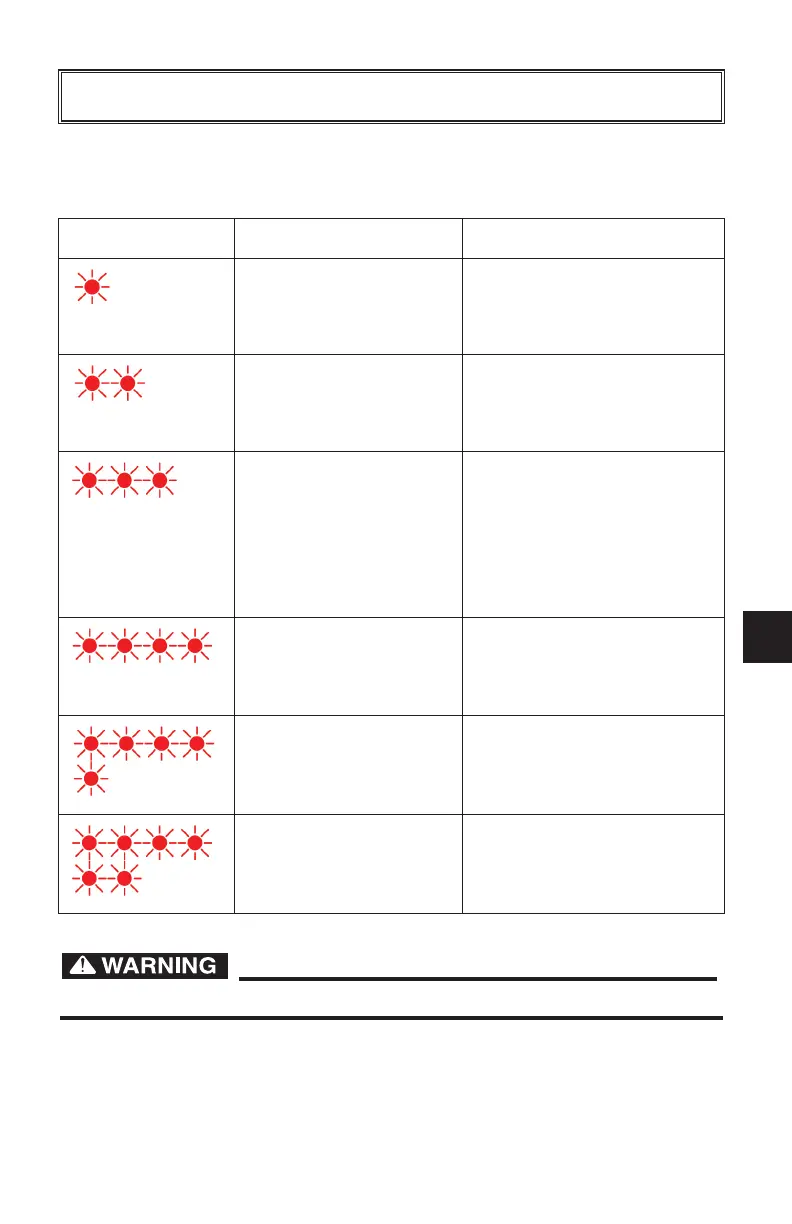
If a fault occurs, count the number of red flashes between pauses and refer to
the table below:
Have qualified service technician inspect if problems persist.
Red Flashes Cause Solution
Battery High Voltage Check battery size and
condition and reset charger
(interrupt DC connection for
15 seconds).
Battery Low Voltage Check battery size and
condition and reset charger
(interrupt DC connection for
15 seconds).
Charge Timeout caused
by battery pack not
reaching required
voltage.
Charger output was
reduced due to high
temperatures.
Check connections.
Operate charger at a lower
ambient temperature.
Check Battery: Battery
could not be trickle
charged up to minimum
voltage.
Check for shorted or
damaged cells.
Over-Temperature:
Charger shut down due
to high internal
temperature.
Ensure sufficient cooling air
flow and reset charger
(interrupt DC connection for
15 seconds).
Charger Internal Fault Reset charger (interrupt AC
power for 15 seconds).
Return to qualified service
depot if fault persists.
MAINTENANCE
J0C-F8199-60.qxp_LIT_19626_16_05.qxd 6/27/16 2:50 PM Page 39



 To Next Page