EasyManua.ls Logo

Yamaha DTX500 - Appendix; LCD Displays

Yamaha DTX500
48 pages
Print Icon
To Next Page IconTo Next Page
To Previous Page IconTo Previous Page
Loading...
41
DTX500 Owner’s Manual
Appendix
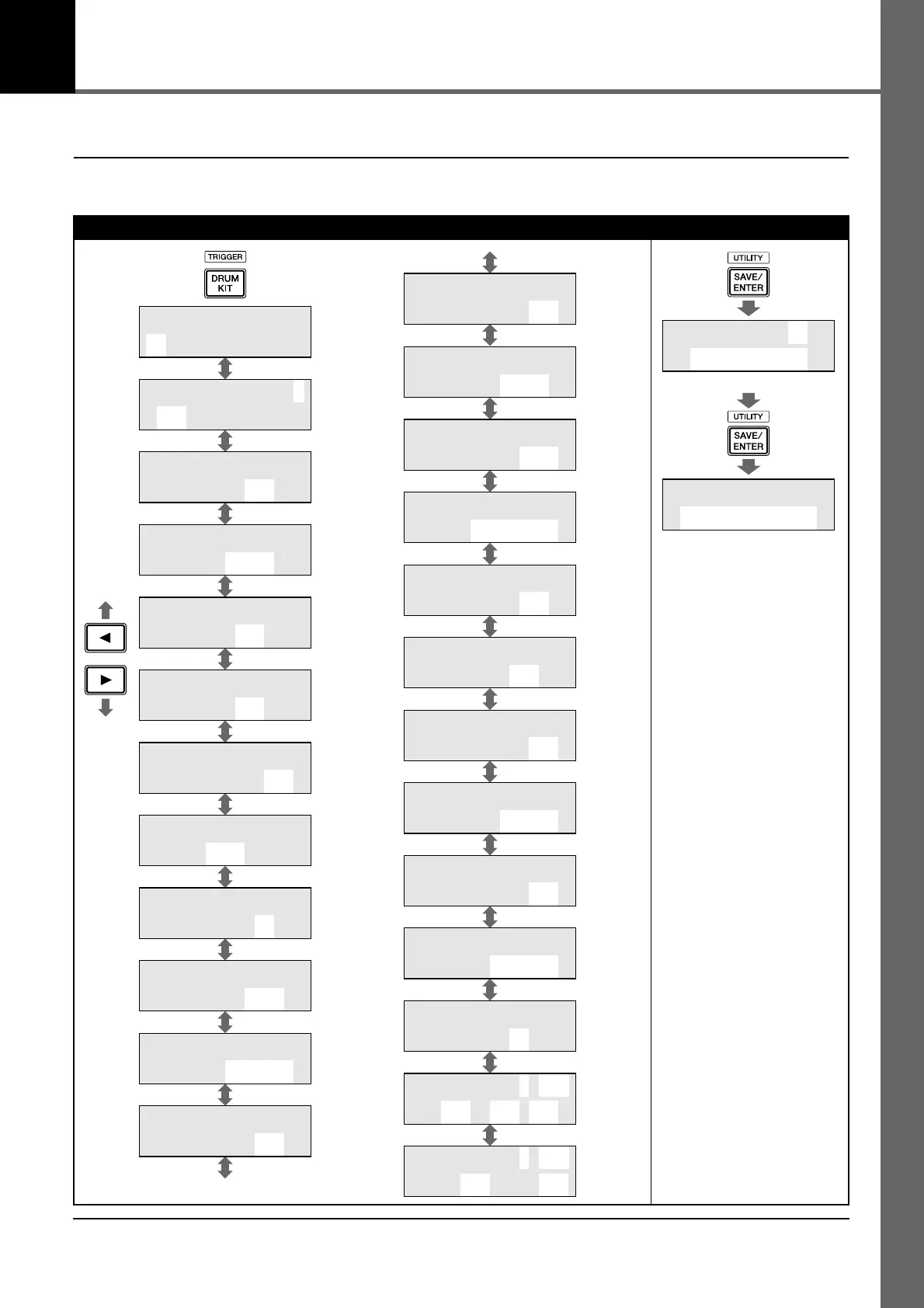
LCD Displays
* The above “LCD Displays” charts show you the pages available in each display.
Keep in mind that the actual displays on the instrument may be different from those shown here.
Drum Kit Settings
KIT1 ååååååååå
1 :Oak Custom
KIT2 ƒsnare ˙
”S01:OakCustom
KIT3 ƒsnare
Volume=127
KIT4 ƒsnare
Tune=+ 0.0
KIT5 ƒsnare
Pan= C
KIT6 ƒsnare
Decay= 0
KIT7 ƒsnare
”CutOffFreq= 0‚
KIT8 ƒsnare
”Note= 32/G#0
KIT9 ƒsnare
MIDI Ch=10
KIT10 ƒsnare
”GateTime=0.3s
KIT11 ƒsnare
”KeyOff=disable‚
KIT12 ƒsnare
HoldMode=off
(Page 13)
(Page 26)
(Page
13, 27)
(Page 27)
(Page 27)
(Page 28)
(Page 28)
(Page 28)
(Page 28)
(Page 28)
(Page 28)
(Page 28)
KIT14 ƒsnare
AltGrp=off
KIT15 ƒsnare
”KeyAssign=poly‚
KIT13 ƒsnare
VelXFade=0
KIT16 ƒsnare
”Song= 45áéplay‚
KIT17 ƒsnare
RimToPad=---
KIT18 ƒsnare
RevSend= 75
KIT23
Snares=32
KIT24 PC Ch1=on
”PC001 M000L001‚
KIT25 CC Ch1=on
”vol=127 Pan= 64
KIT19
RevSendDr= 40‚
KIT20
”RevType=hall2
KIT21
”RevMastRet= 64‚
KIT22
”PadCtl=snares
(Page 29)
(Page 29)
(Page 30)
(Page 30)
(Page 30)
(Page 30)
(Page 31)
(Page 31)
(Page
15, 31)
(Page 31)
(Page 32)
(Page 32)
(Page 29)
KIT save to 51
:[Oak Custom ]
KIT save to 51
Are you sure ?
(Page 32)
(Page 33)

Related product manuals