XM® SATELLITE RADIO TUNING
42 En
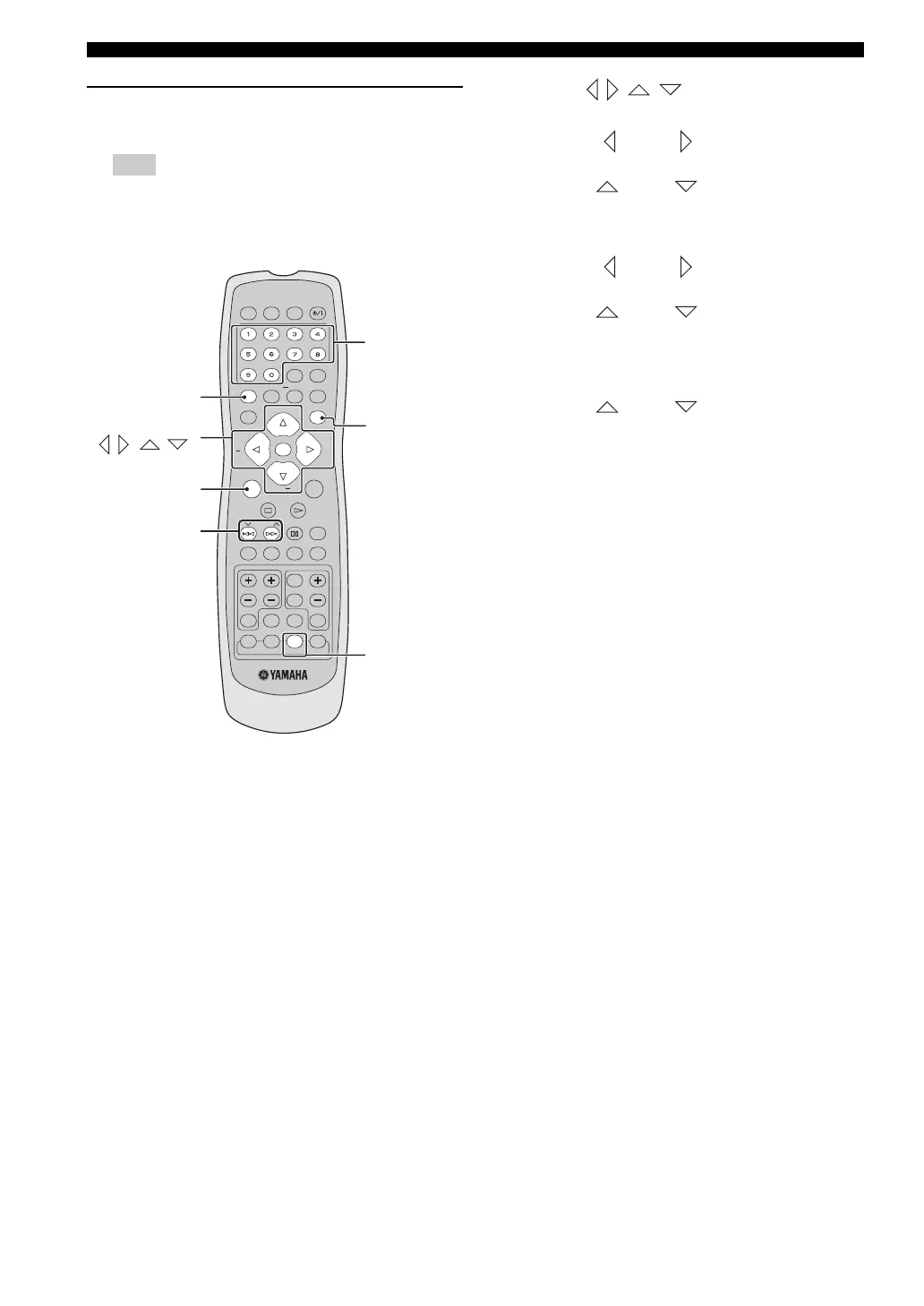
XM Satellite Radio controls and
functions
The following controls are available only when “XM
RADIO” is selected as the input source.
Remote control functions
1 Numeric key pads
(All Channel Search or Category Search mode)
Use 1 to 9 and 0 to enter a channel number directly.
(Preset Search mode)
Use 1 to 9 and 0 to enter a preset channel directly.
2 PROG
Stores a preset channel in the memory.
3 Cursors ( // / )
(All Channel Search mode)
Press CAT– ( )/CAT+ ( ) to change the channel
category.
Press CH+ ()/CH– () to search for a channel
within all channels. Press and hold for quick search.
(Category Search mode)
Press CAT– ( )/CAT+ ( ) to change the channel
category.
Press CH+ ()/CH– () to search for the
channel within a selected category. Press and hold for
quick search.
(Preset Search mode)
Press CH+ ()/CH– () to change the preset
channel number.
ENTER (OK)
Press ENTER (OK) to confirm an entered channel
number.
4 SRCH
Changes the search mode between the All Channel
Search, Category Search, and Preset Search modes.
5 DISPLAY
Displays the XM Satellite Radio information such as
channel number, channel name, category, artist name,
or song title displayed in the front panel display.
6 XM
Selects “XM RADIO” as the input source.
Note
POWER
DISPLAY
SET UP
MENU
SRCH
DIMMER SLEEP
SCAN
A - B SHUFFLEREPEATPROG
ON SCREEN
SUBTITLE
PRESET
AUDIO ANGLE
EFFECT SURR
ZOOM
VOLTV CHTV VOL
TV AUX TUNER DVD/CD
CH
+
CATCAT
ENTER
CH
TOP MENU/RETURN
PAG E
POWER
+
XM
TV
OK
DISC
SKIP
TRE
BASS
MUTE
TV
INPUT
DOCK
Numeric
keypad (0-9)
dPRESETu
(b / a)
Cursors
(// / ),
ENTER (OK)
DISPLAY
XM
SRCH
PROG
01EN_DVX-C310_UC.book Page 42 Monday, July 10, 2006 11:22 AM











 To Next Page