4 En
Controls and Functions
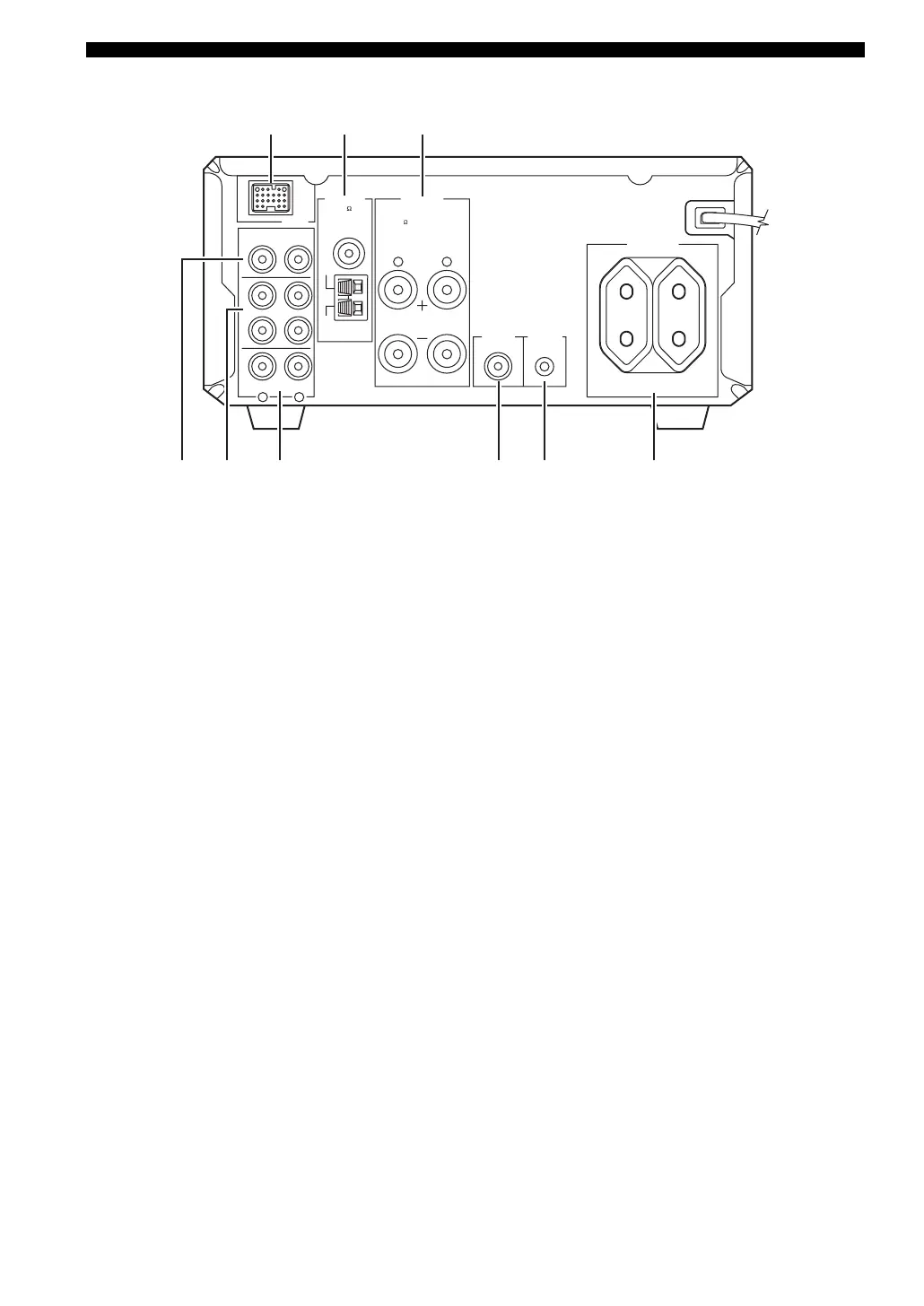
■ Rear panel
1 DOCK terminal
Use to connect a YAMAHA iPod universal dock (such as
YDS-10 sold separately) where your iPod can be stationed
(see page 17).
2 Antenna terminals
See page 15 for connection information.
3 Speaker terminals
See page 13 for connection information.
4 DVD/CD jacks
See page 12 for connection information.
5 TAPE/MD IN/OUT jacks
See page 16 for connection information.
6 AUX jacks
Use to connect the external components.
7 SUBWOOFER OUT jack
Use to connect the subwoofer.
8 System connector (TO DVD-E810) jack
See page 12 for connection information.
9 AC OUTLET(S)
See page 18 for connection information.
LR
LR
AC OUTLETS
SWITCHED
MAINS
SPEAKERS
DOCK
DVD/CD
TAPE/MD
AUX
OUT
IN
FM
GND
AM
ANTENNA
6
MIN / SPEAKER
TO DVD-E810
SUBWOOFER
OUT
100W MAX. TOTAL
75
UNBAL.
12 3
64
578 9
(Europe model)


 To Next Page