EN 5
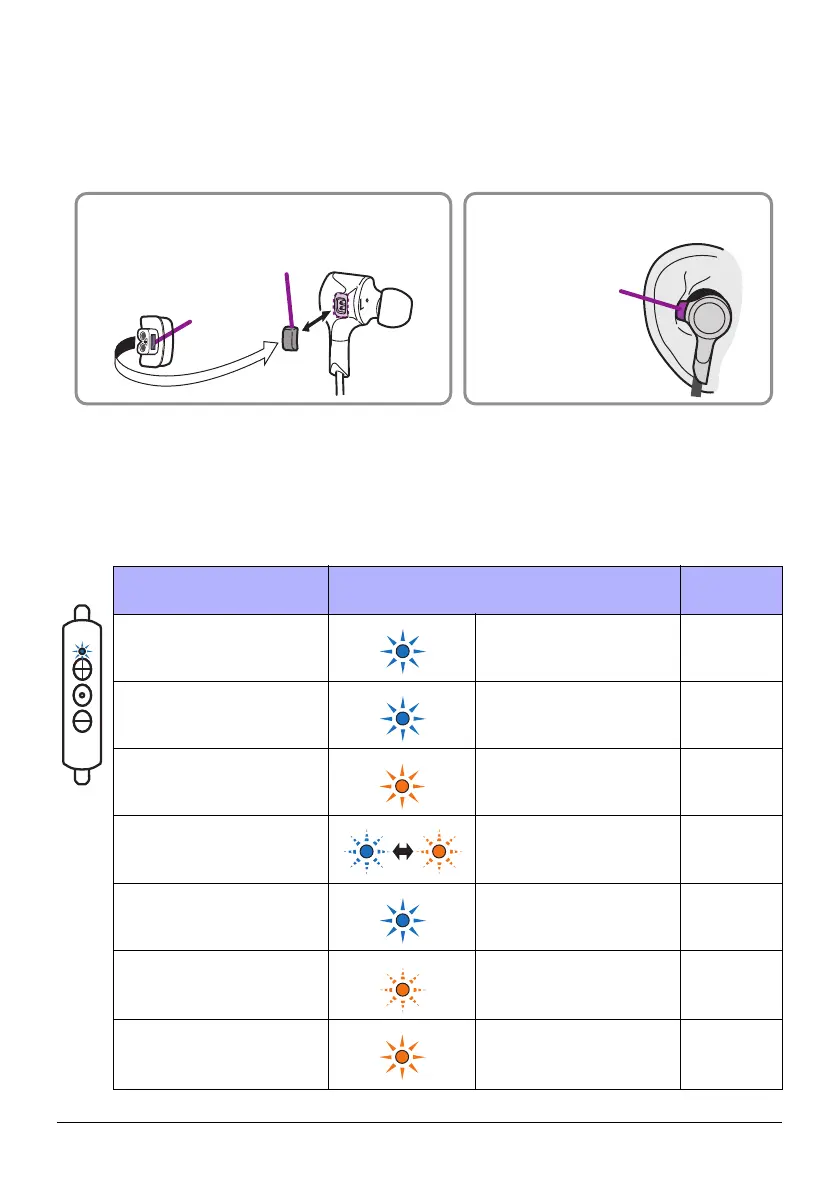
w Ear stabilizers
Attach ear stabilizers of the size that best fits your ears. The M-size ear stabilizers are
attached to the earphones when shipped from the factory.
NOTICE
When attaching the ear stabilizers, do not reverse the front and back.
e Charging connector
Connect the included USB power cable to charge. Open the cover to connect the cable.
r Indicator
Indicates the status of the device by lighting or flashing.
Status Indicator
Reference
page
When pushing the function
key in the power-on state
Lights in blue
(turns off in 0.5 seconds)
Page 8
When turning on
Lights in blue
(turns off in two seconds)
Page 7
When turning off
Lights in orange
(turns off in one second)
Page 7
During Bluetooth pairing
Flashes in blue and
orange alternately
Page 8
When Bluetooth pairing is
completed
Lights in blue
(turns off in two seconds)
Page 8
When the battery is less
than 10% charged
Flashes in orange Page 7
During battery charging
Lights in orange
(turns off when the charg-
ing is completed)
Page 7
Replacing the ear stabilizers
Ear stabilizer
Ear stabilizer
Recommended ear stabilizer
position
Latch



 To Next Page