EN 8
Pairing with a Bluetooth device
“Pairing” is the process of registering Bluetooth devices each other. Pairing must be per-
formed when you use a Bluetooth connection for the first time, or if the pairing data has been
deleted.
1 If the earphones turn on, turn off to press and hold the function key until the indi-
cator lights in orange.
Note
• When the earphones turn on, the indicator lights briefly when the function key is pressed
briefly.
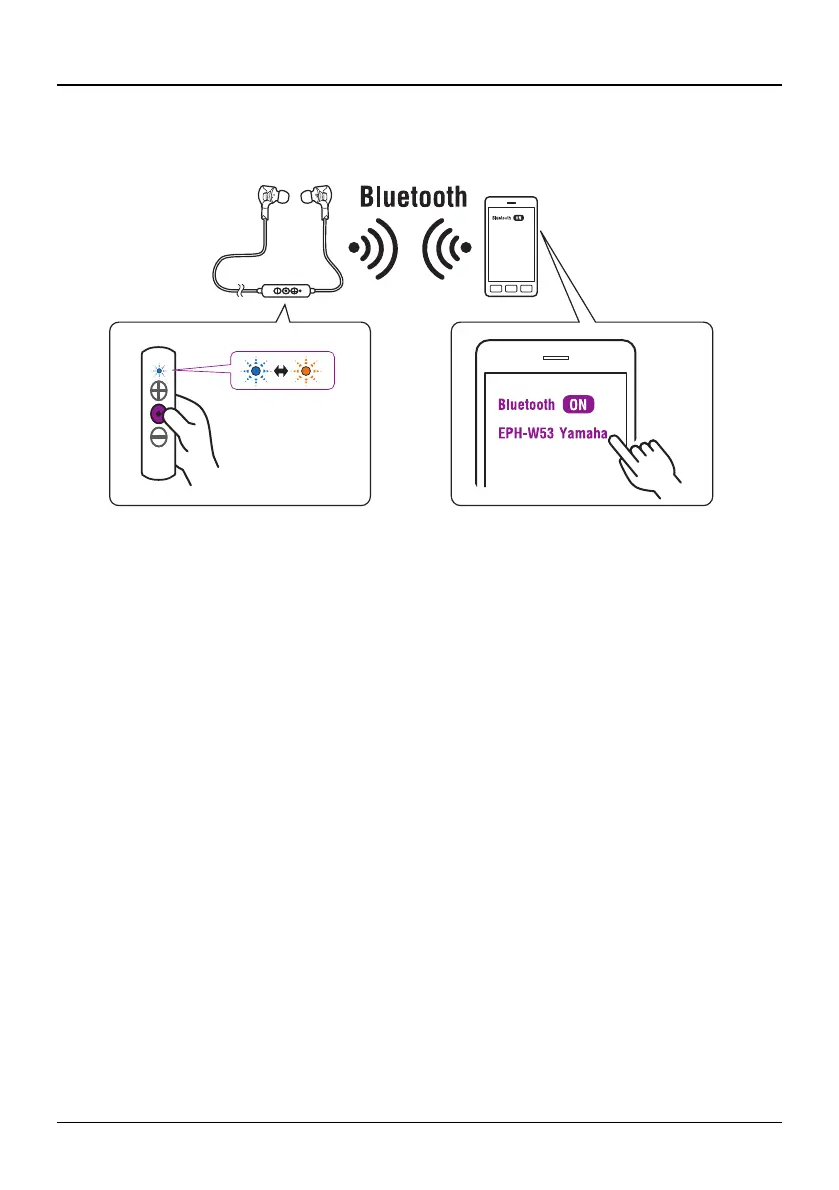
2 Press and hold the function key until the indicator flashes in blue and orange
alternately. (more than eight seconds)
The earphones are waiting for pairing.
3 Perform the pairing process on the Bluetooth device.
For details, refer to the owner's manual of the Bluetooth device.
3-1. Access the Bluetooth setting screen on the Bluetooth device.
3-2. If the Bluetooth setting is disabled, enable it.
3-3. In the list of detected devices, tap “EPH-W53 Yamaha” to select it.
Pairing is completed.
When pairing is completed, the indicator lights in blue for two seconds.
Note
• These earphones can be paired with up to eight Bluetooth devices. When pairing has suc-
ceeded with the ninth device, pairing data is deleted for the oldest paired device.
• If two minutes elapse before pairing is completed, the earphones stop waiting for pairing.
• If you are asked to enter a pass key, enter the numerals “0000. ”



 To Next Page