EasyManua.ls Logo

Yamaha FB-01 - Operational Checks and Test Programs; Test Mode Entry & Navigation; S-RAM & Battery Backup Verification; MIDI & Amplifier Performance Tests

Yamaha FB-01
31 pages
Print Icon
To Next Page IconTo Next Page
To Previous Page IconTo Previous Page
Loading...
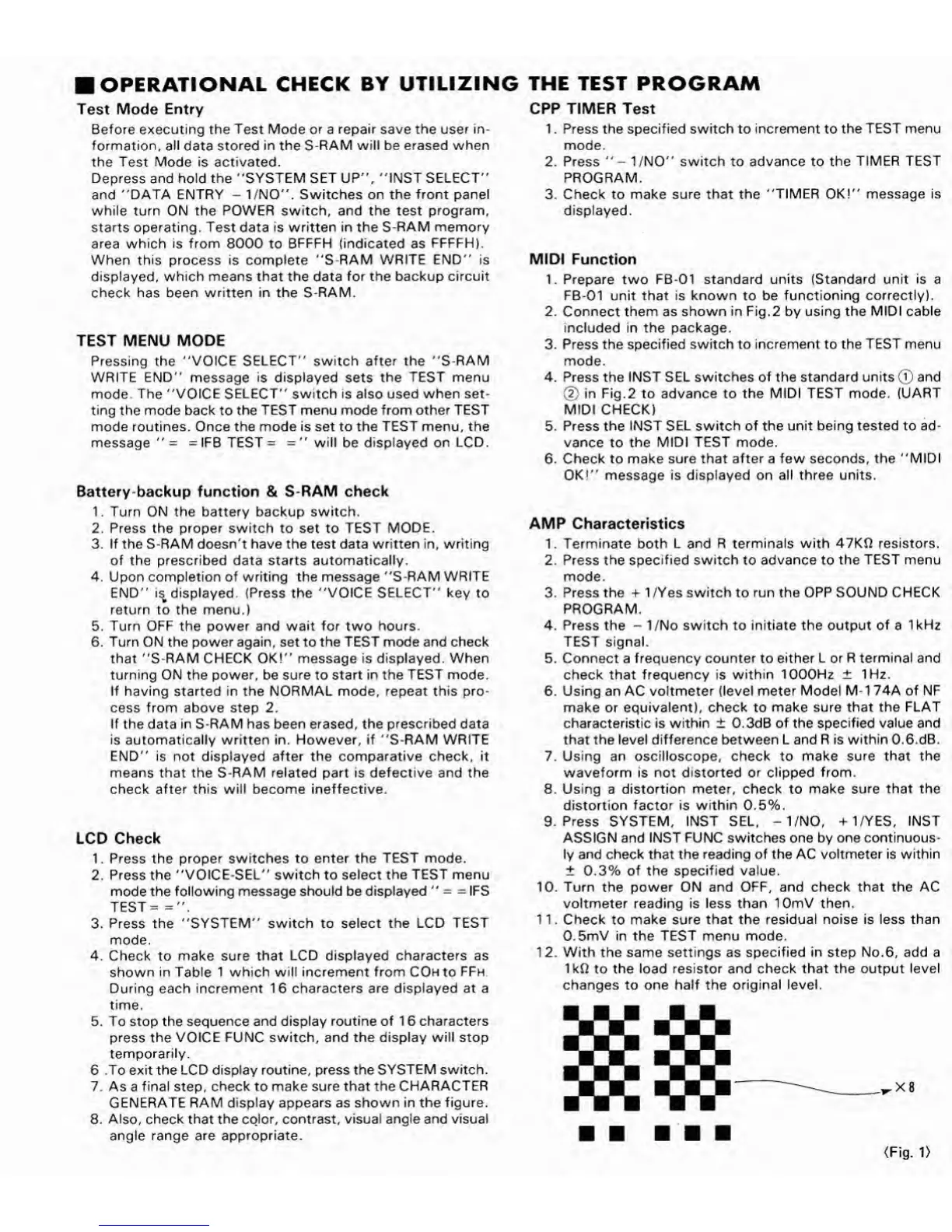
OPERATIONAL
CHECK
BY
UTILIZING
THE
TEST
PROGRAM
Test
Mode
Entry
Before
executing
the
Test
Mode
or
a
repair
save
the
user
in¬
formation,
all
data
stored
in
the
S-RAM
will
be
erased
when
the
Test
Mode
is
activated.
Depress
and
hold
the
"SYSTEM
SET
UP",
"INST
SELECT"
and
"DATA
ENTRY
-
1/NO".
Switches
on
the
front
panel
while
turn
ON
the
POWER
switch,
and
the
test
program,
starts
operating.
Test
data
is
written
in
the
S-RAM
memory
area
which
is
from
8000
to
BFFFH
(indicated
as
FFFFH).
When
this
process
is
complete
"S-RAM
WRITE
END"
is
displayed,
which
means
that
the
data
for
the
backup
circuit
check
has
been
written
in
the
S-RAM.
TEST
MENU
MODE
Pressing
the
"VOICE
SELECT"
switch
after
the
"S-RAM
WRITE
END"
message
is
displayed
sets
the
TEST
menu
mode.
The
"VOICE
SELECT"
switch
is
also
used
when
set¬
ting
the
mode
back
to
the
TEST
menu
mode
from
other
TEST
mode
routines.
Once
the
mode
is
set
to
the
TEST
menu,
the
message
"
=
=
IFB
TEST
=
="
will
be
displayed
on
LCD.
Battery-backup
function
&
S-RAM
check
1.
Turn
ON
the
battery
backup
switch.
2.
Press
the
proper
switch
to
set
to
TEST
MODE.
3.
If
the
S-RAM
doesn't
have
the
test
data
written
in,
writing
of
the
prescribed
data
starts
automatically.
4.
Upon
completion
of
writing
the
message
"S-RAM
WRITE
END"
i^
displayed.
(Press
the
"VOICE
SELECT"
key
to
return
to
the
menu.)
5.
Turn
OFF
the
power
and
wait
for
two
hours.
6
.
Turn
ON
the
power
again,
set
to
the
TEST
mode
and
check
that
"S-RAM
CHECK
OK!"
message
is
displayed.
When
turning
ON
the
power,
be
sure
to
start
in
the
TEST
mode.
If
having
started
in
the
NORMAL
mode,
repeat
this
pro¬
cess
from
above
step
2.
If
the
data
in
S-RAM
has
been
erased,
the
prescribed
data
is
automatically
written
in.
However,
if
"S-RAM
WRITE
END"
is
not
displayed
after
the
comparative
check,
it
means
that
the
S-RAM
related
part
is
defective
and
the
check
after
this
will
become
ineffective.
LCD
Check
1.
Press
the
proper
switches
to
enter
the
TEST
mode.
2.
Press
the
"VOICE-SEL"
switch
to
select
the
TEST
menu
mode
the
following
message
should
be
displayed
"
=
=
IFS
TEST
=
=".
3.
Press
the
"SYSTEM"
switch
to
select
the
LCD
TEST
mode.
4.
Check
to
make
sure
that
LCD
displayed
characters
as
shown
in
Table
1
which
will
increment
from
COHto
FFh
D
uring
each
increment
16
characters
are
displayed
at
a
time.
5.
To
stop
the
sequence
and
display
routine
of
16
characters
press
the
VOICE
FUNC
switch,
and
the
display
will
stop
temporarily.
6
.To
exit
the
LCD
display
routine,
press
the
SYSTEM
switch.
7.
As
a
final
step,
check
to
make
sure
that
the
CHARACTER
GENERATE
RAM
display
appears
as
shown
in
the
figure.
8
.
Also,
check
that
the
color,
contrast,
visual
angle
and
visual
angle
range
are
appropriate.
CPP
TIMER
Test
1.
Press
the
specified
switch
to
increment
to
the
TEST
menu
mode.
2.
Press
"-
1/NO"
switch
to
advance
to
the
TIMER
TEST
PROGRAM.
3.
Check
to
make
sure
that
the
"TIMER
OK!"
message
is
displayed.
MIDI
Function
1.
Prepare
two
FB-01
standard
units
(Standard
unit
is
a
FB-01
unit
that
is
known
to
be
functioning
correctly).
2.
Connect
them
as
shown
in
Fig.2
by
using
the
MIDI
cable
included
in
the
package.
3.
Press
the
specified
switch
to
increment
to
the
TEST
menu
mode.
4.
Press
the
INST
SEL
switches
of
the
standard
units
(j)
and
(2)
in
Fig.2
to
advance
to
the
MIDI
TEST
mode.
(UART
MIDI
CHECK)
5.
Press
the
INST
SEL
switch
of
the
unit
being
tested
to
ad¬
vance
to
the
MIDI
TEST
mode.
6
.
Check
to
make
sure
that
after
a
few
seconds,
the
"MIDI
OK!"
message
is
displayed
on
all
three
units.
AMP
Characteristics
1.
Terminate
both
L
and
R
terminals
with
47KQ
resistors.
2.
Press
the
specified
switch
to
advance
to
the
TEST
menu
mode.
3.
Press
the
+
1/Yes
switch
to
run
the
OPP
SOUND
CHECK
PROGRAM.
4.
Press
the
-
1/No
switch
to
initiate
the
output
of
a
1kHz
TEST
signal.
5.
Connect
a
frequency
counter
to
either
L
or
R
terminal
and
check
that
frequency
is
within
1000Hz
±
1Hz.
6
.
Using
an
AC
voltmeter
(level
meter
Model
M-1
74A
of
NF
make
or
equivalent),
check
to
make
sure
that
the
FLAT
characteristic
is
within
±
0.3dB
of
the
specified
value
and
that
the
level
difference
between
L
and
R
is
within
0.6.dB.
7.
Using
an
oscilloscope,
check
to
make
sure
that
the
waveform
is
not
distorted
or
clipped
from.
8
.
Using
a
distortion
meter,
check
to
make
sure
that
the
distortion
factor
is
within
0.5%.
9.
Press
SYSTEM,
INST
SEL,
-1/NO,
+
1/YES,
INST
ASSIGN
and
INST
FUNC
switches
one
by
one
continuous¬
ly
and
check
that
the
reading
of
the
AC
voltmeter
is
within
±
0.3%
of
the
specified
value.
10.
Turn
the
power
ON
and
OFF,
and
check
that
the
AC
voltmeter
reading
is
less
than
lOmV
then.
11.
Check
to
make
sure
that
the
residual
noise
is
less
than
0.5mV
in
the
TEST
menu
mode.
12.
With
the
same
settings
as
specified
in
step
No.6,
add
a
IkQ
to
the
load
resistor
and
check
that
the
output
level
changes
to
one
half
the
original
level.
(Fig.
1)

Other manuals for Yamaha FB-01

Related product manuals