Reference File Mode
File mode
267
Owner’s Manual
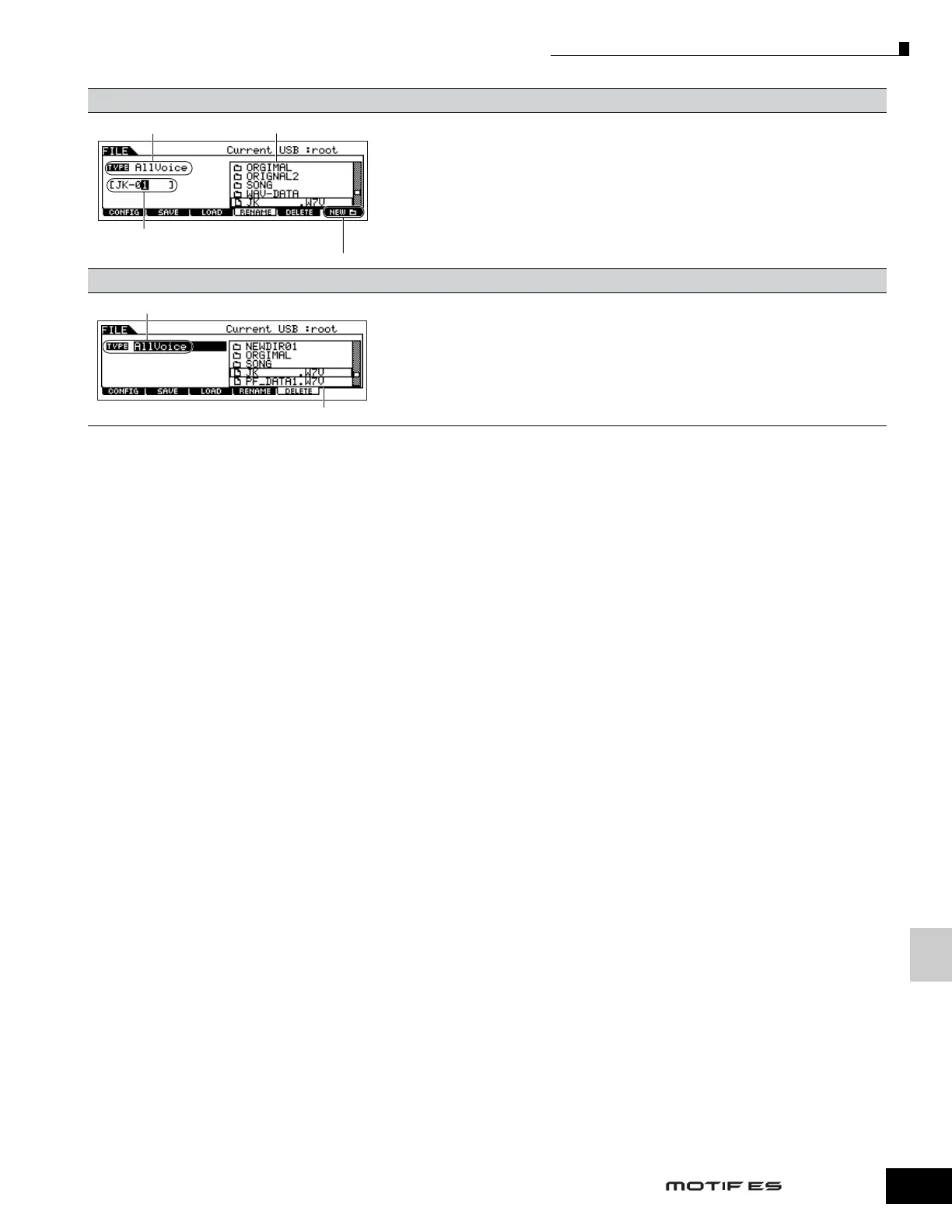
[F4] RENAME
From this display you can rename files or folders in the selected SmartMedia/USB storage device,
using up to eight alphabetic and numeric characters.
Files are named according to the MS-DOS naming convention. If the file name contains spaces and
other characters unrecognized in MS-DOS, these characters will automatically be replaced by “_”
(underscore) characters when saving.
[F5] DELETE
From this display you can delete files/folders from the selected SmartMedia/USB storage device.
Select the desired file or folder as shown below, then press the [ENTER] button.
n When you wish to delete a folder, delete all the files and folders contained in the folder beforehand.
Please keep in mind that only folders that contain no files or other nested folders can be deleted.
Select the desired file type. Select the file/folder to be renamed.
Rename the selected file/folder here.
See “Basic Operation” on page 53.
Press the [F6] NEW button to create a new folder.
Select the desired file type.
Select the file or folder to be deleted.



 To Next Page
 Loading...